3
2018114_b•en•2019-10-01 We reserve the right to carry out improvements.
Operation
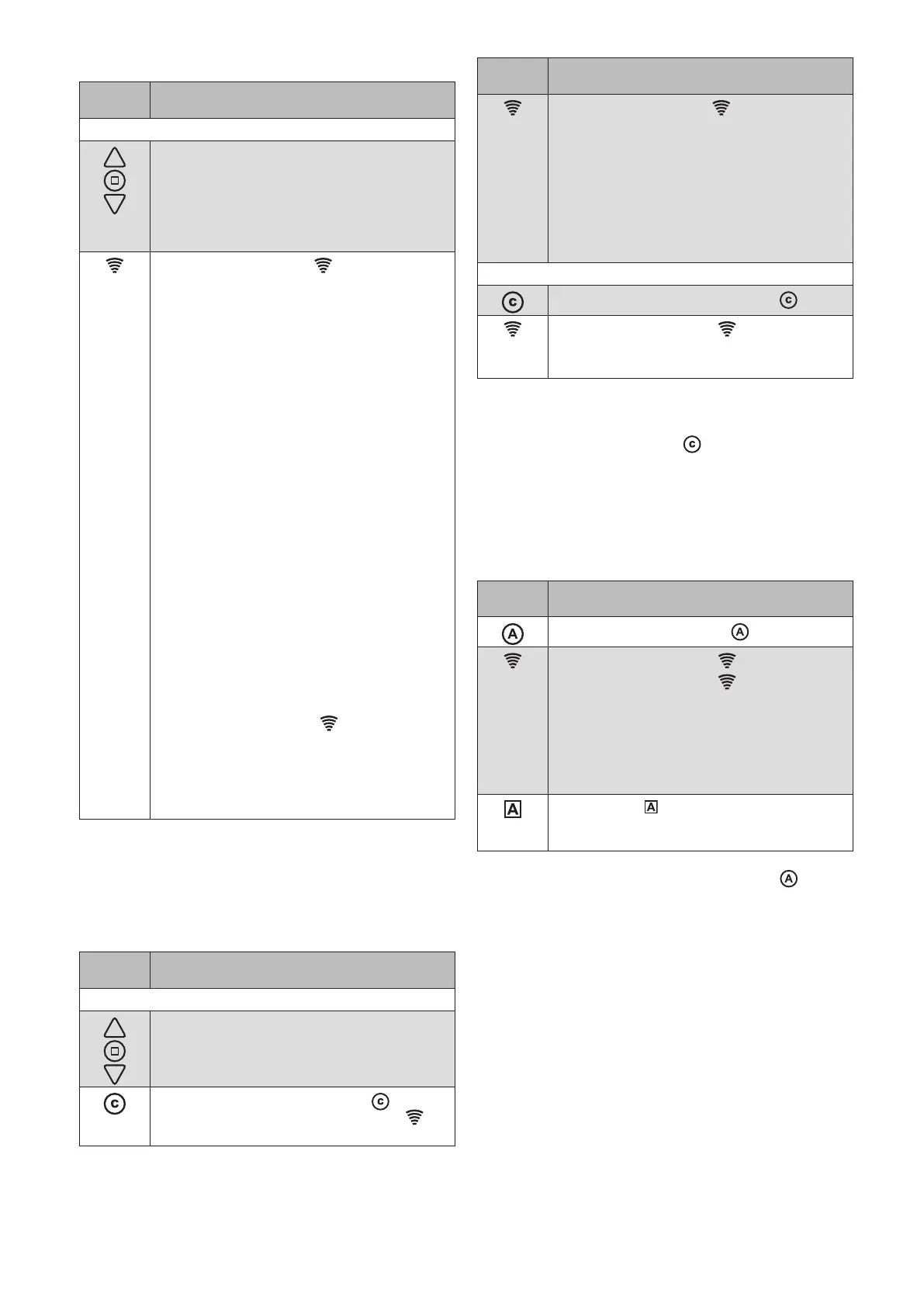
Button/
display
Action/result
To learn in the comfort position:
Operate the selected product using the
UP/STOP/DOWN buttons.
The operating instructions of the
respective receiver describe which
operating options are available to you (e.g.
UP=ON, DOWN=OFF, STOP=switch).
The transmission LED
indicates the
transmission status:
Flashes GREEN: WMS Wall-mounted
transmitter basic is transmitting,
then:
Lights up GREEN for 2s:
The receiver has confirmed the
command.
Lights up RED for 2s:
The command has not been
confirmed (e.g. the receiver
is outside of the transmission
range), or the WMS Wall-
mounted transmitter was added
to the network but a channel
has not yet been copied
onto the WMS Wall-mounted
transmitter basic.
Lights up GREEN for 2s + control symbol
is red:
The receiver confirms the
command, but does not execute
it because of the displayed
control function (e.g. the awning
is not extended because the
wind alarm is active).
The transmission LED indicates the
transmission status:
Lights up RED for 2s: The WMS Wall-
mounted transmitter was added to the
network but a receiver has not yet been
assigned.
Learning/recalling the comfort positions
A comfort position can be stored for the receivers in the
network (e.g. awning half extended). The awning can be
automatically moved to this comfort position at the press
of a button.
Button/
display
Action/result
To learn in the comfort position:
"Move your product to the position that is
to be stored as the comfort position (see
"Operating the products").
Hold down the comfort button for 5
seconds until the transmission LED
lights up.
Button/
display
Action/result
The transmission LED
indicates the
transmission status:
2s GREEN: The comfort position is
stored.
2s RED: The command was not
confirmed (e.g. receiver
outside of transmission
range); repeat the
procedure.
To recall a comfort position:
Briefly press the comfort button .
The transmission LED flashes green.
The comfort position for the selected
product is restored automatically.
OTICEN If a product is already in the comfort position or
if a comfort position has not been stored, the
selected product does not respond to pressing
of the comfort button
:
OTICEN When the comfort position is not moved to
correctly, the run time in the receiver must be
adjusted with a WMS Central transmitter or a
WMS Hand-held transmitter (please see the
operating instructions of the respective receiver).
Switching on/off the comfort control functions
Button/
display
Action/result
Press the control button .
The transmission LED flashes green.
The transmission LED lights up:
GREEN: The control functions are
switched on in all receivers.
RED:
Not all receivers could be
reached; switch the control
functions OFF and ON again (or
ON and OFF).
The A LED lights up:
GREEN: Switch on the control functions.
RED: Switch off the control functions.
The WMS Wall-mounted transmitter basic always remembers
the command last sent. When the control button is
pressed again, the WMS Wall-mounted transmitter basic
sends the opposite command (ON - OFF - ON -...).
OTICEN Before WMS receivers can be operated via a
WMS Wall-mounted transmitter basic, the WMS
Wall-mounted transmitter basic or the receiver
must be included as a device in a radio network.
OTICEN If you purchased the WMS Wall-mounted
transmitter basic separately, we recommend the
"WMS studio pro" PC software in combination
with WMS Stick for commissioning.
OTICEN If the WMS Wall-mounted transmitter basic is
still in its delivered state (no products have
been learned in yet), it is available for 1minute
after any button is pressed.
OTICEN When the [DOWN] function button is pressed
again while the sun shading product is being
lowered, it always moves to 100% (lower limit
position) and the “Position DOWN” value is
ignored.



 To Next Page