2018114_b•en•2019-10-01We reserve the right to carry out improvements.
6
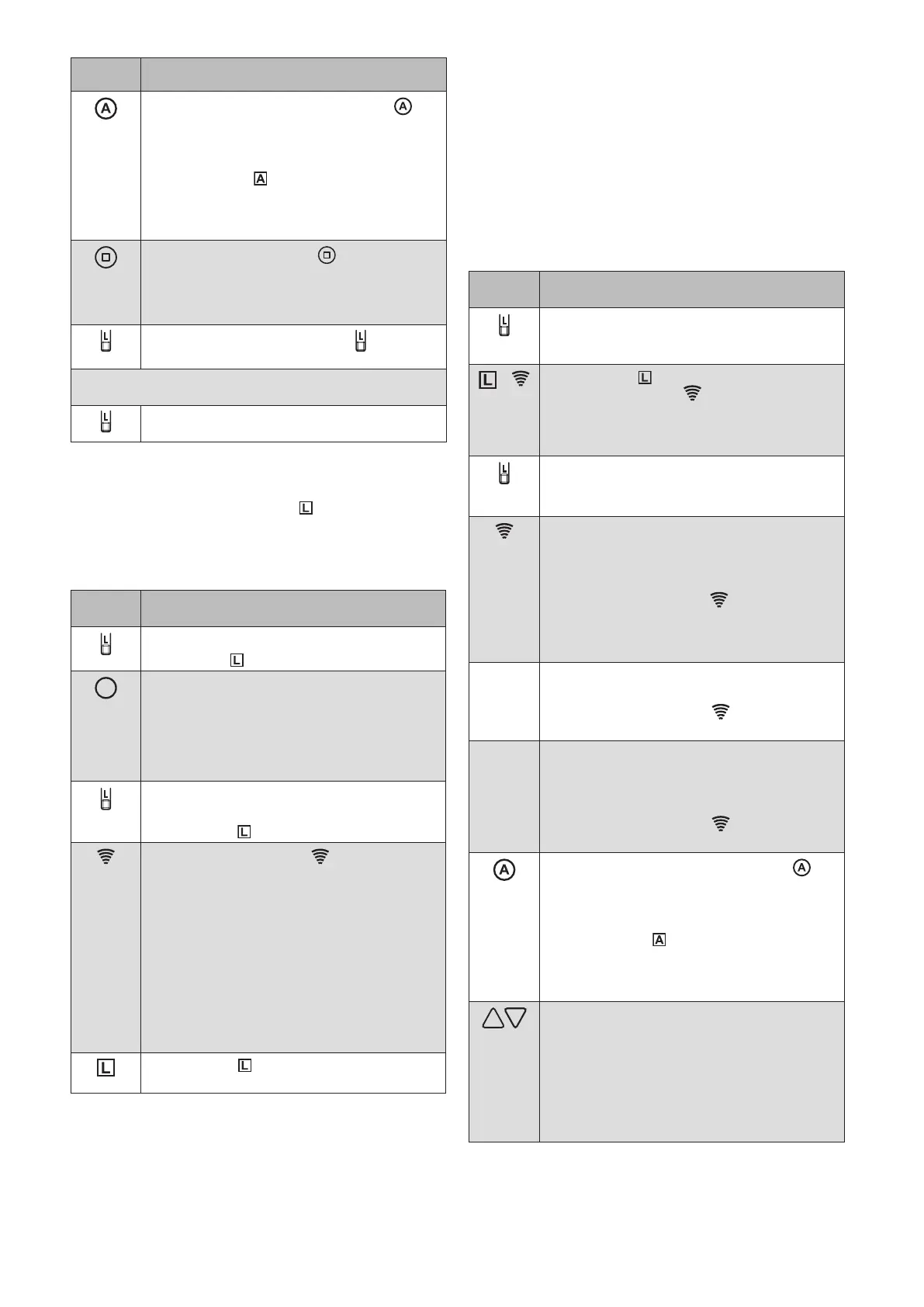
Button/
display
Action/result
When you press the control button ,
you can check WHICH target device was
just found.
The product then waves and the control
function LED flashes.
RED: The target device (transmitter
or sensor) can be added to the
network.
Press the STOP button .
The found target device (transmitter or
sensor) is added to the network.
The target device waves in confirmation.
Briefly press the learn button to leave
the learn mode.
You can now add additional scanned products in the
same manner.
Briefly press the learn button to leave the
learn mode.
OTICEN If the large WMS Hand-held transmitter comfort
is still in its factory state (no products have
been learned in yet), the lights up in red after
the transmitter wakes up.
Step 2:
Copy channel from a WMS Wall-mounted transmitter
basic to a WMS Hand-held transmitter
Button/
display
Action/result
Press the learn button briefly.
The L LED lights up green.
Wake up the large WMS Hand-held
transmitter comfort with any product
button.
Select the desired channel on the target
transmitter by pressing and holding the
button of the desired product.
Briefly press the learn button on the TARGET
TRANSMITTER.
The L LED lights up green.
The transmission LED on the WMS
Wall-mounted transmitter basic flashes.
GREEN During the transmission of data
from the WMS Wall-mounted
transmitter to the target
transmitter; this ends with
GREEN Lights up continuously for
2 seconds,
transmission successful
RED Light up continuously for
2 seconds,
error during transmission
The L LED on the WMS Wall-mounted
transmitter basic goes out.
Example 5:
Learn the WMS Wall-mounted transmitter basic
into a new receiver (plug receiver, actuator, etc.)
OTICEN The system can be comfortably commissioned
using our PC software WMS studio pro, a WMS
Central transmitter or the WMS Hand-held
transmitter comfort.
OTICEN Devices that do not belong to a network yet,
and are not intended to be learned in, must be
de-energised.
Button/
display
Action/result
Press the learn button on the WMS Wall-
mounted transmitter basic for approx. 5
seconds.
+
The L LED lights up green; the
transmission LED flashes. For
several seconds, the WMS Wall-mounted
transmitter basic scans the range for
receivers.
By pressing the learn button again, the
process can be aborted.
The L LED goes out.
If, while scanning, the WMS Wall-mounted
transmitter basic finds a target device
(receiver, transmitter, sensor) that has already
been learned in:
The transmission LED lights up.
GREEN: Lights up continuously for 2
seconds
Then scanning continues.
The WMS Wall-mounted transmitter basic
does not find any device during scanning:
The transmission LED lights up.
ORANGE: No receiver found.
If the WMS Wall-mounted transmitter basic
finds a receiver, transmitter or sensor that has
not yet been learned in, scanning is stopped.
It is indicated as follows:
The transmission LED lights up.
RED: New receiver
When you press the control button ,
you can check WHICH target device was
just found.
The product then waves and the control
function LED flashes.
GREEN: The target device is a receiver
for which the product type can
be adjusted.
By pressing the UP and DOWN arrow buttons,
you can select the desired receiver/product
type:
Press UP
Flashing increases by one
Press DOWN
Flashing decreases by one



 To Next Page