Instruction Manual for A5000 Series
4/12
Modekey(7)
PressingtheModeandEnterkeys
togetherchangestotheparameter
settingmode.
Selectstheitemtobeset.
PressingtheModeandShiftkeys
togetherchangestotheshiftfunction
setupmode.
PressingtheModeandIncremental
keystogetherturnson/offthe“Digital
zero”indicator.
(8) Shiftkey
PressingtheShiftandModekeys
togetherchangestotheshiftfunction
setupmode.
Selectsfromitemsinthe
maximum/minimum/(maximum-
minimum)/inputvaluemonitoringmode.
(Holddownthekeyforaboutonesecond.)
Incrementkey(9)
PressingtheIncrementandModekeys
togetherturnson/offthe“Digital
zero”indicator.
PressingtheIncrementandEnterkeys
changestothe
maximum/minimum/(maximum-
minimum)/inputvaluemonitoringmode.
Resetsthe
maximum/minimum/(maximum-
minimum)/inputvaluemonitoringmode.
(Holddownthekeyforaboutonesecond.)
Changesthevalueorcontent
ofaselecteddigit.
(Incrementsthevalue)
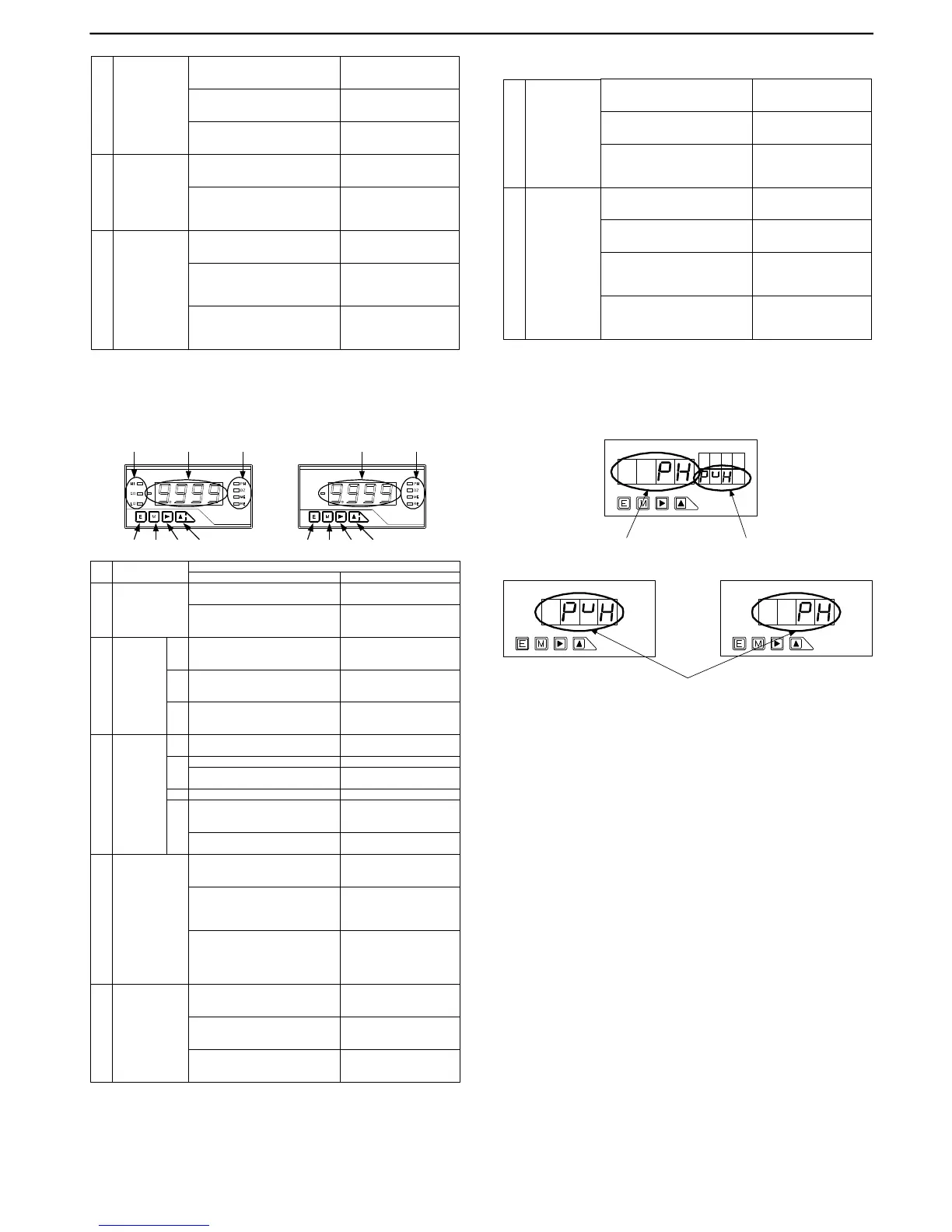
4.2 Single Display Unit
(3) (1) (3)
(6) (7) (8) (9)
No. Name
MainFunctions
Duringmeasurement Duringparametersetup
(1) Maindisplay
Indicatesthemeasuredvalue.
IIndicatesinformationonthe
parametertobeset.
Indicatesinformationontheitemin
themaximum/minimum/(maximum-
minimum)/inputvaluemonitoringmode.
Judgment
indicators
HI
(2) GO
LO
Indicatestheresultofjudgmentand
turnsonifthemeasuredvalue>HI
judgmentvalue.
Indicatestheresultofjudgmentand
turnsonifLOjudgmentvalue≦the
measuredvalue≦HIjudgmentvalue.
Indicatestheresultofjudgmentand
turnsonifthemeasuredvalue<LO
judgmentvalue.
(3)
Function
indicators
ME Turnsonif“digitalzerobackup”ison.
PH
Turnsonif“peakhold/valleyhold/
peak-valleyhold”ison.
Turnsonif“digitalzero”ison.
DZ
RE
Turnsonifremotecontrolisbeing
performedthroughRS-232CorRS-
485interface.
Flasheswhenlinearizationdataoutput
valuesareset.
Flasheswhenlinearizationdatainput
valuesareset.
(6) Enterkey
PressingtheModeandEnterkeys
togetherchangestotheparameter
settingmode.
PressingtheEnterandIncrementkeys
togetherchangestothemaximum/
minimum/(maximum-minimum)/input
valuemonitoringmode.
Switchesfromthemaximum/
minimum/(maximum-maximum/
minimum/(maximum-minimum)/input
valuemonitoringmodetothe
comparativejudgmentreadingmode.
Returnstothemeasurement
mode.
Modekey(7)
PressingtheModeandEnterkeys
togetherchangestotheparameter
settingmode.
Selectstheitemtobeset.
PressingtheModeandShiftkeys
togetherchangestotheshiftfunction
setupmode.
PressingtheModeandIncremental
keystogetherturnson/offthe“Digital
zero”indicator.
(1)(2)
(6) (7) (8) (9)
(8) Shiftkey
PressingtheShiftandModekeys
togetherchangestotheshiftfunction
setupmode.
Selectsfromitemsinthe
maximum/minimum/(maximum-
minimum)/inputvaluemonitoringmode.
(Holddownthekeyforaboutonesecond.)
HoldingdowntheShiftkeyforabout
onesecondmovestotheHIjudgment
valueindicator.
Incrementkey(9)
PressingtheIncrementandModekeys
togetherturnson/offthe“Digital
zero”indicator.
PressingtheIncrementandEnterkeys
changestothe
maximum/minimum/(maximum-
minimum)/inputvaluemonitoringmode.
Resetsthe
maximum/minimum/(maximum-
minimum)/inputvaluemonitoringmode.
(Holddownthekeyforaboutonesecond.)
Changesthevalueorcontent
ofaselecteddigit.
(Incrementsthevalue)
HoldingdowntheIncrementkeyfor
aboutonesecondmovestotheLO
judgmentvalueindicator.
5. Parameter Setup
5.1 Differences between Display Units
5.1.1 Multi-display Unit
Note: Pressing the Mode key displays the next parameter.
5.1.2 Single Display Unit
Note 1: Pressing the mode key with the parameter name shown changes the dis-
play to the parameter information indication. If there is no key opera-
tion for about one second when the parameter name is shown, the dis-
play automatically changes to the parameter information indication (how-
ever, this change does not automatically occur for parameters PH/S-HI/
FSC, etc., right after COND/COM/MET is indicated).
Note 2: Pressing the Mode key when the parameter information indication is
shown results in the next parameter being displayed.
Note 3: If there is no key operation for about 8 seconds with the parameter infor-
mation indication shown, the display returns to the parameter name indi-
cation.
Setupcontentsandparametername
Setupcontents Parametername



 To Next Page
 Loading...