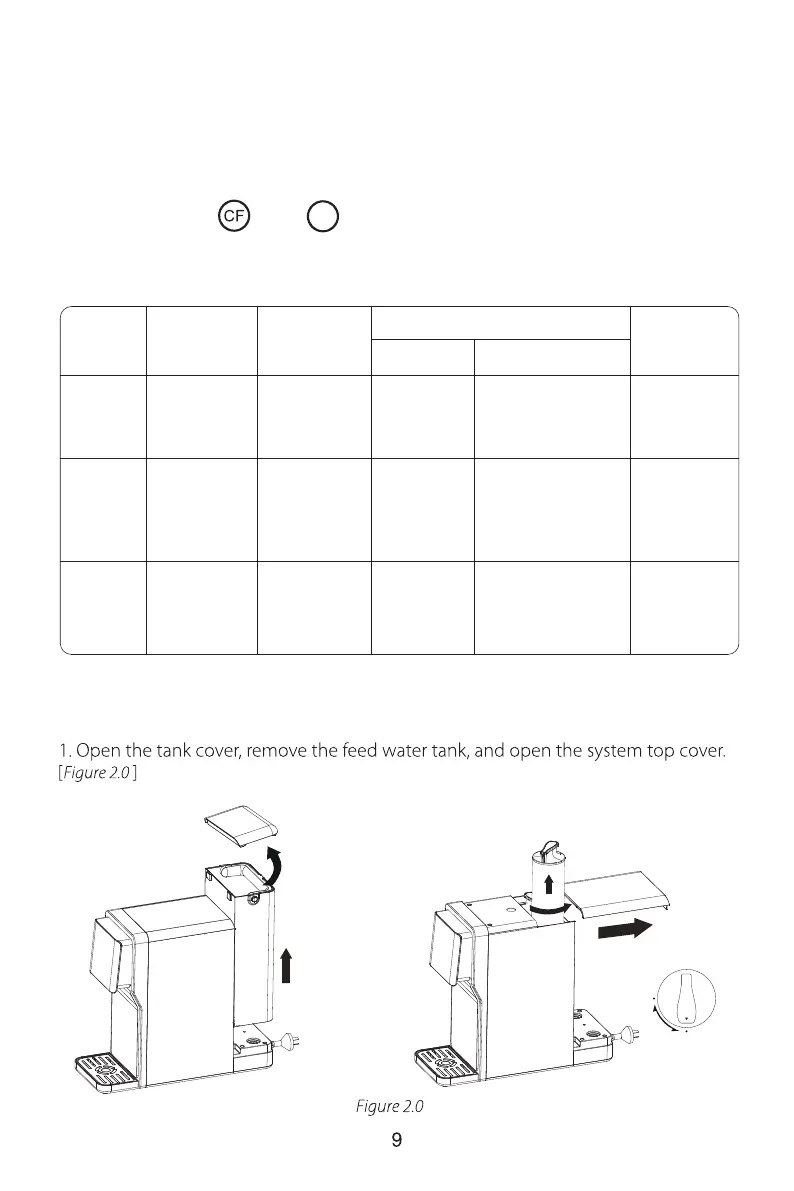
2. Filter replacement guide
a. How to replace filters:
There are helpful “ ” & “ ” filter life indicator light on the front panel that
will notify you to perform routine filter replacement by color change. Be sure to reset
the filter life indicator light every time you replace your filter.
NOTE:
Filter life may vary depending on source water quality and water usage.
Please replace the filters according to the reminder of the filter life indicator light.
Status
Normal >15 >40 N/A N/A
Replace
Soon
Replace
Now
Beeps 3
times when
dispensing water
Beeps 3
times when
dispensing water
Yellow
Red
≤40≤15
≤ 0
Pre-
warning
Warning
Remaining
Life (Day)
Remaining
Capacity (G)
Indication
Light Status
Status
≤40
Good
MRO







 To Next Page