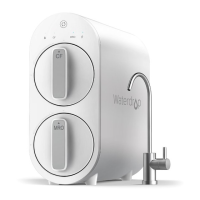
The Waterdrop N1 Countertop Reverse Osmosis Water Filtration System is a compact and efficient device designed to provide purified drinking water. It utilizes a multi-stage filtration process, including CF (Pre-Sediment and Carbon Block) and MRO (Reverse Osmosis Membrane) filters, to remove impurities from municipal tap water. The system is designed for countertop use, offering convenience and ease of installation.
Function Description
The Waterdrop N1 system filters tap water through a reverse osmosis process, providing clean and safe drinking water. It features a display screen for monitoring system status, filter life, and water quality (TDS). The device offers various water dispensing options and includes features for automatic and manual water replenishment, as well as standby and sleep modes for energy saving.
Important Technical Specifications
- Model: WD-N1-W
- System Size (L*W*H): 17.1" * 7.0" * 15.6"
- Feed Water Temperature: 41-100 °F / 5-38 °C
- Daily Production Rate: 75G (measured under 77°F water temperature)
- Feed Water Requirement: Municipal Tap Water
- Power Specification: Input 100-240V AC, Output 24V DC
- Filter Life:
- CF (Pre-Sediment and Carbon Block Filter): 6 months
- MRO (Multiple Reverse Osmosis Membrane Filter): 18 months
Usage Features
Installation:
The installation process involves unpacking the system, inspecting components, and installing the CF and MRO filters. The feed water tank is filled, and the system is plugged in. Upon first power-on, the machine undergoes an automatic flushing cycle for 15 minutes, after which the concentrated water in the feed water tank needs to be discarded and refilled. A manual flushing mode follows, requiring dispensing water until the "Flush" indicator light goes out. The maximum water withdrawal in manual flushing mode is 50 oz, and this water is not drinkable.
Water Dispensing:
The system offers four capacity options: 4 OZ, 8 OZ, 16 OZ, and Manual. Users can select the desired volume by touching the "Volume" button. To dispense water, the "Start/Off" button is pressed briefly. For fixed capacities (4, 8, or 16 OZ), the system automatically stops dispensing. In Manual mode, users press "Start/Off" to start and stop dispensing, with a maximum output of 50 oz.
Water Replenishment:
- Manual Replenishment of Feed Water Tank: When the screen displays "L1," indicating a water shortage, the feed water tank must be removed, concentrated water poured out, and then refilled with fresh water before being placed back into the machine. Direct pouring of water into the tank is not recommended as it may shorten the RO filter life or damage the machine.
- Automatic Replenishment of Purified Water Tank: If the built-in purified water tank is low on water, the machine automatically enters replenishment mode, displaying a 99-second countdown and illuminating the "Pump" indicator light. During this time, the "Start/Off" button is unavailable until the countdown is complete and the purified water tank is full.
Standby and Sleep Modes:
- Standby Mode: If there is no operation for 20 seconds, the machine enters standby. The "Start/Off" indicator light is slightly on, and the "Pump" indicator light displays according to the actual state, while other lights are off. To wake up, any button can be touched.
- Sleep Mode: After 120 hours of inactivity, the machine enters sleep mode, with all lights off. Touching any button will wake it up.
Emptying the Purified Water Tank:
To empty the purified water tank, press the "CF" and "MRO" filter reset buttons simultaneously for 3 seconds. The system enters drain mode, and the "Flush" indicator light flashes. Place a container (>51 oz) under the spout and press "Start/Off" to dispense water until the "Flush" indicator light stops flashing. The screen displays a countdown of 99 seconds to filter water again. The filtered water during this process is drinkable, but it's recommended to empty the purified water tank again.
Maintenance Features
Filter Life Reminder and Replacement Guide:
The system provides filter life reminders through indicator lights on the front panel.
- Normal: CF/MRO indicator light is blue, remaining life >15 days, remaining capacity >40G.
- Pre-warning: CF/MRO indicator light is yellow, remaining life ≤15 days, remaining capacity ≤40G. The system beeps 3 times when dispensing water.
- Warning: CF/MRO indicator light is red, remaining life ≤0 days, remaining capacity ≤40G. The system beeps 3 times when dispensing water, indicating immediate replacement is needed.
Filter Replacement Procedure:
- Open the tank cover, remove the feed water tank, and open the system top cover.
- Twist the expired filter counter-clockwise to remove it.
- Remove the wrappings and protective cap from the new filter.
- Insert the new filter into its corresponding hole and twist clockwise to secure it.
- Close the system top cover and change the water in the feed water tank, then close the water tank cover.
Resetting Filter Life Indicator Light:
- CF Filter: Press and hold the "CF" filter life reset button for 5 seconds until the system beeps.
- MRO Filter: The filter life reset for MRO is the same as for CF.
Flushing After Filter Replacement:
- For CF Filter: The system flushes automatically for 5 minutes. During this process, the display screen shows a dynamic clockwise circulation. After 5 minutes, the machine stops flushing and displays "L1," prompting a water change in the feed water tank. Discard the water and add fresh water.
- For MRO Filter: After the filter life is reset, the system flushes automatically for 15 minutes. The "Flush" indicator light flashes constantly. After the "Pump" indicator light goes out, place a container (>51 oz) below the spout and press "Start/Off" to dispense water until the "Flush" indicator light goes out. The flushing time may vary based on local water quality; it's recommended to flush 2 or 3 more gallons of water (four tanks) until the water looks clean.
System Maintenance:
- Discarding Remaining Water: If the machine has not been used for 3 days, it is recommended to discard the remaining water in the purified water tank.
- Cleaning Feed Water Tank: During daily water changes, it is highly recommended to clean the feed water tank weekly to prevent accumulation of impurities and organic matter.
- Cleaning Floating Ball and Filter Screen: Regularly clean the floating ball, floating ball silicone cover, and filter screen in the feed water tank to avoid limescale. This involves pulling out the silicone cover and floating ball, then pulling out the two filter screens, cleaning them, and reassembling.
- Descaling: Use a descaling agent (such as citric acid) to soak the feed water tank for 30 minutes every month and then clean it. Do not use organic solvents such as alcohol.
- Cleaning Drip Tray: Clean the drip tray regularly (once a week is recommended) to avoid bacteria and residual water overflow.
- Filter Replacement: Replace filters regularly according to the filter life indicator light.
- System Cleaning: Clean the system with clear water. Do not spray water directly onto the filters.
- Cleaning Agents: Do not use steel wool, abrasive cleaners, or corrosive liquids such as gasoline or acetone.
- Water Source: If using well water as the source, ensure that the feed water has been run through a pre-filtration system.
- Emptying Feed Water Tank: Empty the feed water tank before refilling. Adding water without this step will shorten the service life of filter cartridges.
Troubleshooting:
The manual provides solutions for common issues such as high TDS value in the feed water tank, high TDS value of purified water, peculiar water smell, and the machine not reaching the lowest water level. It also addresses issues like the machine not powering on, water leakage, and the machine not filtering water. For complex issues or circuit board disconnections, customer service contact information is provided.

 Need help?
 General





 To Next Page