QUICK REFERENCE INFORMATION
GENERAL OPERATION
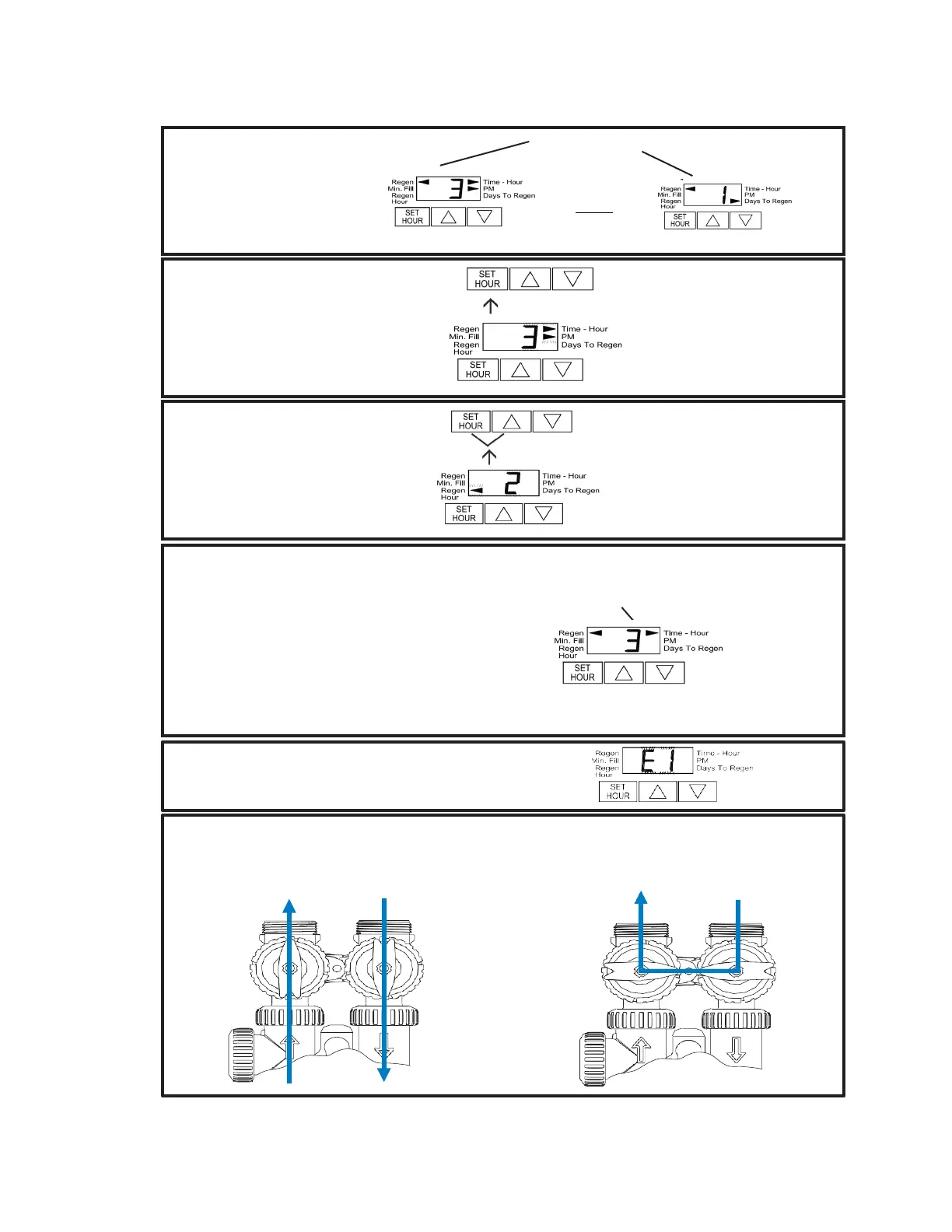
When the system is operating one of
two displays will be shown: time of
day or days until the next regenera-
tion. Pressing UP or DOWN will
toggle between the two choices.
TO SET TIME OF DAY
In the event of a power outage, time of day
needs to be reset. All other information will
be stored in memory no matter how long
the power outage. Please complete the
steps as shown to the right. To access this
mode, press SET HOUR.
TO SET TIME OF
REGENERATION
For initial set-up or to make adjustments,
please complete the steps as shown to
the right. Access this mode by pressing
SET HOUR and UP simultaneously for 3
seconds.
Arrow will point to Regen if a
regeneration is expected
“Tonight.”
1. Accessed by pressing SET
HOUR.
2. Adjust to the nearest hour using
UP or DOWN. An arrow points to
PM during p.m. hours.
3. Press SET HOUR to complete
and return to normal operation.
1. Accessed by pressing SET HOUR and
UP simultaneously for 3 seconds.
2. Adjust time of regeneration hour using
the UP or DOWN. An arrow points to
PM during p.m. hours. Simultaneously
press SET HOUR and DOWN to return
to normal operation.
MANUAL REGENERATION
NOTE: For softeners, if brine tank does not contain salt, fill
with salt and wait at least 2 hours before regeneration.
If you need to initiate a manual regeneration, either
immediately, or tonight at the preprogrammed time (typically
2 a.m.), complete the following steps.
For Immediate Regeneration:
Press and hold UP and DOWN simultaneously until valve
motor starts (typically 3 seconds).
For Regeneration Tonight:
Press and release UP and DOWN simultaneously (notice that
arrow points to Regen).
Arrow will point to Regen if a
regeneration is expected “Tonight.”
ERROR CODES: If the display shows “E1,” “E2” or “E3” (for error),
call a service technician.
To shut off water to the system, please position arrow handles as shown in the bypass operation diagram below.
If your valve doesn’t look like the diagram below, contact your dealer.
NORMAL OPERATION BYPASS OPERATION
Treated
Water
Supply Water Supply Water Supply Water


 To Next Page