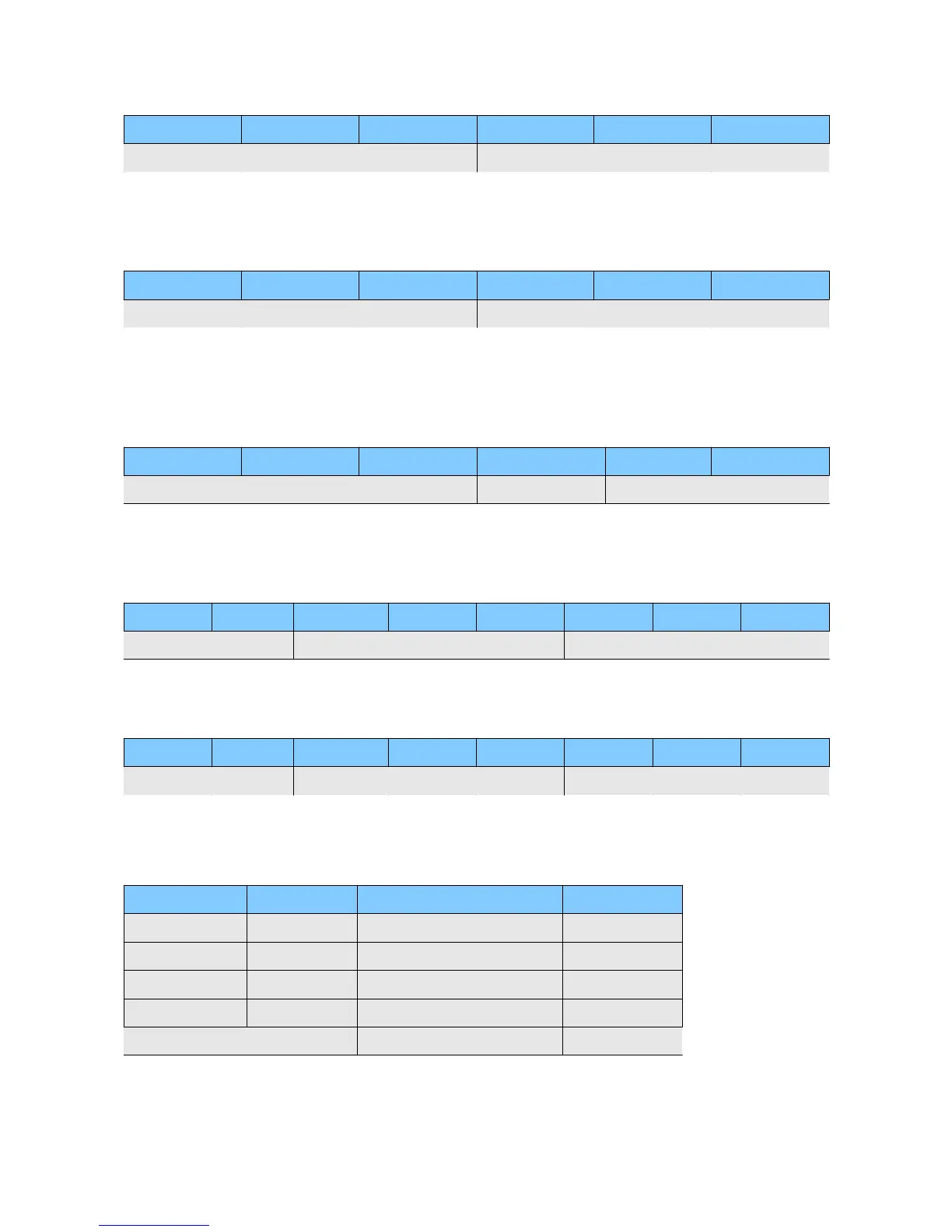
SAVE VOLUME Command
Start Value(fix) Device ID Command Parameter 1 Parameter 2 Checksum
0x86 0...255 3 1 0 CRC-8
GET TRACK COUNT Command
The command is sent with parameter 1 = 0. In response you will see the count of playable tracks.
Only a track with two digits in front will be counted.
Start Value(fix) Device ID Command Parameter 1 Parameter 2 Checksum
0x86 0...255 5 track count 0 CRC-8
GET TRACK NAME Command
The command is sent with parameter 1 = 0. In the response you will see the length of the track
name. The response is extended exactly this count, because the track name is append to the
answer.*
Start Value(fix) Device ID Command Parameter 1 Parameter 2 Checksum
0x86 0...255 6 character cout 0 CRC-8
SET TIME Command
The parameters are hexadecimal values! The command must be send only if the player is in stop or
pause mode! Otherwise unpredictable events can occur.
Start Value Device ID Command P1 P2 P3 P4 Checksum
0x88 0...255 10 hours minutes secondes frames CRC-8
GET TIME Command
The command is sent with parameter 1-4 = 0. In the response you will get the current values.*
Start Value Device ID Command P1 P2 P3 P4 Checksum
0x88 0...255 11 sb|hours minutes seconds frames CRC-8
sb = sync bit (Bit7) 1 = Device is running in sync with received timecode.
Response Format
Start Value(fix) Device ID Status Checksum
0x84 0...255 0=OK CRC-8
1=Track not found
2=unknown command
3=CRC error command
4=CRC error response**
*) This command will get a response 0x84 only if a CRC error occurs.
**) This means the error of a forwarded answer.


 To Next Page