L76X GPS HAT User Manual
4 / 15
HARDWARE
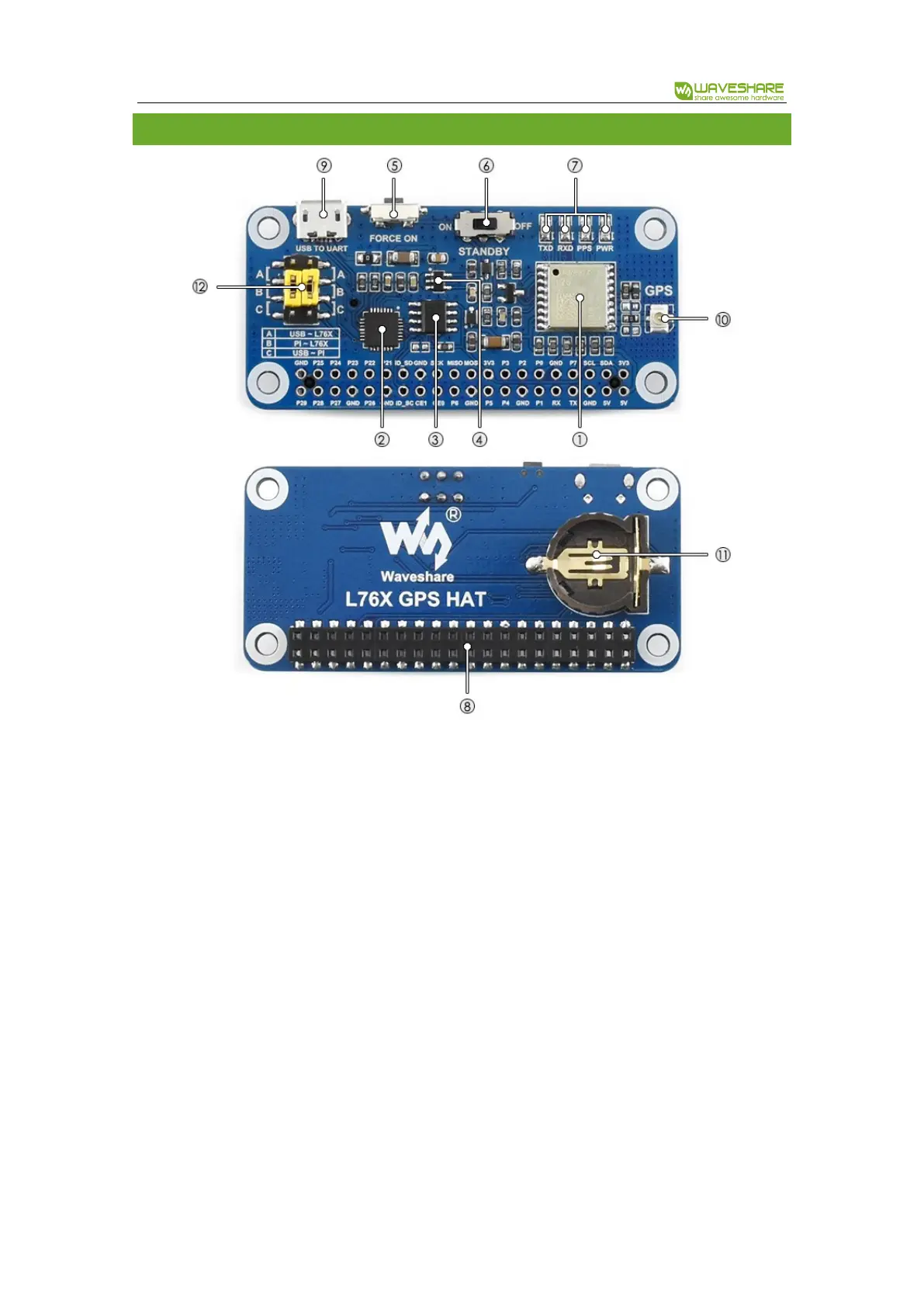
1. L76B module
2. CP2102: USB TO UART converter
3. CAT24C32: EEPROM
4. RT9193-33: power manager
5. Backup mode wakeup button
6. Standby switch
7. Indicators:
a) RXD/TXD: UART RX/TX indicator
b) PPS: GPS status indicator
c) PWR: power indicator
8. Raspberry Pi GPIO connector: for
connecting with Raspberry Pi
9. USB TO UART port
10. GNSS antenna connector
11. Battery holder: supports ML1220
rechargeable battery, for preserving
ephemeris information and hot starts
12. UART selection jumpers
a) A: control the L76B through USB TO
UART
b) B: control the L76B through
Raspberry Pi
c) C: access Raspberry Pi through USB
TO UART
Standby mode: Standby switch is used to switch Standby mode and Working mode. When module is
in Standby mode, the power consumption is ultra-low. It stop satellite searching and navigating, no
NMEA message outputted. Module is accessible for PMTK command or other data.


 To Next Page