a
vin Temp Manifold Installation Manualower
E-MAIL
info@wavin.com
www.wavincom.
TELEPHONE
+31(38)429411
8
avin Temp Control Manualower
E-MAIL
info@wavin.com
www.wavincom.
TELEPHONE
+31(38)429411
Design Manual
TELEPHONE
+31 (38) 4294911
4
E-MAIL
info@wavin.com
www.wavin.com
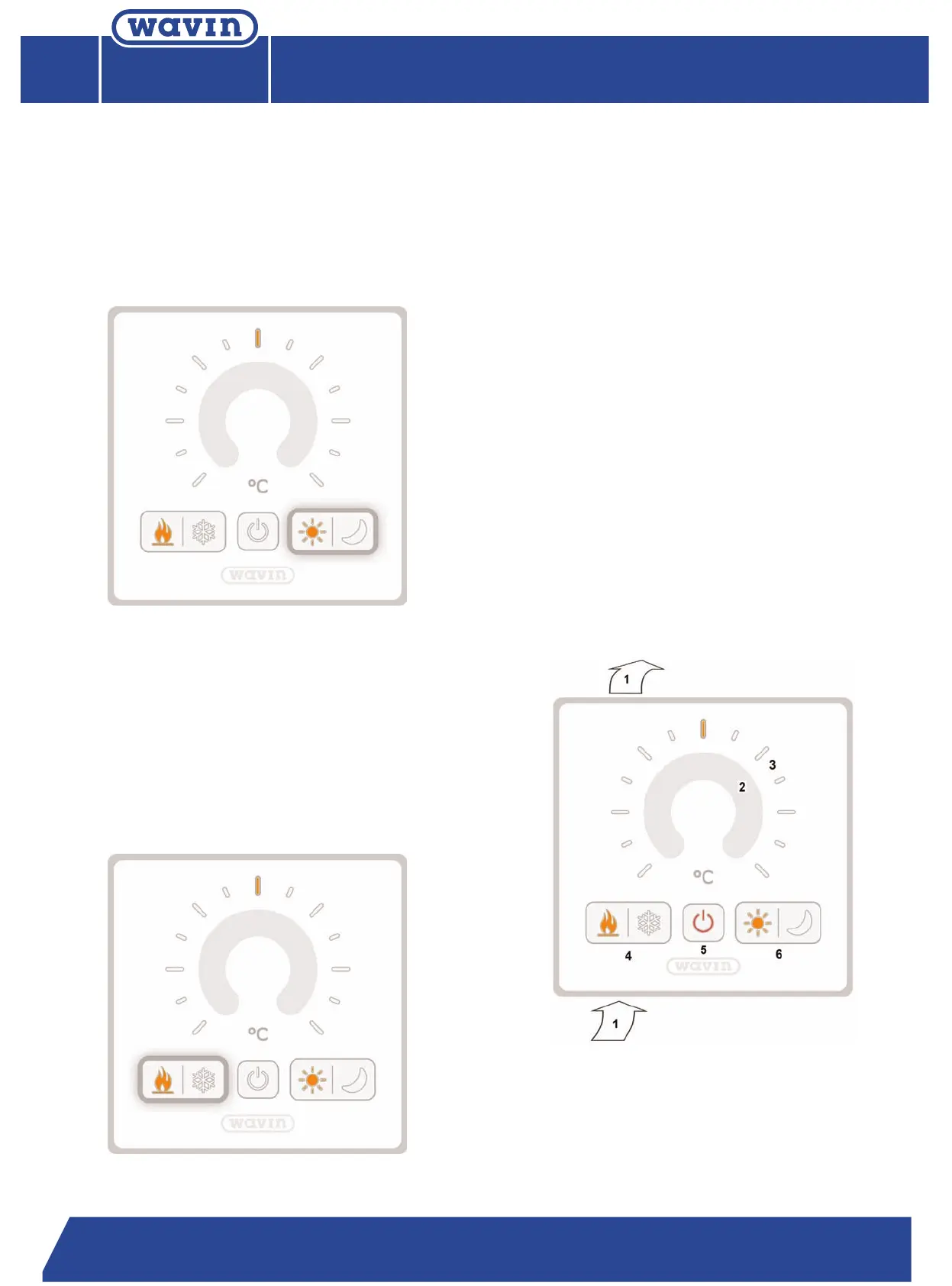
4.4.2. Comfort/economy mode
The thermostat has a comfort/economy function. When the
comfort mode is activated (by pressing the moon symbol) the set
temperature will be 17 °C (default).This function can be activated
b
y the room thermostat (default) or via a master thermostat or the
building management system.
4.4.3. Heating/cooling mode changeover
This function changes the complete heating/cooling system from
one mode to an other. If the heating system is a four pipe
system then all connected zone valves will controlled via the
WTC-3. This function can be activated only on the master
thermostat (default).
4.4.5. Built in humidity sensor
E
very DRT-200 room thermostat has a built in relative humidity
s
ensor. This sensor continuously measures the relative humidity in
the room and sends information to the WTC-3 base unit. In case
of high humidity the WTC-3 will adjust the set temperature of
thermostat increasing it step by step.
4.4.6. Open window detection
Each thermostat has an open window detector input. If this is
used with a window sensor, then the thermostat will stop the
heating/cooling system if the window is opened.
4.4.7. Dew point sensor connection
Each thermostat has a dew point sensor input. This sensor is
installed in the ceiling operates as an override if the sensor
detects condensation; the thermostat closes the actuator on the
manifold, stopping the cooling in the room.
4.4.8. Dimmer function
The thermostat continuously measures the brightness of the envi-
ronment, and sets the LEDs brightness accordingly
. This ensur
es
a higher comfort level as the LEDs dim in low light condition.
Resuming, this is a total overview of the DR
T-200 and his
functions:
1 In and out points of ventilation channel
2 Dial sensor to set temperature
3
Indication LED
s of set temperatur
e
4
Heating/Cooling changeover buttons
5
ON/OFF button
6 Comfort/Economy buttons



 To Next Page
 Loading...