4 | Operation
4 / 13 9045383A OI BlueCool VX EN
Webasto air conditioning units are designed so that, when in-
stalled, they do not exceed the emission sound pressure level
threshold as defined in the Machinery Directive 2006/42/EC
paragraph 1.7.4.2. (u).
3.2 Product Variants
Chiller unit:
l VX36 M -230V –REV –R32
l VX48 M -230V –REV –R32
l VX60 M -230V –REV –R32
l VX72 M -230V –REV –R32
VX36 M -230V –REV –R32
VX BlueCool VX series chiller unit
36 Cooling capacity in kBTU/h
M Mono (1 compressor with 1 closed refrigerant circuit)
230 V Rated voltage
REV “Reverse Cycle” cooling and heating (reverse heating
operation)
R32
R410a
Refrigerant
Table1: Example
3.3 Type label
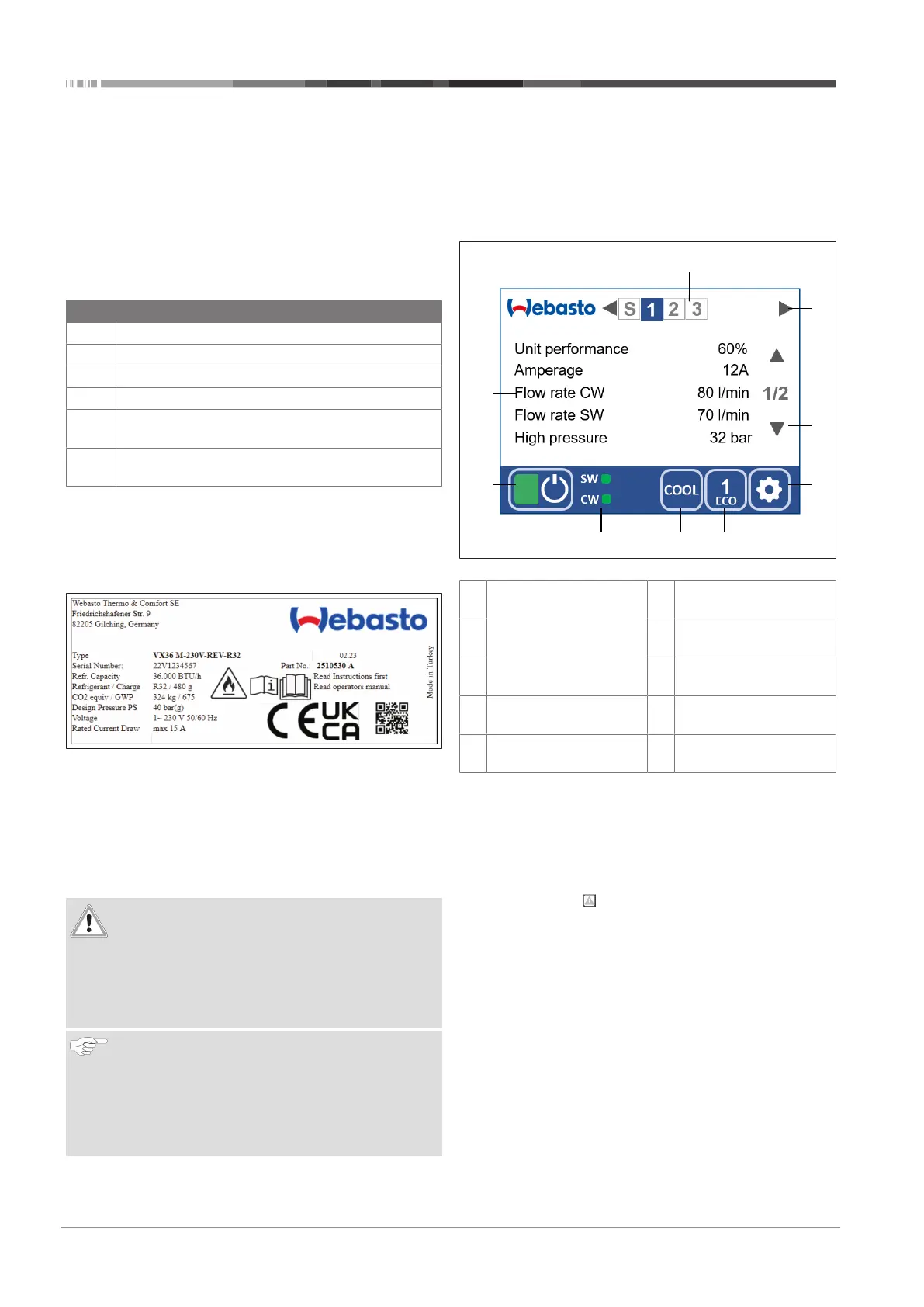
The type label is located next to the cable feed-through for elec-
trical connection at the front of the unit. The type label details
the output, serial number and registration data.
Fig.1 Type label
4 Operation
4.1 Remark
The BlueCool MyTouch control element for the BlueCool VX-Se-
ries enables you to control the connected system. The display
functions as a touch screen as well. Instructions are included in
this document.
ATTENTION
Damage to BlueCool MyTouch
Do not allow the display to come in contact with any
other electrical devices to ensure that there is no elec-
trostatic discharge that could cause malfunctions.
Do not use pointed or sharp objects to operate the
screen, and do not exert excessive pressure.
NOTICE
Webasto recommends that you use your fingers only to
operate the screen. The touch sensitivity of the screen is
optimized to fingertip contact. The screen may not re-
spond if gloves are worn.
Tapping at the very edge of the screen may not be de-
tected.
4.2 Home Screen and Symbols
Black and white are available as background colors for the
home screen. The functions are the same.
To change the background color, see chapter4.4, "Settings
Menu" on page 6.
The symbols on the home screen provide information on the
system status. The symbols are explained in the table below:
Fig.2 Home screen
1 VX unit (system, 1, 2,
3,…)
2 Screen change (system,
unit 1, unit 2, unit 3, …)
3 Page selection (page 1,
page 2)
4 Setting level 1
5 ECO mode (On, 1, 2, 3) 6 Operating mode (Cool,
Heat, Heat Aux)
7 Status of sea water, cold
water pump
8 System status (On, Off)
9 Text display with five pa-
rameters
4.2.1 Standby
The screen will go to Standby mode after five minutes if the
screen remains untouched and will show a standby screen that
you can select in the settings. Tap anywhere on the screen to
call up the home screen.
4.2.2 Notification
The notification icon appears on the bottom status line to
draw your attention to the current status of the system. Tap the
icon to show the current status.
4.2.3 ON/OFF
If the screen is switched off:
l Tap the screen
– The screen switches on.
If the screen is switched on:
l Tap the green/gray field
– The color of the ON/OFF symbol indicates the operating
status of the BlueCool (green=switchedon).
4.2.4 Operation
After switching on, the control system starts up all units in the
system one by one in the selected operating mode.
The color of the lower screen bar shows the operating mode. It
is:


 To Next Page