4
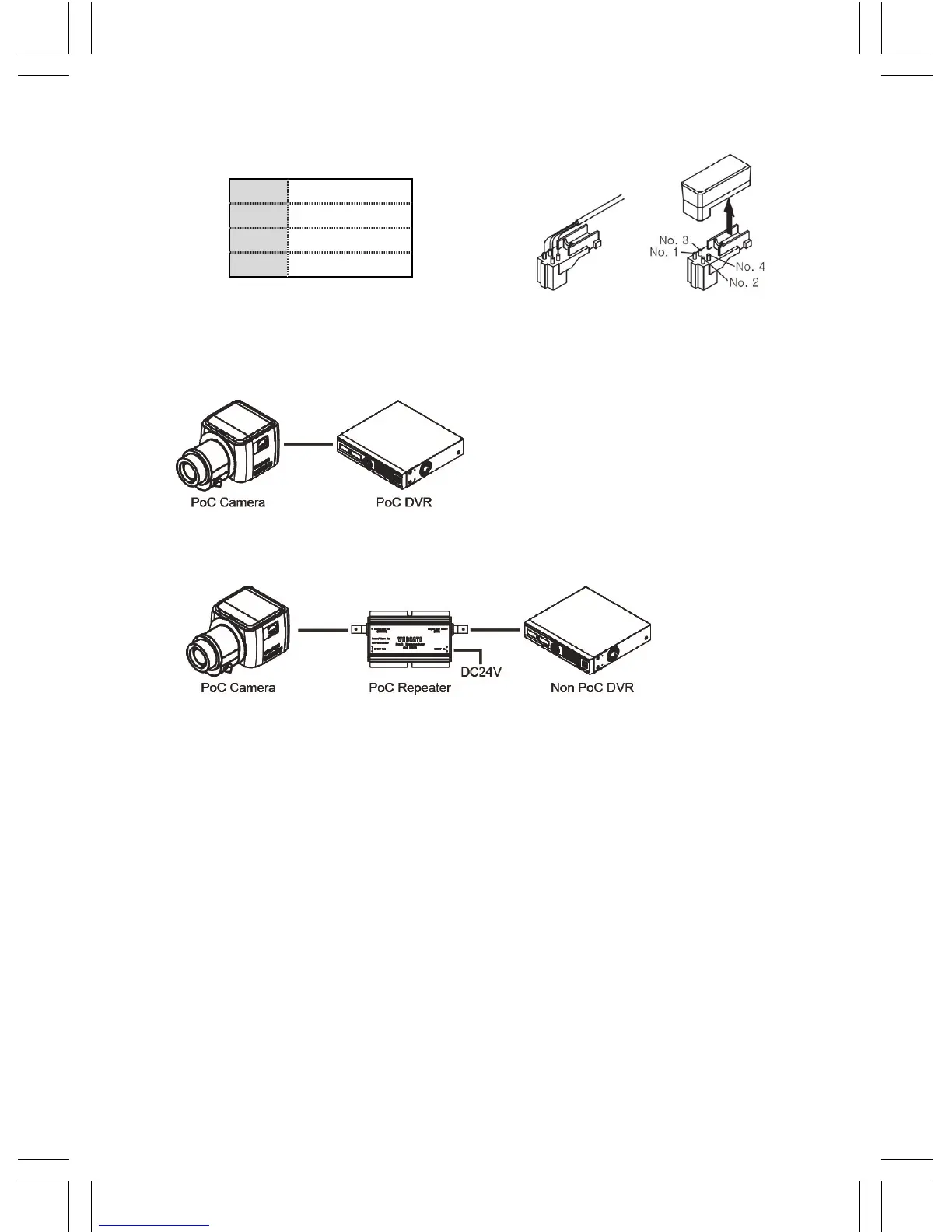
Auto Iris connector wiring
In case of using Auto Iris lens, connect the Iris Jack of lens to the Iris connector of camera.
1 Damping -
2 Damping +
3 Drive +
4 Drive -
How to Set up Install C1080PBM
1. How to connect it with the WEBGATE PoC DVR
- Does not need any additional power adapter. Just connect coaxial cable higher than
4C-HFBT to the DVR.
2. How to connect it with the conventional DVR
- Connect the PoC repeater, RP101P, between the camera and DVR. And put additional
power adopter.
How to use OSD remote controller
1. CVBS output
- Connect CCTV monitor to OSD remote controller’s CVBS outport to check the image.
(SD quality)
- When images stop coming out, press any button on the OSD remote controller to see
the image again.
2. OSD Control
- Press OSD remote controller to control camera’s OSD menu after connected.
Caution in BNC connector connection
The impedance of BNC connector should be 75Ω.
If 50Ω connector is used, the transmission distance will be reduced approx. 10m
Caution in cable selection
The maximum transmission distance of HD-SDI will vary depending on cable manufacturer
and installation environment. Please refer to the below table to select suitable coaxial cable.


 To Next Page