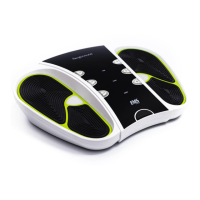
Circulator Nerve & Muscle Stimulator
The Circulator Nerve & Muscle Stimulator is a device designed to provide nerve and muscle stimulation, primarily for increasing local blood circulation, relieving neuropathy pain, osteoarthritis pain, acute and chronic body pain, varicose vein, providing paralytic nervous activation, strengthening body muscle, and relieving body muscle pain, and muscle toning. It operates on two principles: TENS (Transcutaneous Electrical Nerve Stimulation) and EMS (Electrical Muscle Stimulation).
Function Description:
The device utilizes electrical stimulation to activate sensory nerves and thereby stimulate either the pain gate mechanism and/or the opioid system. It delivers high-frequency electrical signals to excite the sensory nerves, activating specific natural pain relief mechanisms. The unit sends light electrical pulses into the body through foot pads and electrode patches placed over peripheral nerves. For muscle stimulation, it employs electrical impulses that directly stimulate motor neurons, creating muscle contractions that can be quick and frequent, long with pauses, or contractions that are held for several (uncomfortable) seconds or minutes at a time. This process helps to improve blood circulation and muscle strength.
Important Technical Specifications:
- Model: Circulator
- Dimensions: 458 mm x 343 mm x 72 mm
- Weight: 2 kg with Box Pack
- No. of Programs: 2 (P1-EMS, P2-TENS)
- Input Voltage: 5VDC
- Input Power: 10 Watt
- Chargeable: Yes
- Working Time: 30 min
- Mode of Machine: 1
- Operational Frequency: 0-99Hz
- Delay Frequency: 300ms
- Batteries: Lithium ion batteries
- Accessories: Electrode Patches Cable, DC USB Cable and Electrode Patches
- Operating conditions: 41°F - 104°F (5°C - 40°C), 30% - 75% RH, 700 hPa - 1060 hPa atmospheric pressure
- Transportation and storage environment: 14°F - 122°F (-10°C - 50°C), 10% - 90% RH, 700 hPa - 1060 hPa atmospheric pressure
- Applied parts: Electrode patches (BF), Foot pads (BF)
- EMS Voltage Waveform:
- TENS Output Waveform:
- Foot: 20-120V
- Body: 12-84V
- TENS Program Sequence (P1 EMS Program):
- Waveform types include Triangular, Sinusoidal, Saw, Square, and Three Step.
- On Time ranges from 100 to 800.
- Idle Time ranges from 50 to 150.
- Frequency is consistently 2.2kHz to 100Hz.
- TENS Program Sequence (P2 TENS Waveform Sequence):
- Similar waveform types and frequency as P1.
- On Time ranges from 100 to 800.
- Idle Time ranges from 50 to 150.
- Frequency is consistently 2.2kHz to 100Hz.
Usage Features:
The device is intended for use by patients aged 15 and above, excluding pregnant ladies, patients with pacemakers/implanted defibrillators, patients with deep vein thrombosis, epileptic patients, and patients with cardiac conditions.
- Components: Foot Pads, Prog/Time Button (P1-EMS and P2-TENS), Foot Intensity Level Button, Body Intensity Level Button, Power Button, Power & Battery Sockets, DC USB Cable, and Electrode Patches.
- Charging: Place the charger output pin in the charging slot, plug into a 110V/50-60Hz or 220/240V/50-60Hz mains electrical outlet. The Glowing Green and Red light indicates charging. A solid green light indicates full charge, which takes approximately 4 1/2 hours. A long beep sound indicates complete discharge.
- Operation:
- Sit on a chair or sofa and place both bare feet on the foot-shaped pad.
- Press the power button located at the bottom of the device.
- Select program P1 or P2 by using the +/- Prog./ Time button.
- Adjust the intensity through +/- foot intensity level buttons.
- The device is set on Auto Timer for 30 minutes, after which it automatically switches off.
- For electrode patches, thoroughly wash the intended treatment site and dry it. Connect the electrode patches with the connecting wire and plug into the accessories socket.
- Peel off the protective membrane from the electrode patches and carefully place on the clean, dry, uninjured skin.
- Adjust the intensity through the 4+ button for body adjustment.
- Do not pull the electrode wires to avoid damage.
- Intensity Levels: Optimal intensity level varies from person to person. For optimum results, do not lift your feet while the device is on. The device should not be on charging mode while in use.
- Program Selection: Selected program will be displayed every 5 minutes for 10 seconds during the therapy in the PROG/TIME display segment.
- Foot Pads and Electrode Patches Usage:
- For > 15 minutes (equally distributed): P1 (35), P2 (99), P3 (7), P4 (2).
- For < 15 minutes (equally distributed): P1 (35), P2 (99), P3 (7), P4 (2).
Maintenance Features:
- Cleaning:
- Electrode patches: Clean with a wet cloth and dry cleaning brush. The foot pads are latex free. Store electrode patches in cool areas with temperature under 30°C in a dry and ventilated place. Avoid exposure to sunlight. If electrode patches get dry and lose their stickiness, put a few drops of water on them and rub them gently to rehydrate. Replace electrode patches after 30 applications or if they lose their adhesiveness.
- Circulator (Nerve and muscle stimulator): Clean the foot pads with a wet cloth and dry cleaning brush.
- Battery: Do not throw the device into fire. Do not recharge, use, or leave the device in any high temperature environment such as in a location near fire or in direct sunlight. The device contains a built-in rechargeable lithium-ion battery which must be disposed of properly.
- Expected Service Life: The machine will often last for more than 5 years, but is warranted for 1 year. Damage to the batteries is not covered by the warranted. Lead life depends greatly on use. Always handle the lead with care. Electrode patches should last 30 applications depending on skin condition and humidity. Fully charged battery should last about 4 hours continuous use.
- Troubleshooting: The manual provides solutions for common problems such as leg pain after use, device not generating electric impulse, device not turning on, device not vibrating, device turning on and then goes off, blinking red light, electrode patches not sticking, weak sensation, and no sensation.
- Disposal: The device must be disposed of as unsorted municipal waste. It should be marked with a crossed-out wheelie bin symbol. Follow local regulations for the disposal of electrical and electronic devices.


 To Next Page
 General