EasyManua.ls Logo

Weinmann homecare SOMNOcomfort 2 - User Manual

Weinmann homecare SOMNOcomfort 2
44 pages
Print Icon
To Next Page IconTo Next Page
Loading...
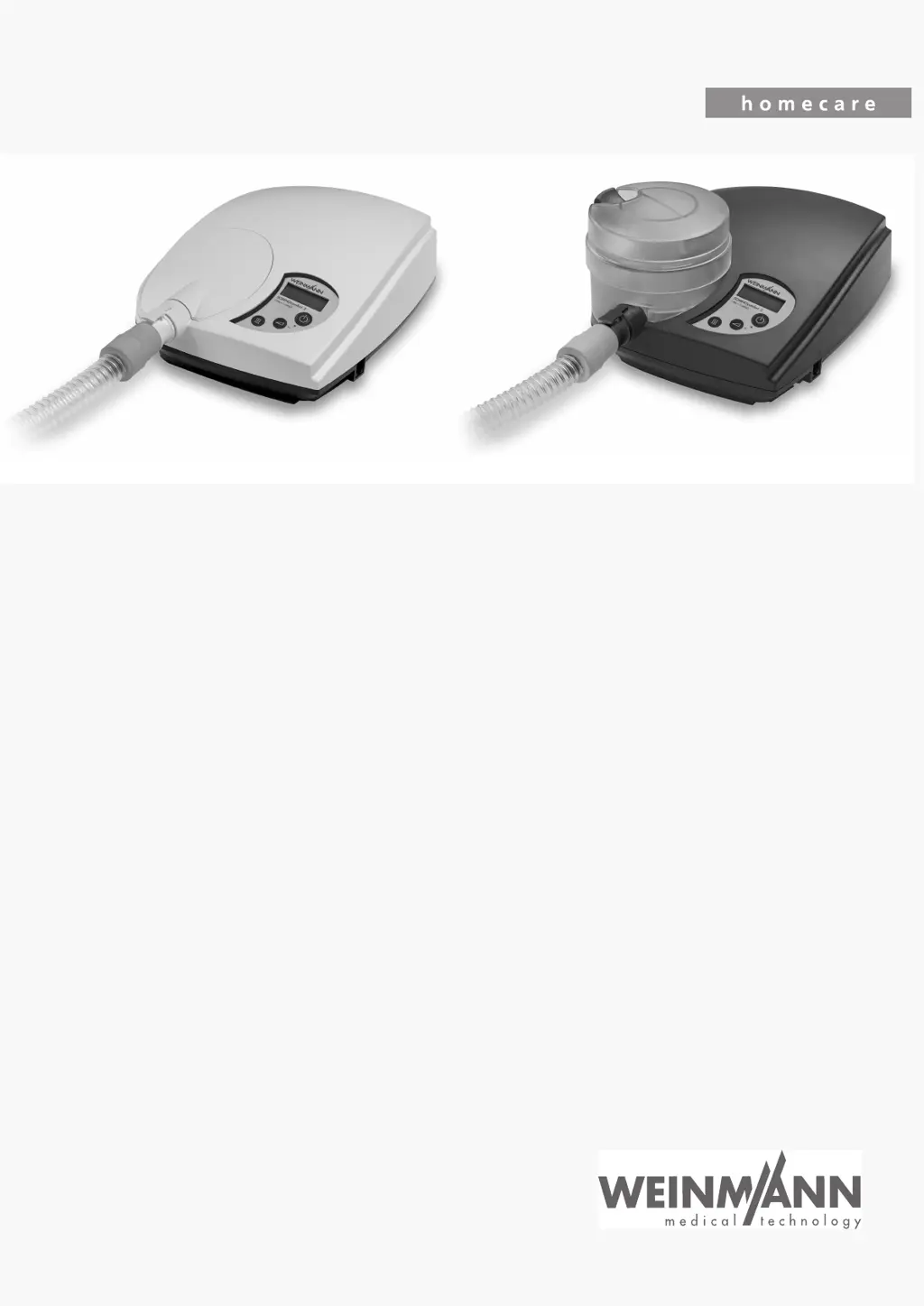
CPAP Units:
SOMNOcomfort 2
SOMNOcomfort 2
WM
24400 / WM
24465
SOMNOcomfort 2 with SOMNOaqua
WM
24450 / WM
24420
SOMNOcomfort 2e
SOMNOcomfort 2e
WM
24405
SOMNOcomfort 2 e with SOMNOaqua
WM
24455
autoCPAP Units:
SOMNObalance
SOMNObalance, white
WM
27400
SOMNObalance, white with SOMNOaqua
WM
27440
SOMNObalance, anthracite
WM
27410
SOMNObalance, anthracite with SOMNOaqua
WM
27450
SOMNObalance
e
SOMNObalance e
WM
27420
SOMNObalance e with SOMNOaqua
WM
27460
Servicing and Repair Instructions

Table of Contents

Questions and Answers

  • H
    Haley MaddoxAug 13, 2025
    What to do if Weinmann Medical Equipment does not reach CPAP pressure?
    • P
      patricia88Aug 14, 2025
      If your Weinmann Medical Equipment isn't reaching the selected CPAP pressure level, several factors could be responsible. The filter might be soiled, requiring replacement of both filters. Alternatively, the mask might be leaking, which can be resolved by adjusting the headgear for a tighter seal. Ensure the humidifier or cover is correctly inserted or attached. Also, check the pressure measurement tube for kinks or looseness, and reattach it, ensuring it's free from kinks when closing the unit.
  • L
    Lori HawkinsAug 17, 2025
    How to troubleshoot no sound and indicator off on Weinmann Medical Equipment?
    • J
      jeffrey66Aug 17, 2025
      If your Weinmann Medical Equipment shows no mechanical sound and the ready/operating indicator is off, it could be due to several reasons. First, check the power connections between the power supply cable, the unit, and the wall outlet, ensuring they are secure. Test the power source with another device. If the power supply cable is faulty, replace it. Also, a defective fuse might be the cause, requiring replacement. If the powerpack’s LED is off, the power supply is defective and should be replaced.
  • C
    Christina MartinAug 21, 2025
    Why is the humidifier not warming up in my Weinmann Medical Equipment?
    • S
      smorganAug 21, 2025
      If the humidifier water in your Weinmann Medical Equipment isn't warming up, the humidifier itself may be defective. If possible, test with another humidifier. Also, a defective main circuit board could be the cause. Another potential issue is a loose or defective humidifier connection line 49; try reattaching or replacing the line.
  • G
    George MedinaAug 25, 2025
    What to do if Weinmann Medical Equipment doesn't switch on in automatic mode?
    • N
      Nicholas CruzAug 26, 2025
      If your Weinmann Medical Equipment fails to switch on by breathing into the mask in automatic mode, verify that the automatic mode is activated. Also, the main circuit board might be defective. If you're using a full-face mask with an integrated exhalation system, automatic on may not be compatible with that type of mask.
  • E
    Elaine BookerAug 28, 2025
    Why is there no sound after the indicator light is on Weinmann Medical Equipment?
    • J
      Jeremy HuntAug 29, 2025
      If your Weinmann Medical Equipment has no mechanical sound after the operating indicator turns on, the motor might not be turning. In this case, consider replacing the main circuit board. Also, the fan connection line might be loose or defective; reattach the line or replace the fan.
  • A
    Alexa HuffmanSep 1, 2025
    Why won't my Weinmann Medical Equipment turn off automatically?
    • F
      Frank OrtegaSep 1, 2025
      If your Weinmann Medical Equipment doesn't switch off approximately 15 seconds after removing the mask, first ensure that the automatic switch on/off feature is activated. Note that automatic off may not be an option if you are using a high-resistance mask, such as nasal pillow masks.
  • J
    John MorenoSep 5, 2025
    What does the filter change indicator mean on Weinmann Medical Equipment?
    • S
      stephenhicksSep 5, 2025
      If the filter change indicator appears on the display of your Weinmann Medical Equipment, it means the filter is soiled or the end of its life cycle has been reached. Clean or change both filters.
  • M
    Mark StewartSep 9, 2025
    What causes high CPAP pressure tolerance in Weinmann Medical Equipment?
    • D
      donaldbuckleySep 9, 2025
      If the pressure tolerance of the CPAP is greater than 1 hPa after 1 minute, the main circuit board might be defective.

Summary

Introduction

Product Overview

Legend

Explains symbols and components shown in the product overview diagrams.

Markings on the packaging

Describes symbols and information found on product packaging.

Equipment Description and Intended Use

Intended Use of SOMNOcomfort 2 and SOMNOcomfort 2 e

Details the therapeutic purpose and patient age for SOMNOcomfort units.

Intended Use of SOMNObalance and SOMNObalance e

Outlines the therapeutic purpose and patient age for SOMNObalance units.

Functional Description SOMNOcomfort 2 and SOMNOcomfort 2 e

Explains the operational principles of SOMNOcomfort devices.

Functional Description SOMNObalance and SOMNObalance e

Details the operational principles of SOMNObalance devices.

Servicing and Maintenance

Servicing Intervals

Defines maintenance schedules based on time or operating hours.

Filter Change Procedure

Step-by-step guide for replacing the unit's filters.

Resetting Service Indicators

Instructions for resetting the service symbol after maintenance.

Product Disposal Guidelines

Proper procedures for disposing of the medical device.

Cleaning and Disinfection Instructions

Cleaning and Disinfecting While in Use

Procedures for cleaning units during operation.

Cleaning and Disinfecting During Repairs

Procedures for cleaning units during repair processes.

Cleaning and Disinfecting, New Patient

Steps to clean and disinfect units for new patient use.

Cleaning and Disinfecting the Humidifier While in Use

Instructions for cleaning the humidifier during use.

Cleaning and Disinfecting the Humidifier, New Patient

Steps to clean the humidifier for new patient transfer.

Final Test Procedures

General Final Test Information

Describes the purpose and requirements of the final test procedure.

Performing the Final Test

Outlines the step-by-step process for conducting the final test.

Checking Power Supply and Housing

Verifies the integrity of the power supply and unit casing.

Checking Control Panel and Indicators

Tests the control panel, display, and indicators for proper function.

Checking Therapy Unit Functionality

Validates the overall operational performance of the therapy unit.

Checking Humidifier Function

Verifies the correct operation and heating of the humidifier component.

Repair Information and Instructions

General Repair Guidelines

Essential safety and procedural information for performing repairs.

Required Tools and Facilities

Lists the necessary tools and equipment for repair tasks.

Repair Sequence Overview

Provides a flowchart outlining the order of repair steps.

Opening the Unit

Step-by-step instructions for safely opening the device for access.

Closing the Unit

Detailed steps for reassembling the therapy unit after repair procedures.

Replacing Main Circuit Board

Procedure for replacing the main electronic control board.

Replacing Front Panel Foil

Guide for replacing the front panel user interface foil.

Replacing Fuse

Instructions for safely removing and replacing a blown fuse.

Replacing Display

Procedure for replacing the device's display screen component.

Replacing Baffle Box

Guide for removing and replacing the internal baffle box.

Replacing the Fan

Instructions for safely removing and replacing the device's cooling fan.

Replacing Housing Parts

Procedures for replacing the lower and upper housing sections.

Replacement Parts Information

Replacement Parts List

Comprehensive catalog of all available spare parts with item numbers.

Replacement Parts Required for Servicing

Lists specific parts included in maintenance service kits.

Tools, Testing Equipment, and Disinfectants

Tools for Servicing

Lists the essential tools required for device maintenance and repair.

Testing Equipment for Calibration

Identifies specialized equipment needed for testing and calibration.

Approved Disinfectant

Specifies the recommended disinfectant for cleaning procedures.

Technical Data and Specifications

Specifications for SOMNOcomfort

Detailed technical specifications and parameters for SOMNOcomfort devices.

Specifications for SOMNObalance

Detailed technical specifications and parameters for SOMNObalance devices.

Pneumatic and Electrical Diagrams

Visual representations of the device's pneumatic and electrical systems.

Safety Distances for HF Equipment

Guidelines for safe distances from telecommunication equipment.

Service Record and Documentation

Service Check and Final Test Record

Checklist for performing and documenting final tests after service.

Servicing and Repair Log

Log section for recording completed servicing and repair actions.

Cleaning and Disinfection Log

Record for documenting cleaning and disinfection procedures performed.

Weinmann homecare SOMNOcomfort 2 Specifications

General IconGeneral
BrandWeinmann
Modelhomecare SOMNOcomfort 2
CategoryMedical Equipment
LanguageEnglish

Related product manuals