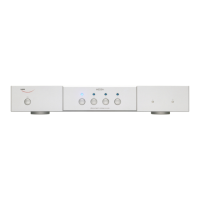
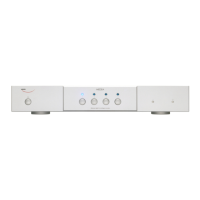
The Weiss DAC204 is a high-performance stereo 24-bit/192kHz Digital-to-Analog Converter designed for audiophiles and professionals seeking pristine audio reproduction. It supports a wide range of digital audio formats and sampling frequencies, offering versatile connectivity and exceptional sound quality.
Function Description:
The primary function of the DAC204 is to convert digital audio signals into analog audio signals for playback through an amplifier and speakers. It acts as a central hub for various digital audio sources, including computers (via USB), CD/DVD players, and other digital audio devices (via RCA or Toslink). Beyond its core D/A conversion, the DAC204 also features digital outputs, allowing it to function as a digital audio interface or a format converter for other digital audio equipment.
Important Technical Specifications:
- RCA Connector (1): Accepts AES/EBU or S/PDIF signals.
- Sampling Frequencies: 44.1, 48.0, 88.2, 96.0, 176.4, 192 kHz.
- Maximum Input Word-length: 24 Bits.
- Toslink Connector (1, optical): Accepts AES/EBU or S/PDIF signals.
- Sampling Frequencies: 44.1, 48.0, 88.2, 96.0 kHz.
- Maximum Input Word-length: 24 Bits.
- USB Connector (1):
- Accepted Sampling Frequencies: 44.1, 48.0, 88.2, 96.0, 176.4, 192, 352.8, 384 kHz.
- Supports DSD64 and DSD128.
Analog Outputs:
- XLR Connectors (2): Balanced, hot output on pin 2, DC coupled, short circuit proof.
- Output Impedance: 44 Ohm.
- RCA Connectors (2): Unbalanced, DC coupled, short circuit proof.
- Output Impedance: 22 Ohm.
Output Level (Selectable via two toggle switches, 4 settings):
- XLR Outputs (with 0 dBFS sinewave input):
- 7.5 Vrms, +19.7 dBu
- 2.3 Vrms, +9.7 dBu
- 0.75 Vrms, -0.3 dBu
- 0.23 Vrms, -10.3 dBu
- RCA Outputs (with 0 dBFS sinewave input):
- 3.75 Vrms, +13.7 dBu
- 1.15 Vrms, +3.7 dBu
- 0.375 Vrms, -6.3 dBu
- 0.115 Vrms, -16.3 dBu
Digital Outputs:
- XLR Connector (1)
- RCA Connector (1)
- BNC Connector (1)
Synchronization:
- Synchronized via the input signal for RCA or Toslink inputs.
- USB input acts as the master clock.
- Features extremely efficient jitter attenuation.
- Supported Sampling Frequencies for synchronization: 44.1 kHz, 48.0 kHz, 88.2 kHz, 96.0 kHz, 176.4 kHz, 192 kHz, 352.8 kHz, 384 kHz, DSD64, DSD128.
Power:
- DC Input Voltage: 6 to 9 Volt.
- DC Input Current: 1050mA at 6V, 700mA at 9V.
- Power Consumption: 6.3 W.
Measurements (at 1 kHz, max output level, 192kHz Fs, 22kHz bandwidth, unweighted, 0 dBr = output level at 0 dBFS):
- Frequency Response:
- Fs = 44.1 kHz, 0Hz-20kHz: within +- 0.25dB
- Fs = 88.2 kHz, 0Hz-20kHz: within +- 0.25dB
- Fs = 88.2 kHz, 0Hz-40kHz: within +- 0.8dB
- Fs = 176.4 kHz, 0Hz-20kHz: within +- 0.25dB
- Fs = 176.4 kHz, 0Hz-40kHz: within +- 0.8dB
- Fs = 176.4 kHz, 0Hz-80kHz: within +- 2.5dB
- Total Harmonic Distortion plus Noise (THD+N):
- -116 dBr (0.00016%) at -3 dBFS input level
- -125 dBr (0.000056%) at -40 dBFS input level
- -125 dBr (0.000056%) at -70 dBFS input level
- Linearity: At 0 dBFS to -120 dBFS input level: less than ±0.4 dB deviation from ideal.
- Spurious Components (including harmonics):
- At 0 dBFS input level, maximum output level, 1 kHz: all components at less than -120 dBr.
- At 0 dBFS input level, maximum output level, 4 kHz: all components at less than -115 dBr.
- Crosstalk: Better than 120 dB, 20 Hz-20 kHz.
- Interchannel Phase Response:
- +- 0.05° 20 Hz-20 kHz
- +- 0.30° 20 Hz-80 kHz.
Usage Features:
- Input Selection: A front-panel switch allows users to select between Toslink, USB, and RCA digital inputs.
- Power Control: A front-panel power on/off switch.
- Sampling Frequency Indication: Eight LEDs on the front panel indicate the sampling frequency for the USB input (44.1, 48.0, 88.2, 96.0, 176.4, 192.0, DSD, and power).
- DSD Conversion Settings: Two front-panel switches allow for DSD to PCM conversion settings, enabling selection of output sampling frequency (88.2 kHz or 176.4 kHz) and word-length (16-bit or 24-bit) for the converter's output. These settings are particularly useful when using the DAC204's digital outputs with an external D/A converter. For the internal D/A converter, 176.4 kHz and 24 Bit are recommended.
- Output Level Attenuation: Two rear-panel toggle switches provide 10dB steps of analog attenuation, allowing for four different output levels to be selected, ensuring compatibility with various amplifier sensitivities.
- Simultaneous Analog Outputs: Both balanced XLR and unbalanced RCA analog outputs can be used simultaneously. However, connecting a low-impedance headphone and an amplifier simultaneously is not recommended as it may compromise the signal to the amplifier.
- USB Driver Support: For MacOS systems, no specific USB driver is required. For Windows systems, a dedicated USB driver must be downloaded from the Weiss website.
- Downsampling for High-Resolution USB: USB input signals at 352.8 kHz or 384 kHz are automatically downsampled to 176.4 kHz or 192 kHz, respectively. Sampling frequencies between 44.1 kHz and 192 kHz are passed unaltered.
- Robust Output Circuitry: The analog outputs are DC coupled and short-circuit proof. The XLR outputs are not servo-controlled, meaning XLR pin 2 or pin 3 should not be shorted to ground. When connecting XLR outputs to an unbalanced input, XLR pin 1 should be used for ground and XLR pin 2 for the hot signal, leaving XLR pin 3 open.
- External Power Supply: The unit uses an external power supply, requiring a voltage between 6V and 9V.
Maintenance Features:
- Durable Construction: The device is housed in a robust metal chassis, indicating a design for longevity and protection of internal components.
- Made in Switzerland: The "made in switzerland" label suggests high-quality manufacturing standards and attention to detail, which typically translates to reliability and reduced need for frequent maintenance.
- Simple Setup: The straightforward unpacking and connection process minimizes the risk of initial setup errors that could lead to maintenance issues.
- Troubleshooting Guidance: The manual advises checking the power switch/LED and ensuring the sampling frequency is within the supported range if no signal is present at the outputs, providing basic troubleshooting steps for users.
- Online Resources: The availability of USB drivers and potentially other support information on the Weiss website (www.weiss.ch) indicates ongoing product support.

 Need help?
 General

 To Next Page