MOUNTING THE INNER POT
IIIII II II I
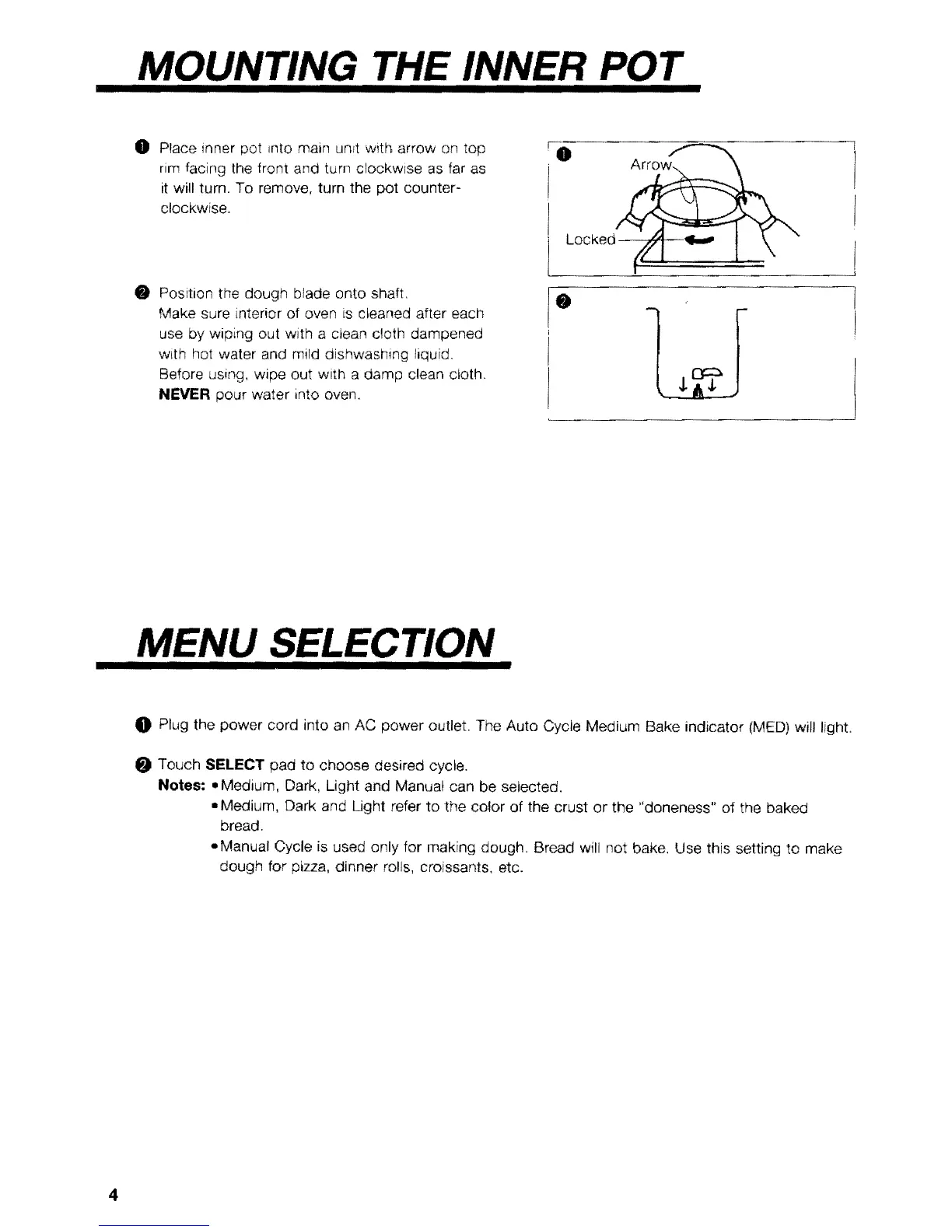
O Place inner pot _nto main unit with arrow on top
rim facing the front and turn clockwise as far as
it will turn. To remove, turn the pot counter-
clockwise.
Position the dough blade onto shaft,
Make sure interior of oven is cleaned after each
use by wiping out with a ctean cloth dampened
with hot water and mild dishwashing liquid,
Before using, wipe out with a damp clean ctoth,
NEVER pour water into oven.
Lockoo /b"t \ "
O
MENU SELECTION
O Plug the power cord into an AC power outlet. The Auto Cycle Medium Bake indicator (MED) will light,
O Touch SELECT pad to choose desired cycle.
Notes: • Medium, Dark, Light and Manual can be selected.
° Medium, Dark and Light refer to the color of the crust or the "doneness" of the baked
bread.
-Manual Cycle is used only for making dough. Bread will not bake, Use this setting to make
dough for pizza, dinner rolls, croissants, etc.



 To Next Page