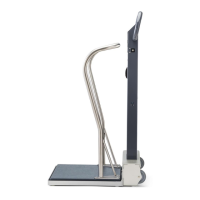
This document provides assembly instructions for Welch Allyn medical scales, specifically covering the #5002, #5702, #6002, #6702, and #6702W Series. These scales are designed for professional use, likely in healthcare settings, to accurately measure patient weight. The instructions detail the process of assembling the scale platform, column, and optional accessories.
Function Description
The Welch Allyn scales are precision instruments used for weighing individuals. They consist of a base platform where the patient stands, a column that supports the display and handle, and various fasteners to secure the components. The different series likely offer variations in capacity, features, or design, but the fundamental function remains consistent: to provide reliable weight measurements. The assembly process involves attaching the column to the base, securing the handle, and in some cases, attaching side panels or other accessories.
Important Technical Specifications (Inferred from diagrams and typical scale design)
- Series Covered: #5002, #5702, #6002, #6702, #6702W.
- Components:
- Scale Platform: The main weighing surface, typically rectangular, with mounting points for the column and side panels.
- Column: A vertical support structure that connects to the platform and likely houses the display and controls (though not explicitly shown in detail in these assembly diagrams).
- Handle: An ergonomic handle attached to the column for patient stability or ease of movement of the scale.
- Fasteners: Various screws (indicated by "TTT" or similar icons) are used to secure components.
- Side Panels (for #6002, #6702, #6702W Series): Foldable or attachable panels that extend the platform's footprint, potentially for bariatric patients or to provide a larger standing area.
- Optional Accessory (#60224): A curved support bar, possibly a handrail or additional stability aid, that attaches to the scale column.
- Assembly Method: Primarily involves mechanical fastening using screws. The diagrams show components being aligned and then secured with multiple screws.
- Material (Inferred): Likely durable medical-grade plastics and metals for the platform, column, and handle to withstand frequent use and cleaning.
Usage Features (Inferred from assembly and typical scale design)
- Stability: The design with a broad base platform and a sturdy column suggests good stability for patients during weighing. The presence of handles further enhances patient stability.
- Portability (Inferred): While not explicitly stated, the assembly of a column and handle often implies that the scale might be designed for some degree of portability within a clinical setting, allowing it to be moved between examination rooms.
- Patient Comfort/Safety: The optional #60224 accessory (a curved support bar) and the handles suggest a focus on patient safety and comfort, providing additional support points during the weighing process. The side panels on certain models (#6002, #6702, #6702W) indicate an ability to accommodate a wider range of patient sizes, enhancing usability for bariatric patients.
- Ease of Assembly: The step-by-step diagrams with clear visual cues (arrows, numbered steps, fastener indicators) suggest that the scales are designed for relatively straightforward assembly by trained personnel.
Maintenance Features (Inferred from typical medical device practices)
- Modular Design: The assembly instructions highlight a modular design where components like the platform, column, and handle are separate units. This modularity could simplify maintenance and replacement of individual parts if they become damaged or require servicing.
- Cleaning: While not explicitly mentioned in the assembly instructions, medical scales are typically designed with smooth, easy-to-clean surfaces to facilitate disinfection and maintain hygiene in clinical environments. The visible fasteners suggest that components can be disassembled for more thorough cleaning or inspection if necessary.
- Durability: The use of multiple screws for securing components implies a robust construction intended for long-term use in demanding healthcare settings.
Assembly Process Overview
The assembly instructions are presented in a visual, step-by-step format:
Step 1 (Common to all series):
- The initial step involves attaching the column to the main scale platform. This is shown by aligning the column's base with the platform's mounting points and securing it with screws (indicated by "TTT" or similar icons).
- For the #5002 and #5702 Series, the column directly attaches to the platform.
- For the #6002 and #6702/6702W Series, there appears to be an intermediate plate or frame that the column attaches to, which then secures to the main platform. This might be related to the mechanism for the foldable side panels.
Step 2 (For #6002, #6702, #6702W Series):
- This step specifically details the attachment of the side panels. These panels are shown being folded out and secured to the main platform, likely providing an extended weighing surface. Fasteners are used to secure these panels in place.
Step 3 (Common to all series):
- This step involves securing the handle to the top of the column. The handle is positioned and then fastened with screws.
Optional Accessory (#60224):
- The instructions also show how to attach the optional #60224 accessory, which is a curved support bar. This accessory is mounted to the column, providing additional hand support.
The diagrams clearly differentiate between the series, showing specific assembly steps for each. For instance, the #5002 and #5702 series have a simpler base assembly compared to the #6002 and #6702/6702W series, which feature the foldable side panels. The use of icons like "TTT" consistently indicates screw locations, making the instructions easy to follow. The overall design emphasizes a secure and stable final product, essential for patient safety and accurate measurements in a clinical environment.

 Need help?
 General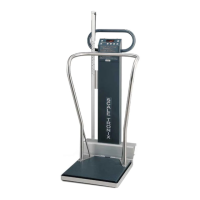

 To Next Page