9
up the machine. Set the welding mode switch
(7) to ‘Lift TIG’.
7.5 Select the required output current using the
current control knob (5). You are now ready to
weld!
NOTE: The WF-180MST is a DC (Direct Current)
output welder only, this means that it is unable to
TIG weld reactive metals such as Aluminium alloys
and Brass (which require AC output). DC TIG output is
suitable for steel, stainless steel and copper.
Tips & Tricks
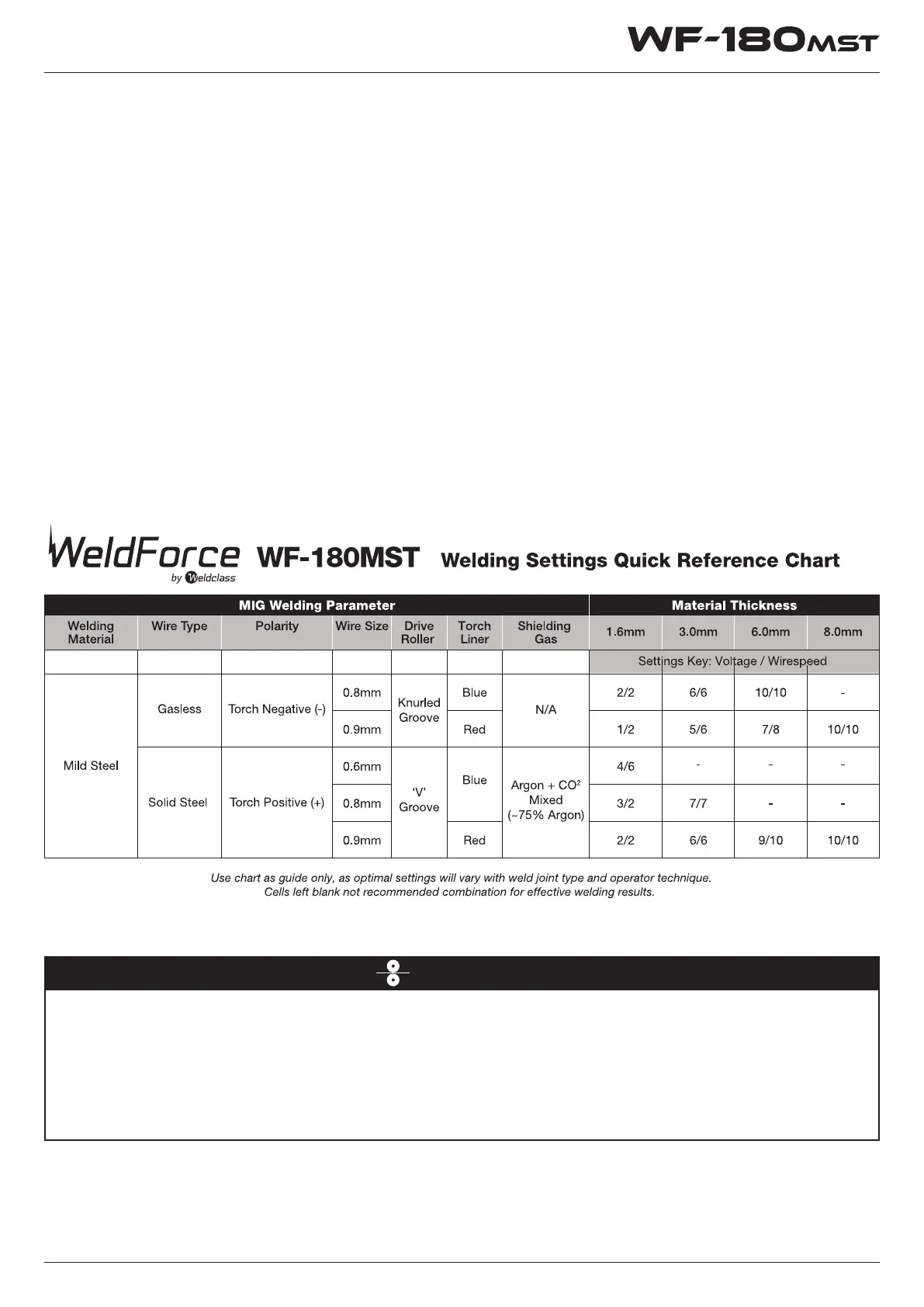
Welding Settings
Welding duty cycle is the percentage of actual
welding time that can occur in a ten minute cycle.
E.g. 20% at 160 amps - this means the welder can
weld at 160 amps for 2 minutes and then the unit
will need to be rested for 8 minutes. All duty cycle
ratings are based on an ambient air temperature of
40°
C
with 50% humidity, which is the international
standard for such a rating. In an environment with
temperature s exceeding 40°
C
, the duty cycle will
be less than stated. In ambient temperature less
than 40°
C
, duty cycle performance will be higher.
Duty Cycle Rating
Wire Jam Troubleshooting
• If wire jam occurs when the torch becomes hot, this is often because the heat causes the wire and the tip
to expand (which shrinks the hole in the tip). Using a slightly oversize tip can prevent this – eg: for 0.9mm
wire, use a 1.0mm tip.
• Do NOT over-tighten the drive roll tension – this will accelerate wear of the drive system, may distort the
wire & will cause further wire feed problems.
• Refer to page 15-16 for more troubleshooting tips.


 To Next Page