This document provides an instruction manual for a Digital Video Broadcasting (DVB) receiver, specifically the WELL REC-DVBT2-ENJOY-WL model. It outlines the device's features, controls, installation process, and basic functions.
Device Overview
The WELL REC-DVBT2-ENJOY-WL is a DVB-T2 receiver designed for digital video broadcasting. It supports H.265 HEVC (High Efficiency Video Coding), indicating its capability to decode modern, high-efficiency video streams, which is crucial for receiving high-definition digital television broadcasts. The device features a compact design with a clear front panel display and a comprehensive set of rear panel connections.
Front Panel Controls and Display
The front panel of the device is minimalistic yet functional, featuring:
- Display: An LED display showing "88:88", likely indicating the current time or channel number.
- POWER Button: A standby button to switch the device on or off.
- CH- Button: Used to navigate down through channels.
- CH+ Button: Used to navigate up through channels.
- USB Port: A front-facing USB port for connecting external storage devices, likely for media playback or recording functions.
Rear Panel Connections
The rear panel offers a variety of input and output ports for connecting the receiver to an antenna, television, and other audio/video equipment:
- ANT IN: For connecting the terrestrial antenna to receive DVB-T2 signals.
- ANT OUT: An output for passing the antenna signal to another device, such as a television with a built-in tuner.
- COAXIAL: A digital audio output, typically for connecting to an audio receiver or sound system for high-quality audio.
- HD-OUT: An HDMI output for connecting to modern televisions or displays, supporting high-definition video and audio transmission.
- SCART: A legacy analog audio/video connector for connecting to older televisions or VCRs.
- DC 12V: The power input for the 12V power adapter.
Remote Control Functions
The device comes with a comprehensive remote control, offering a wide array of functions for navigation and control:
- STANDBY: Toggles the standby mode.
- EPG (Electronic Program Guide): Displays program information.
- INFO: Shows current program details.
- AUDIO: Selects audio language or mode.
- FAV (Favorite List): Accesses favorite channels.
- MENU: Enters the main menu.
- CH+/CH-: Changes channels up or down.
- V+/- (Volume): Adjusts volume.
- P+/P- (Page): Navigates pages in menus or EPG.
- Number Buttons (0-9): Direct channel selection or input for settings.
- REV/FWD (Rewind/Forward): Used for media playback control.
- Play/Pause: Controls media playback.
- MUTE: Mutes or restores audio.
- PVR (Personal Video Recording): Initiates personal video recording.
- SUBTITLE: Selects subtitle language.
- Exit: Exits the current menu.
- OK: Confirms selections.
- RECALL: Returns to the last played program or operation.
- GoTo/Next/PREV (Previous): Navigation functions.
- REC (Record): Starts recording.
- Stop: Stops recording.
- Multi-Function Keys: Additional keys for various functions.
Basic Functions and Installation
The manual details the initial setup process, which includes configuring important settings:
- First Installation: Upon first power-on, the device guides the user through initial configurations such as Region, Language, Display Mode, and Aspect Mode. After these settings are complete, the user can initiate a channel scan.
- Channel Scan: The device supports two types of channel scans:
- DVB-T2 Channel Scan: A manual scan for DVB-T2 channels.
- DVB-T2 Auto Scan: An automatic scan to find all available DVB-T2 channels.
- LCN (Logical Channel Numbering): An option to enable or disable Logical Channel Numbering, which organizes channels in a logical sequence.
- Display Information: Pressing the "INFO" key during normal playback displays current program information, including channel number, program title, time, and signal strength/quality.
The device offers various system settings and tools for customization and maintenance:
- Parental Lock:
- Default password: "1234".
- "Menu lock" feature to restrict access to channel edit and search menus.
- Parental rating option (e.g., "18 years") to lock adult channels.
- System Setup Menu: Provides convenient system configurations, including:
- Language
- TV System
- Display Setting
- Local Time Setting
- Local Code Setting
- Timer Setting
- Parental Control
- OSD (On-Screen Display) Setting
- Favorite
- Software Update:
- Upgrade by USB: The device supports firmware updates via USB. Users are cautioned not to interrupt power during the upgrade process, as the system will automatically restart with the new firmware upon completion.
The manual includes an important environmental notice regarding waste electrical and electronic equipment (WEEE):
- WEEE Directive: Highlights that waste electrical and electronic equipment is a special waste category requiring proper collection, storage, transport, treatment, and recycling to prevent environmental pollution and harm to health.
- Disposal: Emphasizes the importance of submitting WEEE to special collection centers for proper recycling and environmental protection, warning against landfill disposal due to its polluting effects.
In summary, the WELL REC-DVBT2-ENJOY-WL is a DVB-T2 receiver designed for modern digital television reception, featuring H.265 HEVC support, a user-friendly interface with both front panel and remote controls, and essential connectivity options for a complete home entertainment setup. Its installation and system settings are straightforward, and it includes important features like parental control and USB-based software updates.

 Need help?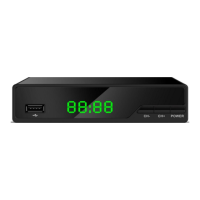

 To Next Page
 General