5
5
English
°
°
C
C
)
)
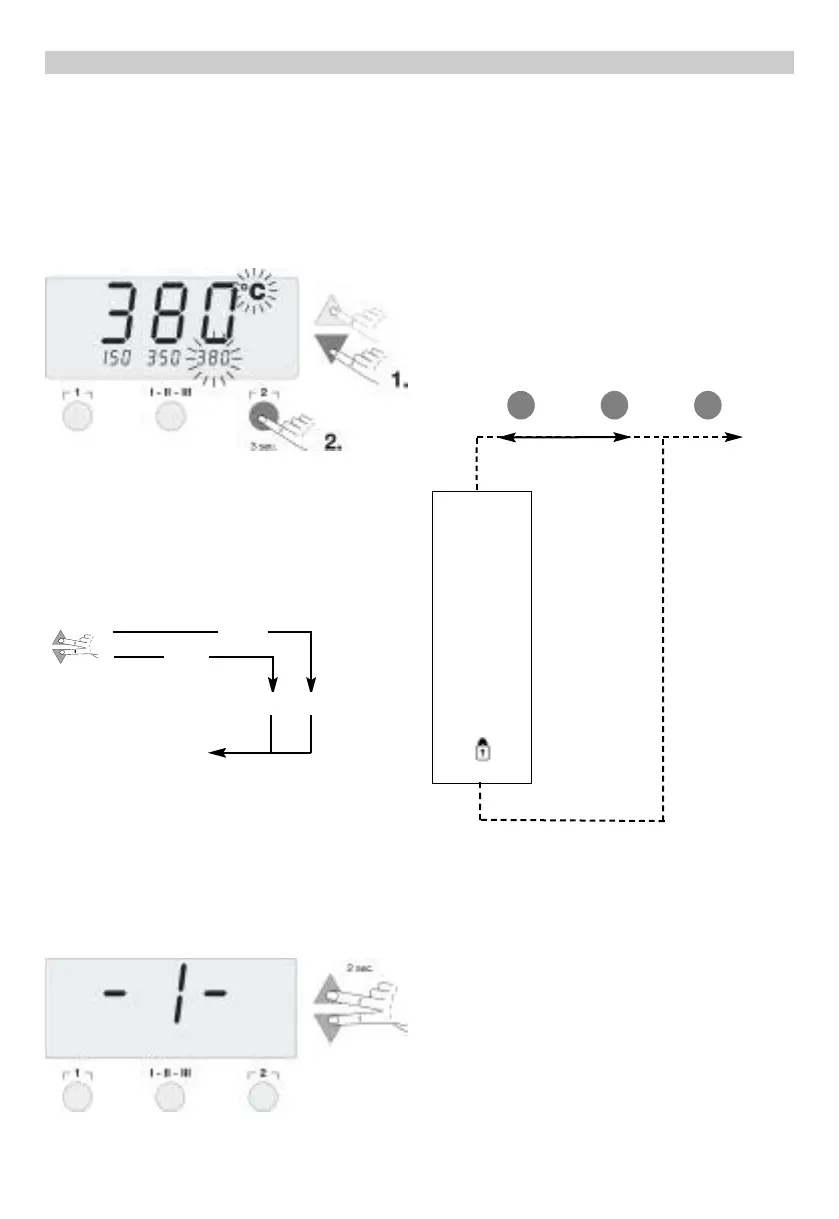
temperature symbol flashes
.
.
Next, depress and hold the desired Radio Button
1
1
,
,
I
I
-
-
I
I
I
I
-
-
I
I
I
I
I
I
or
2
2
. While the button is depressed, the small display
assigned to the Radio Button also flashes and, after 3
seconds, accepts the value of the large display.
Release the Radio Button.
Setting a Radio Button to a low temperature gives you
the option of manually and quickly decreasing temper-
ature when the soldering iron is not being used.
7
7
.
.
S
S
p
p
e
e
c
c
i
i
a
a
l
l
f
f
u
u
n
n
c
c
t
t
i
i
o
o
n
n
s
s
The special function are split in two menu sections.
Special functions menu 1: often used functions like
STANDBY, OFFSET, SETBACK, ...
Special functions menu 2: Calibration function, Remote
Id
7
7
.
.
1
1
S
S
p
p
e
e
c
c
i
i
a
a
l
l
f
f
u
u
n
n
c
c
t
t
i
i
o
o
n
n
s
s
m
m
e
e
n
n
u
u
1
1
Select the desired channel (CH1 or CH2) for inputting
the special functions. If the
U
U
P
P
and
D
D
O
O
W
W
N
N
buttons are
pressed simultaneously, after approx. 2 seconds the
menu selection for the special functions is activated
and -
I
I
- appears in the display, release buttons.
The following set-
tings are possible:
OFFSET, STANDBY, WINDOW (temperature settings);
SETBACK, OFF (time settings); Lock function (On/Off);
Temperature scale ( °F /°C ).
Radio Buttons
1
1
and I-II-I
I
I
I
I
are used for menu item
selection.
Radio Button
2
2
is used to exit the menu.
R
R
e
e
s
s
e
e
t
t
t
t
i
i
n
n
g
g
t
t
h
h
e
e
S
S
t
t
a
a
t
t
i
i
o
o
n
n
t
t
o
o
F
F
a
a
c
c
t
t
o
o
r
r
y
y
S
S
e
e
t
t
t
t
i
i
n
n
g
g
s
s
:
:
Depress and hold Radio Button
2
2
. Then depress the
U
U
P
P
and
D
D
O
O
W
W
N
N
Scroll Keys at the same time. "
F
F
S
S
E
E
",
“Factory Setting Enabled” appears in the display. The
soldering station is now reset to its factory default set-
tings.
7
7
.
.
1
1
.
.
1
1
S
S
t
t
a
a
n
n
d
d
b
b
y
y
T
T
e
e
m
m
p
p
e
e
r
r
a
a
t
t
u
u
r
r
e
e
When the Setback time has elapsed, the “Set” temper-
ature is decreased automatically to the Standby value.
The “Read” temperature is displayed (flashing) and
"
S
S
T
T
A
A
N
N
D
D
B
B
Y
Y
" appears in the display. The Standby tem-
perature can be set in the range ( 200 - 600°F/100 -
300°C ).
Adjust the standby temperature with the
U
U
P
P
or
D
D
O
O
W
W
N
N
Scroll Keys.
Switch to the previous menu item with Radio Button
1
1
.
Switch to the next menu item with Radio Button I-II-I
I
I
I
I
.
S
S
T
T
A
A
N
N
D
D
B
B
Y
Y
O
O
F
F
F
F
O
O
F
F
F
F
S
S
E
E
T
T
S
S
E
E
T
T
B
B
A
A
C
C
K
K
W
W
I
I
N
N
D
D
O
O
W
W
°
°
C
C
/
/
°
°
F
F
1
1
I
I
-
-
I
I
I
I
-
-
I
I
I
I
I
I
2
2
E
E
X
X
I
I
T
T
-1- -2-
2 (EXIT)
4 sec.
2 sec.
Menu Selection Exit


 To Next Page