7
7
English
Switch to next menu item with Radio Button I-II-I
I
I
I
I
.
7
7
.
.
2
2
S
S
p
p
e
e
c
c
i
i
a
a
l
l
F
F
u
u
n
n
c
c
t
t
i
i
o
o
n
n
s
s
M
M
e
e
n
n
u
u
2
2
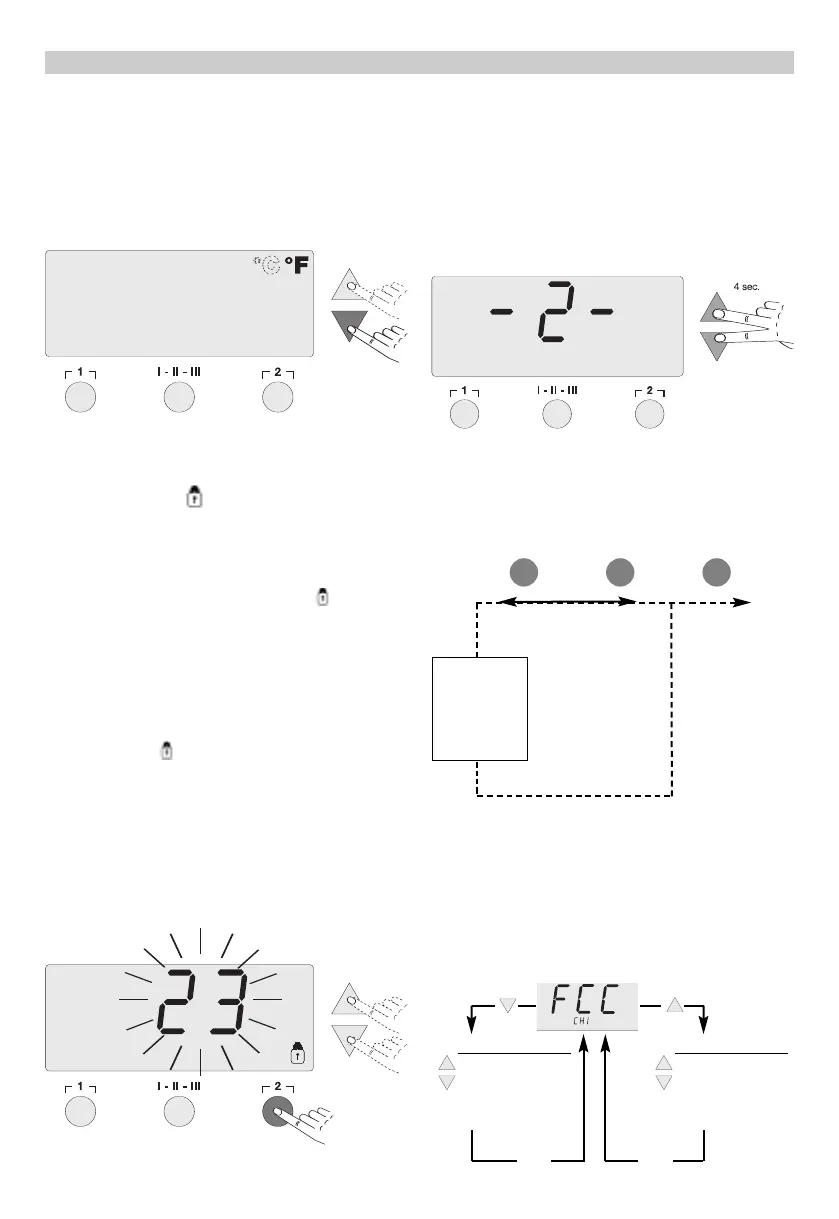
Select the desired channel (CH1 or CH2) for inputting
the special functions. If the
U
U
P
P
and
D
D
O
O
W
W
N
N
Scroll Keys
are pressed simultaneously, after approximately 4 sec-
onds, the menu selection for the Special Functions is
activated and
-
-
2
2
-
-
appears in the display. Release the
Scroll Keys.
Radio Buttons
1
1
and I-II-III are used for menu selection.
7
7
.
.
2
2
.
.
1
1
F
F
actory
C
C
o
o
n
n
t
t
r
r
o
o
l
l
C
C
heck
F
F
u
u
n
n
c
c
t
t
i
i
o
o
n
n
(
(
F
F
C
C
C
C
)
)
This function checks temperature accuracy of the sol-
dering station and allows modifications if necessary. To
perform the “FCC” function, the soldering tip tempera-
ture must be measured using an external temperature
measuring instrument.
Switch to next menu item with Radio Button
I
I
-
-
I
I
I
I
-
-
I
I
I
I
I
I
.
7
7
.
.
1
1
.
.
6
6
S
S
w
w
i
i
t
t
c
c
h
h
i
i
n
n
g
g
T
T
e
e
m
m
p
p
e
e
r
r
a
a
t
t
u
u
r
r
e
e
S
S
c
c
a
a
l
l
e
e
s
s
°
°
F
F
/
/
°
°
C
C
Use the UP or DOWN Scroll Key to switch between
°
°
F
F
and
°
°
C
C
and vice versa.
Switch to previous menu item with Radio Button
1
1
.
Switch to next menu item with Radio Button I-II-I
I
I
I
I
.
7
7
.
.
1
1
.
.
7
7
L
L
o
o
c
c
k
k
F
F
u
u
n
n
c
c
t
t
i
i
o
o
n
n
“
“
”
”
The Lock Function locks the soldering station control
so that no setting changes are possible. Radio Buttons
1
1
,
,
I
I
-
-
I
I
I
I
-
-
I
I
I
I
I
I
,
,
a
a
n
n
d
d
2
2
remain operational in the lock mode.
When the lock function is selected in the Special
Functions menu, “
O
O
F
F
F
F
” and the flashing “ ” symbol
appears in the menu display. If Radio Buttons
1
1
or
I
I
-
-
I
I
I
I
-
-
I
I
I
I
I
I
are depressed while “
O
O
F
F
F
F
” appears in the display,
no code is saved.
The
U
U
P
P
or
D
D
O
O
W
W
N
N
Scroll Keys can be used to enter a 1, 2
or 3-digit Lock code. Confirm the code by depressing
Radio Button
2
2
for 5 seconds. The station is now
Locked and the “ ” symbol appears in the main dis-
play.
To unlock, activate the Lock Function in Special
Functions menu 1. “
O
O
N
N
” appears in the display. Enter
the code and confirm by depressing Radio Button
2
2
.
The station is now unlocked.
Switch to previous menu item with Radio Button
1
1
.
5 sec.
Menu 2 Menu selection Exit
F
F
a
a
c
c
t
t
o
o
r
r
y
y
C
C
o
o
n
n
t
t
r
r
o
o
l
l
C
C
h
h
e
e
c
c
k
k
R
R
E
E
M
M
O
O
T
T
E
E
I
I
d
d
1 I-II-III 2 EXIT
F
F
C
C
C
C
2
2
1
1
2
2
°
°
F
F
/
/
1
1
0
0
0
0
°
°
C
C
+ 1
- 1
I
I
-
-
I
I
I
I
-
-
I
I
I
I
I
I
Confirmation
F
F
C
C
C
C
8
8
4
4
2
2
°
°
F
F
/
/
4
4
5
5
0
0
°
°
C
C
+ 1
- 1
I
I
-
-
I
I
I
I
-
-
I
I
I
I
I
I
Confirmation
EXIT
EXIT


 To Next Page