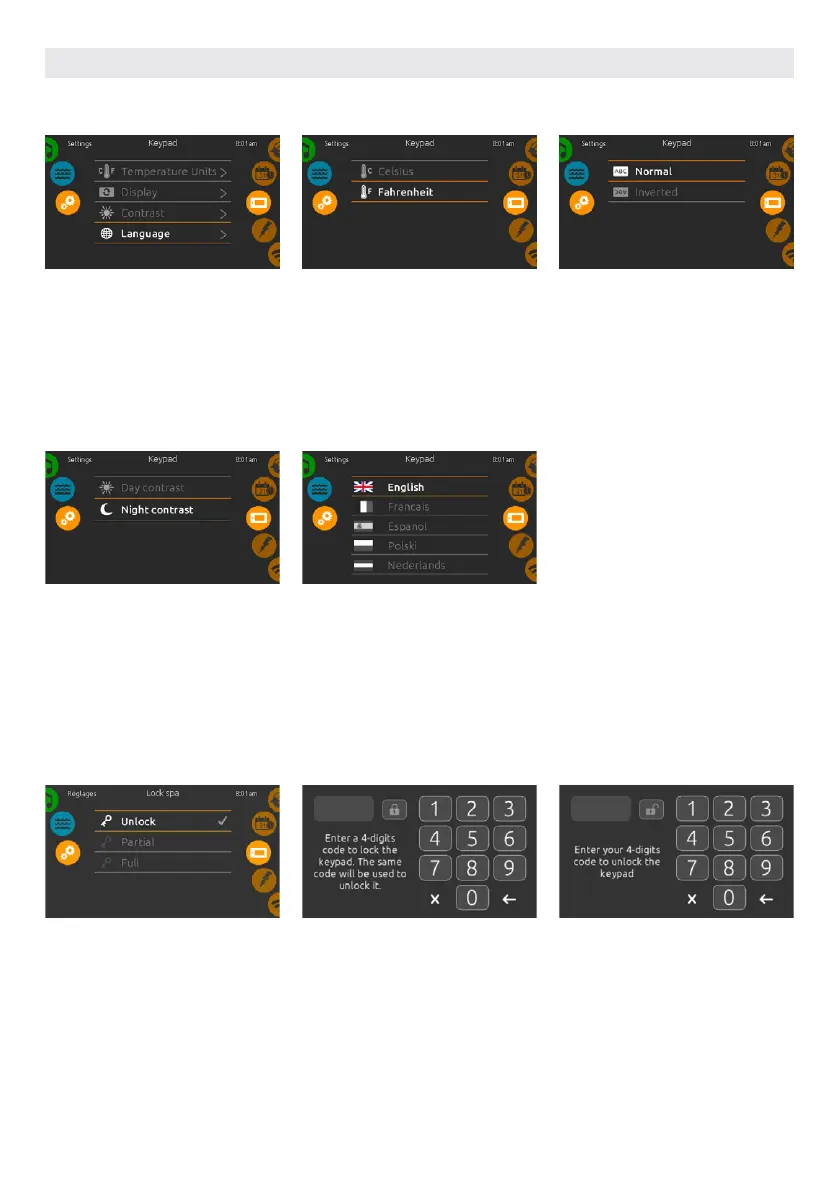
DISPLAY CONTRAST
Use this page to set or change the
display day or night contrast.
DISPLAY LANGUAGE
Use this page to set or change the
display language.
USER INTERFACE SMART TOUCH
KEYPAD SETTING
KEYPAD SETTINGS
To modify keypad settings, slide the
right wheel until the keypad icon is
highlighted in the middle.
Simply touch the line of the item you
want to change.
TEMPERATURE UNITS
Use this page to set or change the
temperature in F˚ or C˚ units.
DISPLAY ORIENTATION
Use this page to set or change the nor-
mal or inverted display orientation.
KEYPAD LOCK/UNLOCK OPTIONAL
When this option is enabled, the user
can partially or completely lock the key-
pad. When the user wants to lock the
keypad he is asked to select a 4-digit
code. The same code will be needed to
unlock the keypad. Next time he wants
to lock the keypad, he will be prompted
again to select a 4-digit code (same
functionality as a Safe in a hotel room).
The keypad can be unlocked with a
universal unlock code (3732) or by a
reset of the keypad.
When Full Lock is selected, all functions
are locked.
In Partial Lock, you may only activate
accessories. Settings may not be
changed in this mode.
66



 To Next Page