Need help?
Do you have a question about the Wellue PO6 and is the answer not in the manual?
Device is for measuring, displaying, and storing SpO2, pulse rate of adults in home or healthcare.
No contraindications are listed for the use of this device.
Important safety information, warnings, and precautions for using the pulse oximeter.
Explanation of symbols used on the device and in the manual.
Contents of the package: device, user manual, and charging cable.
Details about the Pulse Oximeter, its models, and configuration.
Instructions on how to use the pulse oximeter, including charging and operation.
Instructions for charging the pulse oximeter using a USB cable.
How to turn the pulse oximeter on and off manually and automatically.
Step-by-step guide for charging, wearing, and uploading data from the device.
Instructions on how to wear the device correctly for accurate measurements.
Explanation of the photoelectric method used for SpO2 measurement.
How to stop the device, save data, and upload it to a phone.
Instructions on how to check the device's battery status.
Explanation of the symbol indicating unavailable readings and its causes.
Instructions for pairing the device with a phone via Bluetooth.
Details on SpO2 and pulse rate threshold alerts via vibration.
How the device time synchronizes with a connected phone.
Proper methods for cleaning the pulse oximeter for reuse.
Solutions for problems like device not turning on or inaccurate measurements.
Technical details including environmental, electrical, and physical characteristics.
Summary of SpO2 accuracy values from clinical studies.
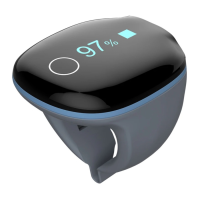
This document describes the Pulse Oximeter, a lightweight, portable health device designed for measuring, displaying, and storing pulse oxygen saturation (SpO2) and pulse rate in adults within home or healthcare facility environments.
The Pulse Oximeter utilizes a developed photoelectron method for SpO2 measurement. It incorporates a circuit design and calculation software developed by Shenzhen Viatom Technology Co., Ltd. The device features an SpO2 sensor that receives optical signals from red and infrared light transmitted through the finger. Two emitting tubes (red light diodes and infrared diodes) are located on the inner upside of the sensor, while a receiving end is on the inner downside. The Microcontroller Unit (MCU) processes the pulse signal, obtains frequency signals by counting, and ultimately determines the measured SpO2 value. The pulse rate (PR) is calculated by averaging the peak intervals of the PR waveform.
The device is calibrated to display functional oxygen saturation. It includes a smart vibration feature that activates a buzzer if SpO2 drops below a preset threshold or if the pulse frequency exceeds or falls below its set limits. The buzzer will stop once the SpO2 or pulse rate returns to normal ranges.
Power On/Off: The device powers on automatically when worn and turns off automatically a moment after it is removed from the sensor.
Charging: The Pulse Oximeter is charged via a USB cable connected to a USB charger or PC. A battery logo flashes on the device during charging. A low power prompt will appear on the display screen when the battery is low. A full charge typically takes 2-3 hours, after which the device automatically powers off. It's important to note that the device cannot be used during charging. If a third-party charging adapter (Class II) is used, it must comply with IEC60950 or IEC60601-1 standards.
Wearing and Operation: To begin, charge the battery and then wear the device on the index finger. Users should try to move the device along the forefinger to find the best fit, avoiding loose wearing, which can lead to inaccurate measurements. The device will automatically turn on and begin working after a few seconds.
Data Storage and Upload: The device has a built-in memory that can store one record. The oldest record will be overwritten by the next one, so it's crucial to upload data to a phone promptly. Data uploading is initiated by running the phone application after the device has completed its recording countdown. If the working time is less than 2 minutes, data will not be saved.
Bluetooth Connection: The device's Bluetooth is automatically enabled when powered on. To establish a connection, ensure both the device and the phone's Bluetooth are enabled. For initial use, a new device needs to be added by turning on the device, running the phone application, selecting "Oxyfit," and pressing the button on the side of the device. Users are advised not to pair the device directly in the phone's Bluetooth settings.
Checking Battery: The side button allows users to switch the display between readings and battery status.
Unavailable Symbol: If an unavailable symbol appears on the screen, it indicates that readings are currently unavailable. This can be caused by excessive movement, poor signal, or a cold finger. Readings usually recover within a few seconds once the user is at rest.
Warnings and Cautions:
Time & Date: After connecting with a phone, the device's time will automatically synchronize with the phone's time.
Cleaning: The device is reusable and should be cleaned before each reuse.
Troubleshooting:
The biocompatibility testing has been performed on the materials in contact with the person in accordance with ISO10993.
 General
| Measurement Range (SpO2) | 70% - 100% |
|---|---|
| Measurement Range (PR) | 30 - 250 bpm |
| Accuracy (SpO2) | ±2% (70% - 100%) |
| Display Type | OLED |
| Dimensions | 62 x 33 x 13 mm |
| Resolution (SpO2) | 1% |
| Resolution (PR) | 1 bpm |
| Bluetooth | Yes |
| Compatibility | iOS and Android |
| Type | Pulse Oximeter |
| PR Accuracy | ±2 bpm or ±2%, whichever is greater |
| Weight (without strap) | 30g |
| Battery Type | Rechargeable lithium battery |

 To Next Page