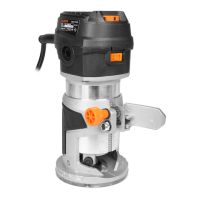
The WEN RT1460 Variable Speed Trim Router is a versatile power tool designed for creating intricate patterns on workpieces. It is suitable for both exterior and interior routing tasks, offering precision and control for various woodworking projects.
Function Description
The trim router is equipped with a variable speed dial, allowing users to adjust the bit rotation speed from 12,000 to 30,000 RPM. This feature is crucial for adapting to different materials, bit sizes, and cutting styles, ensuring optimal results and preventing damage to the workpiece or the bit. The power switch, located on the front of the router head, incorporates a soft start function for enhanced safety during operation. When activated, the motor gradually speeds up, giving the user time to secure their grip and maintain control.
Depth adjustment is managed via a knob that manipulates a rack-and-pinion gear system, allowing for precise control over the cutting height of the straight guide base. A locking lever, positioned opposite the depth adjustment knob, secures the base at the desired height. The spindle lock button facilitates easy and secure installation or removal of router bits by locking the spindle when tightening or loosening the collet nut.
The tool utilizes a 1/4" collet and nut assembly, designed to firmly hold router bits with a 1/4-inch shank. Proper insertion and tightening of the bit are critical for safe and effective operation.
Usage Features
The router is designed for a variety of cutting applications, including general routing, trimming, and working with templates.
For general routing, users must ensure the workpiece is firmly clamped. The router's speed and cutting depth should be set appropriately, with deeper cuts often requiring multiple passes to prevent motor overload and ensure a clean finish. The router should be held firmly with both hands, one on the grip surface of the straight base and the other on the router head, to maintain control during operation. The router bit should be slowly fed into the workpiece, moving smoothly through the cut until complete. It is essential to turn off the router and allow the bit to come to a complete stop before removing it from the workpiece to prevent injury.
Trimming involves moving the router bit along the edge of a workpiece. For this, a router bit with a bearing is typically used to guide the bit accurately. If the edge of the workpiece is laminated or veneered, applying masking tape can protect the surface from damage.
When cutting along a straight edge, the included straight fence guide is attached to the straight base. This guide helps maintain a consistent cutting distance along a straight reference edge of the workpiece. The offset distance of the fence can be adjusted and locked into place.
For cutting along irregular profiles, the trim guide is used. It mounts to the straight base and helps maintain an equal cutting distance along the edge of an irregularly shaped workpiece. The trim guide's vertical and lateral depths can be adjusted to accommodate different router bit lengths, workpiece thicknesses, and desired cutting depths.
The router also supports cutting with templates. The plastic base cover of the straight base is designed to fit standard 1-3/16” template guides. These guides allow for accurate duplication of curves and other shapes. When using a template, it is important to account for the cutting distance between the router bit's cutting edge and the outer edge of the template bushing. The manual provides a diagram for checking compatibility with most router tables on the market.
Maintenance Features
Regular maintenance is crucial for the longevity and safe operation of the WEN Trim Router. Users are advised to always disconnect the tool from the power supply before performing any cleaning or maintenance tasks.
Cleaning involves regularly wiping the router with a soft cloth or using compressed air to remove dust and chips. When using compressed air, safety goggles should always be worn. The router bits and collet should also be cleaned carefully to prevent accumulation of dust and chips. It is important to keep brake fluids, gasoline, petroleum-based products, penetrating oils, and similar chemicals away from plastic parts, as these can cause damage, weakening, or destruction of the plastic, potentially leading to serious personal injury.
Carbon brush inspection and replacement are recommended every six months, or more frequently depending on usage. The carbon brush caps are located on both sides of the trim router head and can be removed with a flat-head screwdriver. If the carbon brushes are worn to less than 1/4" in length, they should be replaced with new ones. It is important to ensure that the carbon brushes are clean and slide freely in their holders, and that both carbon brushes are replaced at the same time.
The troubleshooting guide provides solutions for common issues such as the motor not starting, the carbon brush cap falling out, router bit slippage, routed profile burns, and excessive router vibration. These solutions range from checking power connections and replacing worn parts to adjusting router speed and feed rate.
For environmental responsibility, when the product reaches the end of its lifetime, it should not be disposed of with household waste. Electrical and electronic products contain hazardous substances and should be taken to a local recycling facility for proper disposal to minimize environmental and health impacts.


 To Next Page
 General