33
STANDARD EQUIPMENT / INSTALLATION / COMMISSIONING
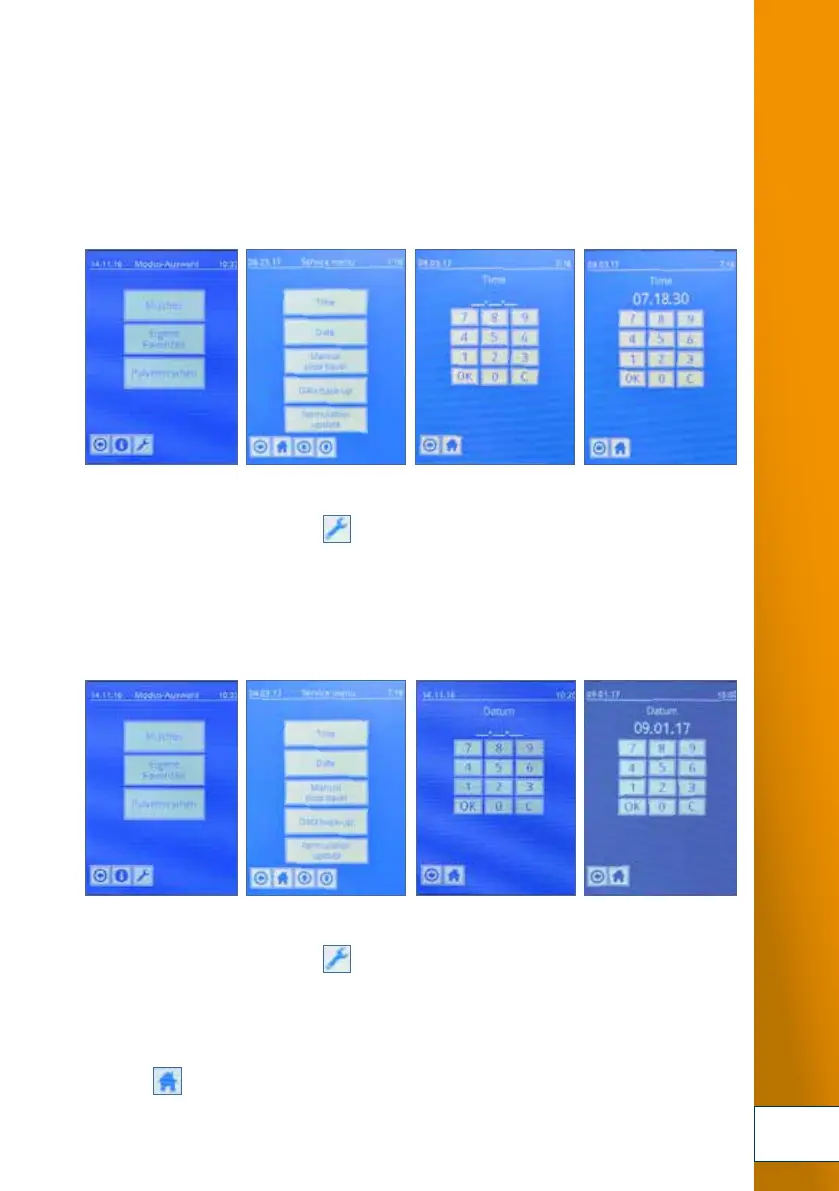
5.6.2 Adjusting date and time settings
Your TOPITEC
®
TOUCH should be operated with accurate date and time settings.
The date and time have been factory-set. You must however manually change from standard to
energy saving time. Correct date and time settings are important for accurate logging.
Setting time
1. Press the service menu button [ ].
2. Selection menu option "Time".
3. Set the time (e.g. 08:30:30) and confirm with [OK]. To correct the entry, press [C].
4. Press [3] to return to the service menu.
Setting date
1. Press the service menu button [ ].
2. Selection menu option "Date".
3. Set the date (e.g. 01/04/12) and confirm with [OK]. To correct the entry, press [C].
4. Press [3] to return to the service menu.
5. Press [ ] to return to the start menu.
1. 2. 3. 4.
1. 2. 3. 4.
DSC_0232.JPG
DSC_0234.JPG
DSC_0233.JPG
DSC_0235.JPG
Fig. 5-5 Adjusting date and time settings (page 33)
DSC_0224.JPG
DSC_0226.JPG
DSC_0225.JPG
DSC_0227.JPG
DSC_0232.JPG
DSC_0234.JPG
DSC_0233.JPG
DSC_0235.JPG


 To Next Page
 Loading...