12 FJWESTCOTT.COM
ADJUSTABLE SHOE MOUNT BRACKET #5015
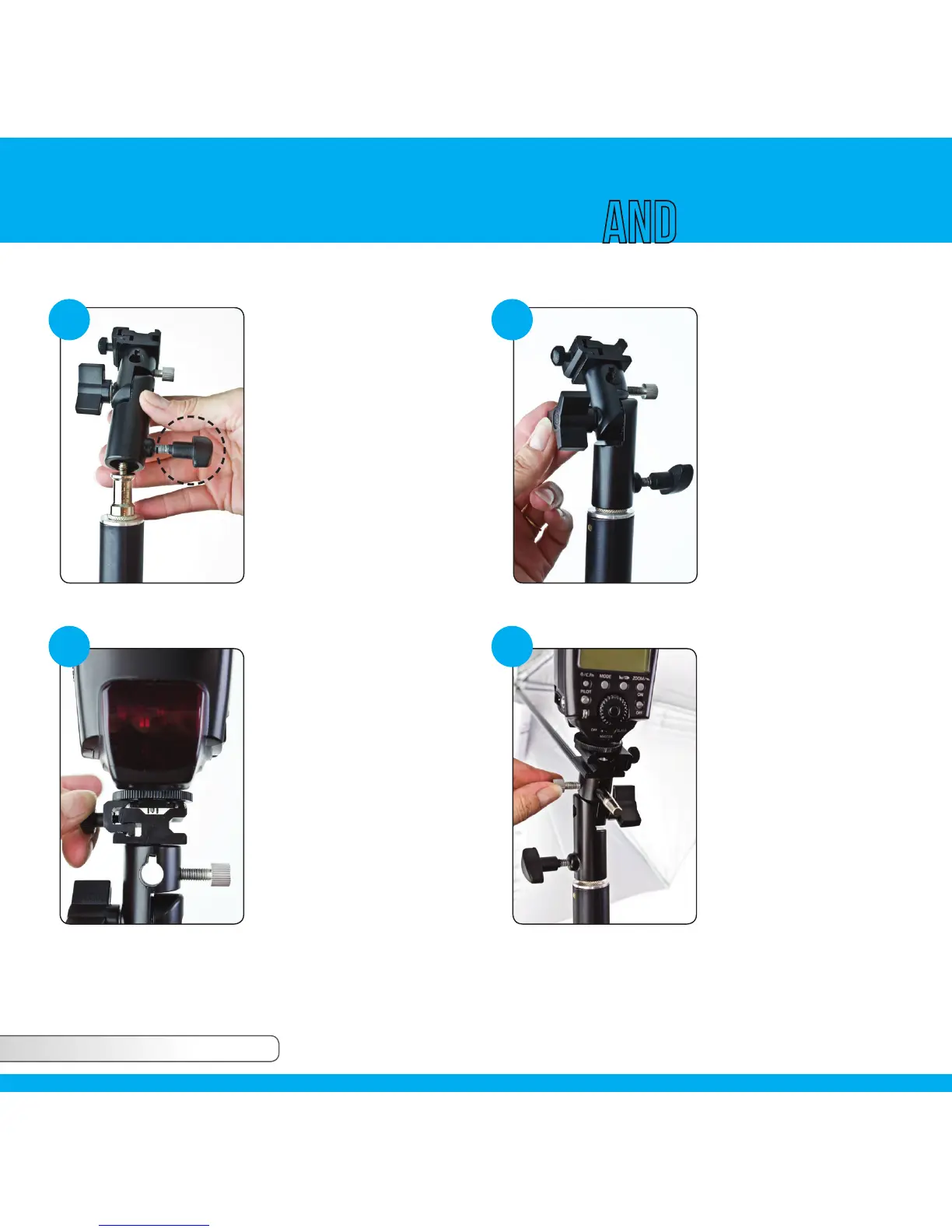
Locate the tightening
knob at the base of
the unit and unscrew
fully. Place shoe
mount umbrella
bracket on top of
light stand and screw
tightening knob to
secure in place.
1 2
At the top of the unit loosen
the tightening mechanism
to separate the shoe mount
receptacle. Slide the shoe
mount on the base of your
flash into the shoe mount
receptacle and tighten
fully to secure in place.
Gently wiggle the unit in
all directions to ensure the
flash is fully tightened and
attached to the shoe mount
umbrella bracket.
3
To attach an umbrella
or Apollo series
of umbrella style
Softboxes, locate
and unscrew the
silver tightening knob.
Slide the shaft of
your modifier into the
umbrella receptacle
and re-tighten the silver
knob until secure.
4
To tilt, simply loosen
the tightening knob
in the middle of the
unit and tilt to your
desired angle.
Re-tighten the knob
to secure in place.
Adjustable Bracket
Setup UsagE


 To Next Page