ArmorLock App
Your key to revolutionary security, speed and convenience
We designed the ArmorLock mobile app to make unlocking and managing your
ArmorLock drive really simple. Instead of remembering passwords or using
your phone or computer becomes the key to unlock your drive. The app is packed with
features such as and management, secure erase and
and tracking your drive’s last known location. We’ve made this technology
so easy to use that if you can use your phone, you can use ArmorLock.
What's in the Box
▪
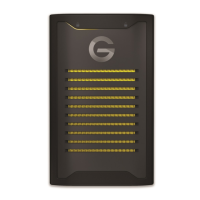
G-DRIVE ArmorLock SSD
▪
USB-C
™
to USB-C cable
SuperSpeed USB 10Gbps)
▪
USB-C to USB-A cable
SuperSpeed USB 10Gbps)
▪
Quick Guide
▪
Technical and Limited Warranty Guide
Tech Notes
Note:
The G-DRIVE ArmorLock SSD drive is a direct attached storage unit that uses USB for storage
access. This product is not a wireless Internet-enabled drive.
Drive Compatibility
The drive works with USB-C and USB-A 3.0 hosts, and is compatible with the following
operating systems.
Table 1.1
Windows
®
macOS
Windows 10+ macOS 10.14+
App Compatibility
The ArmorLock app is compatible with the following operating systems. The app is
required to unlock and manage the drive.
Table 1.2
Android
Android 9.x, 10.x, 11.x
For the newest features and compatibility options, always install the latest app updates.
Welcome to ArmorLock
ArmorLock Encrypted NVMe SSD
User Manual
2












 To Next Page