17
ETL-ES-Halley Smart B-WH21
3
Restore electrical power to the outlet box by turning on the electricity at the main fuse box.
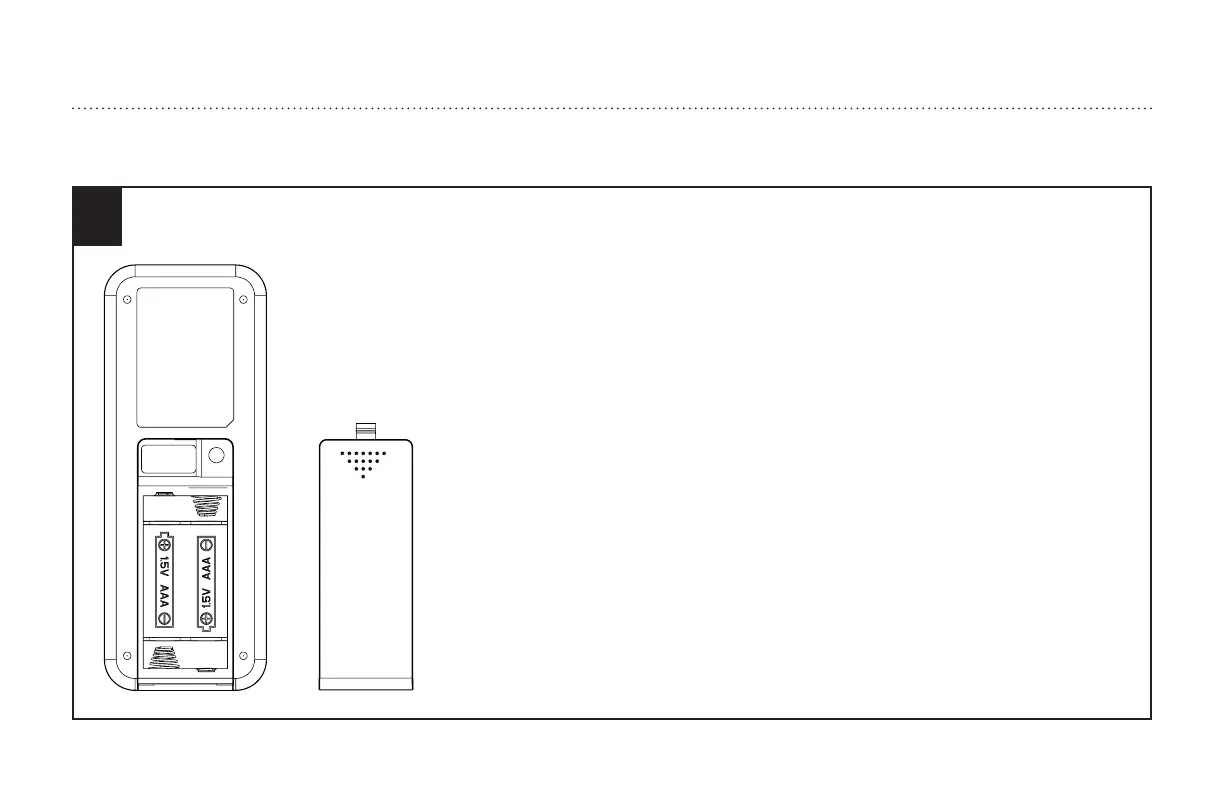
To make the fan operational, open battery door by pressing and sliding down the battery door.
Install two AAA 1.5V batteries (included) into the hand-held smart remote transmitter(if not used for
long periods of time, remove the batteries to prevent damage to the smart remote transmitter).
1. The smart remote control adopts RF wireless digit emission technique.
2. The smart remote transmitter and smart remote receiver are matched at the factory. Please follow the
next step to repair when the pairing is failed.
3. Turn off the fan power and then restore it, press and hold the "fan stop" button for 5 seconds,
within 60 seconds after you restore the power, the fan will automatic turn on at low speed and then
turn off, with the light flashing 3 times.
(NOTE: The pairing process is not accepted after 60 seconds when you restore supply power)
4. Please note that the smart remote transmitter can pair with multiple smart remote receiver. When the
smart remote transmitter does not control the smart remote receiver, please check if any similar smart
remote controls are working nearby, disconnect them and then proceed with pairing process again.
5. Store the smart remote transmitter away from excessive heat or humidity.
6. When batteries are low or haven’t been used in a while, the batteries should be replaced.
HOW TO OPERATE YOUR CEILING FAN
INSTRUCCIONES PARA OPERAR SU VENTILADOR DE TECHO



 To Next Page