Command 63: Set the mono/multivend
If command is set to 0 - the machine operates in single-vend
mode , and in cash mode the surplus credit is returned. If the
command is set to 1 - the machine operates in multivend mode
and the amount which exceeds the cost, after sale, is displayed
once again and can be recovered by simply pressing the coin
return button or used for a new selection.
Command 64: Sets the message display language
Controls the language for the message displays
0= Italian; 1 = English; 2 = French; 3 = German; 4 = Dutch;
5 = Swedish; 6 = Finnish; 7 = Spanish; 8 = Portuguese;
9 = Danish; 10 = Norwegian
Command 65: Displaying optional messages
This is for modifying the message displayed by the machine
when the selection is made.
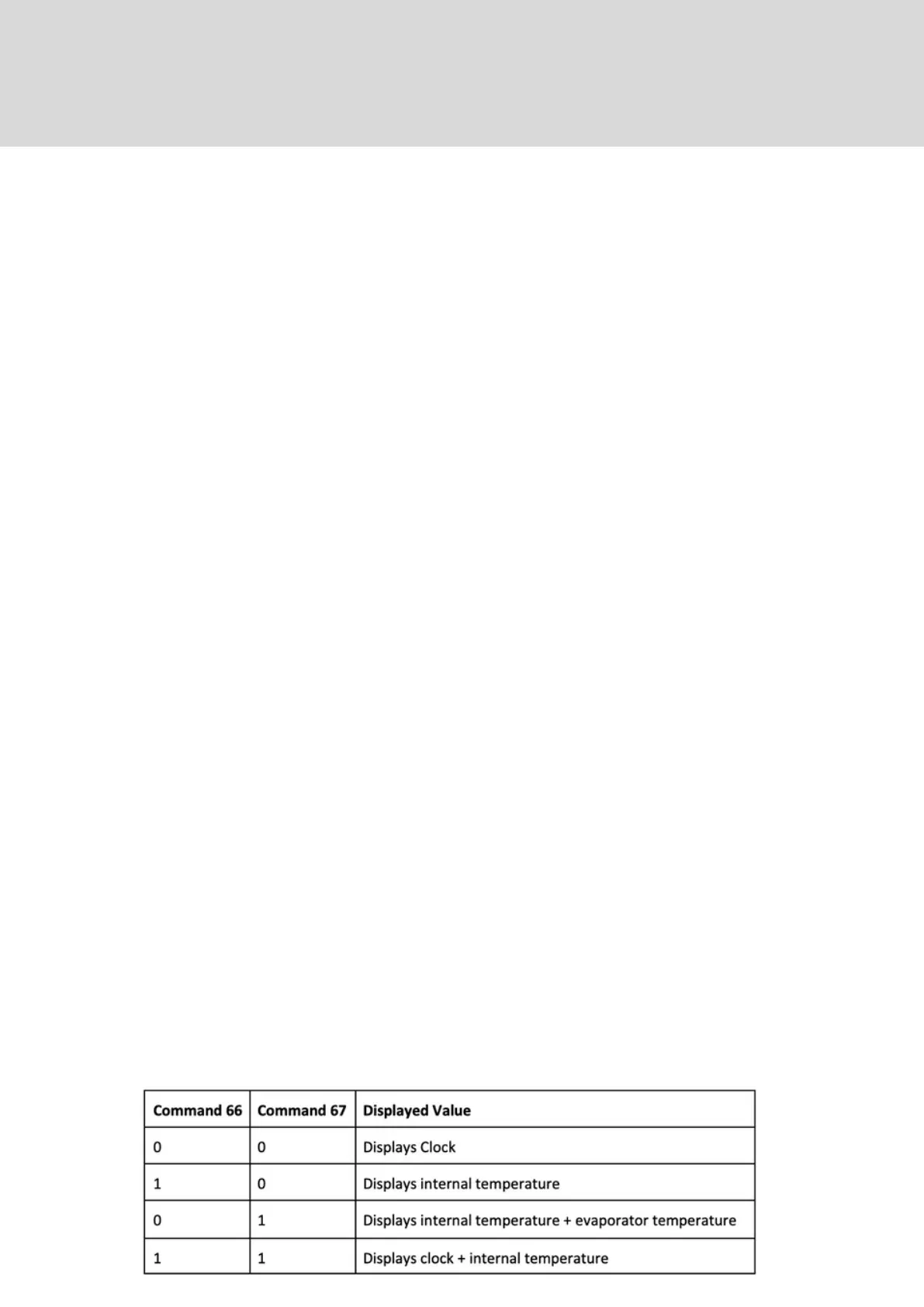
Commands 66+67: Internal Temperature and Evaporator
Temperature display
The value set at these commands determines the information
shown on the second line of the display. As a default the clock is
displayed.
19. Command Codes EXPLANED



 To Next Page