EasyManua.ls Logo

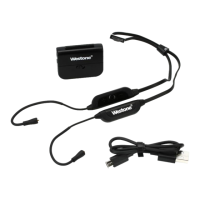
Westone Bluetooth Cable - User Manual

Westone Bluetooth Cable
16 pages
Print Icon
To Next Page IconTo Next Page
Loading...
Designed
in
Colorado, USA
Bluetooth®
Cable

Other manuals for Westone Bluetooth Cable

Question and Answer IconNeed help?

Do you have a question about the Westone Bluetooth Cable and is the answer not in the manual?

Summary

Westone Bluetooth Cable Quick Start Guide

Registration and Maintenance

Product Registration

Register your new cable to receive updates on products, promotions, contests, and accessories.

Maintenance Guidelines

Tips to increase listening enjoyment and lifespan: avoid liquids, temperature extremes, and impacts; disconnect properly.

Cable Overview

Component Identification

Identifies MMCX Audio Connector, Battery, Charge Port, and Cable Management features of the Bluetooth cable.

Connecting Your Cable

How to Connect

Steps to connect the Bluetooth cable to the appropriate earphone, matching L and R sides.

How to Disconnect

Proper procedure to disconnect the cable from the earphone, avoiding damage to the wire or connection.

Pairing Your Device

Pairing Steps

Instructions on how to put the cable into pairing mode and connect with a phone (iPhone, Android, Windows).

Passcode and Confirmation

Details on entering a passcode (0000) if prompted and recognizing successful pairing via sound and light indicators.

Button Functionality

Volume and Power Controls

Details on single/long presses for volume up/down, next/previous track, power on/off, and entering pairing mode.

Call and Media Controls

Explains functions like play/pause music, answer/reject/end calls, reconnect to last device, and voice search/Siri.

LED Indications

Status Light Meanings

Explains LED color and flashing patterns for power status, pairing mode, connection state, and battery level.

Troubleshooting

Pairing and Connection Issues

Steps to ensure pairing mode, clear device list, and resolve pairing failures for the Westone BT device.

Device Behavior and Alerts

Information on auto-reconnect, voice search/Siri compatibility, and low battery indicators/alarms.

Troubleshooting - Device Behavior

Auto-Reconnect and Voice Search

Explains automatic reconnection to previous devices and usage limitations for voice search/Siri.

Low Battery Alerts

Details LED indicators and audible alarms for low battery status.

Charging Your Cable

Charging Procedure

Instructions on how to charge the Bluetooth cable using a USB cable and adapter or computer.

Warranty Information

Limited Product Warranty

Details the one-year warranty against defects for original purchasers from authorized dealers, excluding user-caused damage.

Repair and Replacement Policy

Explains warranty coverage duration for repairs/replacements and ownership of replaced parts.

Warranty Support Process

Guidance on how to process valid warranty claims, typically through the point of purchase within 30 days.

Warranty Service - US & Canada

Return Merchandise Authorization (RMA)

Procedure for returning products for warranty/post-warranty service, including contact info and RMA submission.

Shipping Responsibilities

Clarifies customer responsibility for shipping charges when returning products for service.

International Warranty and Liability

International Warranty Coverage

Explains how warranty applies to products sold outside the US/Canada and how to obtain service.

Limitation of Liability

States Westone's disclaimer of implied warranties and liability for damages beyond reasonable control.

FCC Compliance

FCC Rules and Operation

Details FCC compliance statement, conditions for operation, and potential interference.

Interference Mitigation

Provides measures for users to correct radio or television reception interference caused by the equipment.

Contact and Legal Information

Westone Contact Details

Provides mailing address, physical address, phone numbers, fax, and email for Westone Laboratories, Inc.

Trademark and Licensing Notice

Details Bluetooth trademarks, licensing, and other ownership notices for Westone products.

Summary

Westone Bluetooth Cable Quick Start Guide

Registration and Maintenance

Product Registration

Register your new cable to receive updates on products, promotions, contests, and accessories.

Maintenance Guidelines

Tips to increase listening enjoyment and lifespan: avoid liquids, temperature extremes, and impacts; disconnect properly.

Cable Overview

Component Identification

Identifies MMCX Audio Connector, Battery, Charge Port, and Cable Management features of the Bluetooth cable.

Connecting Your Cable

How to Connect

Steps to connect the Bluetooth cable to the appropriate earphone, matching L and R sides.

How to Disconnect

Proper procedure to disconnect the cable from the earphone, avoiding damage to the wire or connection.

Pairing Your Device

Pairing Steps

Instructions on how to put the cable into pairing mode and connect with a phone (iPhone, Android, Windows).

Passcode and Confirmation

Details on entering a passcode (0000) if prompted and recognizing successful pairing via sound and light indicators.

Button Functionality

Volume and Power Controls

Details on single/long presses for volume up/down, next/previous track, power on/off, and entering pairing mode.

Call and Media Controls

Explains functions like play/pause music, answer/reject/end calls, reconnect to last device, and voice search/Siri.

LED Indications

Status Light Meanings

Explains LED color and flashing patterns for power status, pairing mode, connection state, and battery level.

Troubleshooting

Pairing and Connection Issues

Steps to ensure pairing mode, clear device list, and resolve pairing failures for the Westone BT device.

Device Behavior and Alerts

Information on auto-reconnect, voice search/Siri compatibility, and low battery indicators/alarms.

Troubleshooting - Device Behavior

Auto-Reconnect and Voice Search

Explains automatic reconnection to previous devices and usage limitations for voice search/Siri.

Low Battery Alerts

Details LED indicators and audible alarms for low battery status.

Charging Your Cable

Charging Procedure

Instructions on how to charge the Bluetooth cable using a USB cable and adapter or computer.

Warranty Information

Limited Product Warranty

Details the one-year warranty against defects for original purchasers from authorized dealers, excluding user-caused damage.

Repair and Replacement Policy

Explains warranty coverage duration for repairs/replacements and ownership of replaced parts.

Warranty Support Process

Guidance on how to process valid warranty claims, typically through the point of purchase within 30 days.

Warranty Service - US & Canada

Return Merchandise Authorization (RMA)

Procedure for returning products for warranty/post-warranty service, including contact info and RMA submission.

Shipping Responsibilities

Clarifies customer responsibility for shipping charges when returning products for service.

International Warranty and Liability

International Warranty Coverage

Explains how warranty applies to products sold outside the US/Canada and how to obtain service.

Limitation of Liability

States Westone's disclaimer of implied warranties and liability for damages beyond reasonable control.

FCC Compliance

FCC Rules and Operation

Details FCC compliance statement, conditions for operation, and potential interference.

Interference Mitigation

Provides measures for users to correct radio or television reception interference caused by the equipment.

Contact and Legal Information

Westone Contact Details

Provides mailing address, physical address, phone numbers, fax, and email for Westone Laboratories, Inc.

Trademark and Licensing Notice

Details Bluetooth trademarks, licensing, and other ownership notices for Westone products.

Westone Bluetooth Cable Specifications

General IconGeneral
BrandWestone
ModelBluetooth Cable
CategoryCables and connectors
LanguageEnglish

Related product manuals