EasyManua.ls Logo

Westone Bluetooth Cable 2.0 - User Manual

Westone Bluetooth Cable 2.0
13 pages
Print Icon
To Next Page IconTo Next Page
Loading...
User Manual
Cable 2.0
Question and Answer IconNeed help?

Do you have a question about the Westone Bluetooth Cable 2.0 and is the answer not in the manual?

Summary

Product Component Overview

Bluetooth Cable 2.0 Components

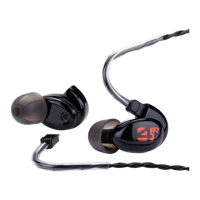
Details the components of the Westone Bluetooth Cable 2.0, including connectors, battery module, and microphone.

Portable Charging Dock and Cord

Describes the portable charging dock, its cover, and the charging cord.

Connecting and Disconnecting Earphones

How to Attach Earphones to the Cable

Step-by-step guide on how to correctly connect MMCX earphones to the Bluetooth cable.

How to Disconnect Earphones from the Cable

Instructions for safely disconnecting earphones from the Bluetooth cable, with a caution against pulling the cable.

Pairing and Cable Functions

Pairing the Cable to Your Device

Guide on how to pair the Westone Bluetooth Cable 2.0 with various devices like iPhone, Android, and Windows.

Cable Functions Overview

Details on operating the Power/Center Button, Volume Up/Right Button, and Volume Down/Left Button.

LED and Charging Dock Functions

Explanation of LED indicator lights and functions of the portable charging dock during charging.

Charging and Wearing Instructions

Charging Your Cable with the Portable Charging Dock

Instructions on how to charge the Bluetooth cable using its portable charging dock.

Wearing the Charging Dock

Guidance on wearing the charging dock with the cable to increase battery life.

Wearing the Cable

Describes two ways to wear the cable for high-impact and low-impact activities.

Additional Instructions and Troubleshooting

Additional Instructions for Pairing

Provides extra steps for pairing the cable to a new device and reconnection behavior.

Troubleshooting Common Issues

Offers solutions for when the cable fails to pair to a selected device.

Warranty and Compliance Information

Limited Product Warranty

Outlines the one-year warranty for defects in materials and workmanship.

Repair;Replacement Warranty

Details the warranty period for repairs or replacement parts.

Requesting Warranty Support

Provides instructions for obtaining warranty or post-warranty service.

FCC and SRRC Compliance

Information regarding FCC and SRRC compliance for the device.
Contact Us

Summary

Product Component Overview

Bluetooth Cable 2.0 Components

Details the components of the Westone Bluetooth Cable 2.0, including connectors, battery module, and microphone.

Portable Charging Dock and Cord

Describes the portable charging dock, its cover, and the charging cord.

Connecting and Disconnecting Earphones

How to Attach Earphones to the Cable

Step-by-step guide on how to correctly connect MMCX earphones to the Bluetooth cable.

How to Disconnect Earphones from the Cable

Instructions for safely disconnecting earphones from the Bluetooth cable, with a caution against pulling the cable.

Pairing and Cable Functions

Pairing the Cable to Your Device

Guide on how to pair the Westone Bluetooth Cable 2.0 with various devices like iPhone, Android, and Windows.

Cable Functions Overview

Details on operating the Power/Center Button, Volume Up/Right Button, and Volume Down/Left Button.

LED and Charging Dock Functions

Explanation of LED indicator lights and functions of the portable charging dock during charging.

Charging and Wearing Instructions

Charging Your Cable with the Portable Charging Dock

Instructions on how to charge the Bluetooth cable using its portable charging dock.

Wearing the Charging Dock

Guidance on wearing the charging dock with the cable to increase battery life.

Wearing the Cable

Describes two ways to wear the cable for high-impact and low-impact activities.

Additional Instructions and Troubleshooting

Additional Instructions for Pairing

Provides extra steps for pairing the cable to a new device and reconnection behavior.

Troubleshooting Common Issues

Offers solutions for when the cable fails to pair to a selected device.

Warranty and Compliance Information

Limited Product Warranty

Outlines the one-year warranty for defects in materials and workmanship.

Repair;Replacement Warranty

Details the warranty period for repairs or replacement parts.

Requesting Warranty Support

Provides instructions for obtaining warranty or post-warranty service.

FCC and SRRC Compliance

Information regarding FCC and SRRC compliance for the device.

Contact Us

Westone Bluetooth Cable 2.0 Specifications

General IconGeneral
BrandWestone
ModelBluetooth Cable 2.0
CategoryHeadphone
LanguageEnglish

Related product manuals