EasyManua.ls Logo

Westone Series - User Manual

Westone Series
2 pages
Print Icon
To Next Page IconTo Next Page
Loading...
Westone Series Care + Maintenance
Here are a few simple guidelines that can greatly increase your listening enjoyment and the
lifespan of your Westone Series earphones:
Always store your earphones in the provided case.
In case of poor sound quality due to earwax in the sound bore, use the included wax
removal loop to carefully remove the earwax. Never use any other object to attempt
to remove the earwax as this may result in damage to the earphones and will void the
warranty.
Do not use the cord to remove the earphones from your ears. This may cause damage
to the cord and result in poor performance. Damage of this nature is not covered by the
warranty.
Do not expose your earphones to temperature extremes. Avoid strong impacts to your
earphones.
Wipe down your earphones after each use and never immerse them in water.
Please Note: Moisture in your earphones can cause temporary performance issues. Do not insert your earphones if your
ears are wet. Always dry your ears completely before inserting your earphones. Should you inadvertently allow water or
perspiration into the earphones and they quit working, allow to dry completely before attempting to use again. Minor
moisture build-up should dry out and not a ect long-term performance. Extended exposure to moisture or submersion
will result in permanent damage (not covered by the warranty).
Listen for a Lifetime!
Please read this important information before using your Westone Westone Series earphones.
If everything sounds mu ed or you hear ringing or buzzing after using your eaphones, your
ears are trying to give you a warning! These are symptoms normally associated with a condi-
tion known as Temporary Threshold Shift and are an indication of conditions that could lead
to permanent hearing loss.
While no two individuals’ hearing sensitivity is exactly the same, there are established safety
guidelines for sound levels versus time of exposure. The chart (see below) is based on
OSHAs (Occupational Health and Saftey Administration) exposure information for industry.
Remember that these guidelines are based on average hearing sensitivity. Your sensitivity
may be above or below these levels.
The use of any earphones o ers bene ts and risks. Westone Series earphones can lower
ambient sound levels approximately 25dB when properly worn. However, the performance
capabilities of the earphones can allow the user to negate the bene ts of hearing protection
from ambient sound. We want you listening for a lifetime!
Remember, personal hearing protection is your responsibility!
Cable Instructions for Westone 4R
REMOVAL
REPLACEMENT
Insertion Instructions
Before inserting the monitor, turn down the volume on your sound source and either drape
the cord over your shoulders and down your back, or run the cord down in front. The ear-
phones are marked with a red and blue dot. Red for the right ear, blue for the left. Compress
the foam eartip by rolling it between your  ngers ( g. 1). With the body of the earphone-
toward the back of your ear and the cord facing forward, insert the eartip into your ear canal
before the foam expands back to its original shape ( g.2). If you have trouble inserting the monitor,
reach over your head with your opposite hand and gently pull up and back on the top of your
ear before inserting the eartip. This helps straighten your ear canal and may allow for easier
insertion. The monitor cord should run over and behind your ear. Hold the monitor in place for 5
to 10 seconds to allow the foam to expand and conform to the shape of your ear canal ( g. 3).
Once the earphones and cords are comfortably in place, slide the cable zipper up to the
base of your skull (not too snugly, as this may cause discomfort). This will limit cable move-
ment and help ensure that your earphones stay in place during use.
COMPRESS EARTIP
the foam eartip; red dot for right,
blue dot for left
HOLD
the earpiece and cable  rmly
with each hand
CHECK
if the cable is for the left or
right monitor
MATCH
the cable to the
appropriate monitor
INSERT
the cable into the monitor by
pushing directly into the socket
REMOVE
the cable by pulling at a straight
angle from the socket
INSERT EARTIP
into ear canal before foam expands,
cord facing forward
HOLD IN PLACE
5-10sec; foam will expand and
conform to ear canal
85
90
8hr
4hr
dB
Level
MAXIMUM
Exposure Time
95
100
2hr
1hr
dB
Level
MAXIMUM
Exposure Time
105
110
30mins
15mins
dB
Level
MAXIMUM
Exposure Time
WESTONE SERIES
OWNER’S MANUAL
Westone 1 | Westone 2 | Westone 3 | Westone 4R
SERIES
westoneaudio.com
FIG. 1 FIG. 2 FIG. 3

Question and Answer IconNeed help?

Do you have a question about the Westone Series and is the answer not in the manual?

Summary

Insertion Instructions

Compress Eartip

Roll the foam eartip between your fingers, noting red for right and blue for left.

Insert Eartip

Insert the eartip into your ear canal before the foam expands, with the cord facing forward.

Listen for a Lifetime!

Hearing Protection

Understand temporary threshold shift and risks of permanent hearing loss from noise.

Safety Guidelines

Avoid blocking surroundings, use caution in hazardous situations, and don't use while driving.

Limited Product Warranty

Important Information and Safety

Hearing Health

Prevent noise-induced hearing loss by avoiding prolonged exposure to excessive noise.

Usage Guidelines

Do not block surroundings, use caution in hazardous situations, avoid driving.

Summary

Insertion Instructions

Compress Eartip

Roll the foam eartip between your fingers, noting red for right and blue for left.

Insert Eartip

Insert the eartip into your ear canal before the foam expands, with the cord facing forward.

Listen for a Lifetime!

Hearing Protection

Understand temporary threshold shift and risks of permanent hearing loss from noise.

Safety Guidelines

Avoid blocking surroundings, use caution in hazardous situations, and don't use while driving.

Limited Product Warranty

Important Information and Safety

Hearing Health

Prevent noise-induced hearing loss by avoiding prolonged exposure to excessive noise.

Usage Guidelines

Do not block surroundings, use caution in hazardous situations, avoid driving.

Overview

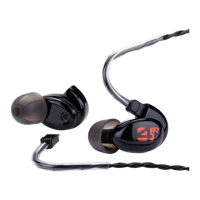
The Westone Series earphones are in-ear monitors designed for high-quality audio reproduction, offering a blend of professional heritage and user-centric features. They are available in several models: Westone 1, Westone 2, Westone 3, and Westone 4R.

Function Description

These earphones are designed to deliver clear and accurate sound directly into the ear canal, minimizing ambient noise. They are intended for personal listening, professional monitoring, and situations where noise isolation is beneficial. The Westone 4R model features a removable cable, allowing for replacement or upgrades.

Important Technical Specifications

While specific technical specifications like frequency response or impedance are not detailed in the provided manual, the emphasis is on sound quality and noise isolation. The earphones are capable of lowering ambient sound levels by approximately 25dB when properly worn, contributing to a better listening experience and hearing protection.

Usage Features

Insertion:

  1. Cord Management: Before insertion, the cord can be draped over the shoulders and down the back, or run down in front.
  2. Earphone Identification: The earphones are marked with a red dot for the right ear and a blue dot for the left.
  3. Eartip Compression: The foam eartip must be compressed by rolling it between the fingers (Fig. 1).
  4. Insertion into Ear Canal: With the earphone body facing the back of the ear and the cord facing forward, the compressed eartip is inserted into the ear canal before the foam expands (Fig. 2).
  5. Straightening the Ear Canal: If insertion is difficult, reaching over the head with the opposite hand and gently pulling up and back on the top of the ear can help straighten the ear canal.
  6. Cord Routing: The monitor cord should run over and behind the ear.
  7. Holding in Place: The monitor should be held in place for 5-10 seconds to allow the foam to expand and conform to the ear canal's shape (Fig. 3).
  8. Cable Zipper: Once the earphones and cords are comfortably in place, the cable zipper should be slid up to the base of the skull (not too snugly) to limit cable movement and ensure the earphones stay in place.

Cable Instructions for Westone 4R (Removable Cable):

  • Removal:
    • Hold: Firmly grasp both the earpiece and the cable.
    • Remove: Pull the cable at a straight angle directly from the socket.
  • Replacement:
    • Check: Verify if the cable is for the left or right monitor (typically marked).
    • Match: Align the cable with the appropriate monitor.
    • Insert: Push the cable directly into the monitor's socket.

Hearing Protection Guidelines:

The manual strongly emphasizes responsible listening to prevent noise-induced hearing loss.

  • Volume Control: Avoid turning up the volume so high that ambient sounds cannot be heard.
  • Hazardous Situations: Exercise extreme caution or temporarily discontinue use in potentially hazardous environments.
  • Motorized Vehicles: Do not use while operating a motorized vehicle, as it can create a traffic hazard and is illegal in many areas.
  • OSHA Guidelines: The manual includes a chart based on OSHA's exposure information for industry, outlining maximum exposure times at different dB levels:
    • 85 dB: 8 hours
    • 90 dB: 4 hours
    • 95 dB: 2 hours
    • 100 dB: 1 hour
    • 105 dB: 30 minutes
    • 110 dB: 15 minutes These guidelines are based on average hearing sensitivity, and individual sensitivity may vary.

Maintenance Features

General Care:

  • Storage: Always store earphones in the provided case when not in use.
  • Earwax Removal: If sound quality is poor due to earwax in the sound bore, use the included wax removal loop to carefully remove it. Never use other objects, as this can damage the earphones and void the warranty.
  • Cord Handling: Do not use the cord to remove earphones from ears, as this can damage the cord, affect performance, and is not covered by the warranty.
  • Temperature Extremes: Avoid exposing earphones to extreme temperatures.
  • Impacts: Avoid strong impacts to the earphones.
  • Cleaning: Wipe down earphones after each use. Never immerse them in water.

Moisture Management:

  • Wet Ears: Do not insert earphones if ears are wet; always dry ears completely first.
  • Moisture Exposure: If water or perspiration inadvertently enters the earphones and they stop working, allow them to dry completely before attempting to use them again.
  • Temporary Issues: Minor moisture buildup should dry out without affecting long-term performance.
  • Permanent Damage: Extended exposure to moisture or submersion will result in permanent damage, which is not covered by the warranty.

Warranty and Support:

  • Limited Product Warranty: Two (2) years from the date of original retail purchase for defects in material or workmanship. Applies only to the original purchaser from an authorized Westone distributor or reseller.
  • Coverage: Covers the external shell, internal components, and cable. The carrying case, cleaning tool, adapters, and other included accessories are warranted for 90 days. Ear tips are not covered.
  • Exclusions: Does not cover loss, theft, or damage from abuse, misuse, misapplication, or modifications by unauthorized parties.
  • Repair/Replacement Warranty: Applies for the remainder of the original warranty period or 90 days, whichever is greater.
  • Requesting Warranty Support: First, troubleshoot by checking for earwax blockage and ensuring the unit is dry. Valid claims are generally processed through the point of purchase within the first 30 days.
  • RMA Process (US & Canada): For warranty or post-warranty service, contact Westone for a Return Merchandise Authorization (RMA) number via phone (1-800-525-5071) or online form. Requires proof of purchase date, ownership, and purchase from an authorized retailer. Package securely and send prepaid and insured to Westone Laboratories, Inc. Westone covers shipping to the consumer after warranty repair/replacement; the customer covers return shipping.
  • International Warranty: Complies with applicable law. Contact the dealer or distributor. If purchased from an authorized Westone retailer outside the local distributor's network, contact Westone directly.
  • Online Registration: Register online within 90 days of purchase to extend the warranty by two additional years.

Professional Heritage:

Westone has over 50 years of experience in custom in-ear solutions, with two decades dedicated to creating custom in-ear earphones for sound engineers and elite musicians. This expertise is integrated into the Westone Series earphones.

Westone Series Specifications

General IconGeneral
BrandWestone
ModelSeries
CategoryHeadphone
LanguageEnglish

Related product manuals