Need help?
Do you have a question about the Westone UM Pro50 and is the answer not in the manual?
Identifies the left (L) and right (R) earpieces for proper monitor insertion.
Positions the monitor and cord correctly for insertion into the ear canal.
Inserts the eartip into the ear canal and secures the monitor.
Guidelines for storing, cleaning, and protecting monitors from damage and poor sound quality.
Information on how moisture affects performance and steps to take if monitors become wet.
Instructions on how to properly hold the earpiece and pull the cable from the monitor.
Steps to check cable compatibility, match it to the monitor, and insert it correctly.
Recommendations for safe listening levels and awareness of potential hearing damage.
Chart detailing maximum safe exposure times for various decibel (dB) sound levels.
Details the 2-year warranty, exclusions, and coverage for accessories.
Procedure for troubleshooting, obtaining an RMA, and sending products for service.
Instructions for returning products for warranty service in the US, Canada, and internationally.
Information on how to register the product online for warranty and updates.
Guidance on preventing hearing loss from excessive noise exposure.
Recommendations for safe use, including avoiding high volumes and hazardous situations.
Background on Westone's experience in custom in-ear solutions for professionals.
Details limitations on implied warranties and liability for damages.
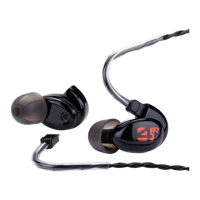
The Westone UM Pro is a series of in-ear monitors designed for musicians and sound engineers, offering a high-quality audio experience with features tailored for demanding professional applications. These monitors are engineered to provide clear, detailed sound reproduction while also offering significant ambient noise reduction, making them suitable for stage use, studio monitoring, and personal listening in noisy environments.
The primary function of the Westone UM Pro monitors is to deliver accurate and high-fidelity audio directly into the ear canal. They are designed to act as personal sound monitors, allowing users to hear their mix or instrument with clarity and precision, free from the interference of external noise. This is achieved through a combination of advanced acoustic design and effective passive noise isolation. The monitors utilize balanced armature drivers, which are known for their efficiency and ability to reproduce a wide frequency range with accuracy. The multi-driver configurations in the UM Pro series allow for specific frequency bands to be handled by dedicated drivers, resulting in a more coherent and detailed soundstage.
Beyond simple audio playback, the UM Pro monitors serve as a critical tool for hearing protection. When properly inserted, they can reduce ambient sound levels by approximately 25dB, helping to prevent noise-induced hearing loss, especially in loud environments like concerts or recording studios. This protective aspect is a key benefit, allowing professionals to monitor their audio at safer levels without sacrificing clarity. The design also emphasizes comfort for extended wear, which is crucial for musicians and engineers who may use them for hours at a time during performances or long studio sessions.
The Westone UM Pro monitors are designed for intuitive and comfortable use, with several features aimed at optimizing the user experience.
The monitors are clearly marked with "R" for the right ear and "L" for the left ear to ensure correct placement. Users can choose between foam or silicone STAR tips, depending on their preference for comfort and seal. For foam eartips, the process involves compressing the foam by rolling it between the fingers before insertion. With the monitor body positioned towards the back of the ear and the cord facing forward, the eartip is inserted into the ear canal, allowing the foam to expand and conform to the ear canal's shape for a secure and isolating fit. For silicone STAR tips, the process is similar, but without the need for compression. If insertion is difficult, gently pulling the top of the ear up and back can help straighten the ear canal, facilitating easier placement. Once inserted, the monitor cord should run over and behind the ear, and the cable zipper can be slid up to the base of the skull to limit cable movement and ensure the monitors stay in place. Holding the monitor in place for 5 to 10 seconds after insertion allows the eartip to fully expand and create an optimal seal.
The UM Pro monitors feature a detachable cable, which is a significant advantage for both durability and customization. The cable is designed to be robust, but in the event of damage, it can be easily replaced without needing to replace the entire monitor. For removal, users should hold both the earpiece and the cable firmly near the connection point and pull the cable at a straight angle from the socket, avoiding pulling directly from the wire. For replacement, the cable is checked for left or right orientation, matched to the appropriate monitor, and then pushed directly into the socket until it clicks securely into place. This modular design extends the lifespan of the monitors and allows users to experiment with different cable types if desired.
A key usage feature is the passive noise isolation provided by the monitors. When properly fitted with the correct eartips, the UM Pro series can reduce ambient sound levels by approximately 25dB. This allows users to monitor their audio at lower, safer volumes, protecting their hearing from the damaging effects of loud external noise. However, users are reminded that the performance capabilities of the monitors can also allow them to negate these benefits if they choose to listen at excessively high volumes. The manual provides guidelines on safe listening levels and exposure times, emphasizing personal responsibility for hearing health.
Proper maintenance is crucial for extending the lifespan and ensuring the continued performance of the Westone UM Pro monitors.
Always store the monitors in the provided case when not in use. This protects them from physical damage, dust, and environmental factors that could degrade their performance.
Regular cleaning is essential. After each use, wipe down the monitors to remove any earwax, moisture, or debris. In the event of poor sound quality due to earwax accumulation in the sound bore, the included wax removal loop should be used carefully to clear the obstruction. It is critical to use only the provided tool or similar appropriate instruments designed for this purpose. Never use other sharp or unsuitable objects, as this can damage the monitors and void the warranty.
Moisture can temporarily affect monitor performance. It is important not to insert the monitors if the ears are wet; always ensure ears are completely dry before use. If water or perspiration inadvertently enters the monitors and they stop working, allow them to dry completely before attempting to use them again. Minor moisture buildup should dry out and not cause long-term damage. However, extended exposure to moisture or submersion will result in permanent damage, which is not covered by the warranty. Never immerse the monitors in water.
While the cables are detachable and replaceable, proper care is still important. Avoid using the cord to remove the monitors from the ears, as this can damage the cable and lead to poor performance. Damage of this nature is not covered by the warranty.
Do not expose the monitors to extreme temperatures, as this can affect their materials and internal components. Also, avoid strong impacts, which can cause internal damage.
By adhering to these usage and maintenance guidelines, users can ensure their Westone UM Pro monitors provide years of reliable, high-quality audio performance and effective hearing protection.
 General
| Type | In-ear monitor |
|---|---|
| Drivers | 5 balanced armature drivers |
| Frequency Response | 20 Hz - 18 kHz |
| Cable | Detachable |
| Cable Length | 1.3m |
| Connector | 3.5mm |


 To Next Page