EasyManua.ls Logo

Wet Sounds SYN-DX 2 - User Manual

Wet Sounds SYN-DX 2
18 pages
Print Icon
To Next Page IconTo Next Page
Loading...
FULL RANGE CLASS-D AMPLIFIERS
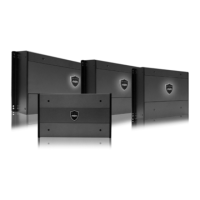
SYN-DX 2, SYN-DX 2.3 HP, SYN-DX 4 , SYN-DX 6
OWNER'S MANUAL
HIGH PERFORMANCE MARINE AUDIO
wetsounds.com
SYN-DX SERIES
REV DATE FEB 2017
Question and Answer IconNeed help?

Do you have a question about the Wet Sounds SYN-DX 2 and is the answer not in the manual?

Summary

Welcome and Product Overview

SYN-DX Series Amplifier Overview

Introduces the SYN-DX series as premium marine audio amplifiers.

Hearing Protection Advisory

Warns about potential hearing damage from high volumes and advises checking local laws.

Installation Safety Precautions

Advises checking installation location and avoiding hidden wires or devices.

Installation Instructions

General Installation Guidance

Provides general advice for installing the amplifier in a boat.

Locating the Amplifier

Details on mounting the amplifier securely in a dry, ventilated location away from vibration.

Supplying Enough Power

Explains the importance of adequate power from the boat's system for optimal amplifier performance.

Wiring Cable Management

Cable Management and Safety

Recommends separating signal and power cables and securing them to prevent shorts.

Amplifier Connections

Power Connections

Explains how to connect the 4 AWG power and ground wires to the terminal block.

Remote Turn-on Connection

Describes connecting the remote turn-on wire to the head unit or accessory wire.

Signal Inputs and Configuration

Connecting RCA Inputs

Details how to connect RCA outputs from the source unit to the amplifier inputs.

SYN-DX 4 Input Selection

Explains the input switch for 2 or 4 channel input selection on the SYN-DX 4.

SYN-DX 6 Input Selection

Describes the input switches for 2/4 channel and 5/6 channel input selection on the SYN-DX 6.

SYN-DX 2 Subwoofer Features

Subwoofer Features

Mentions Bass Boost and Subsonic Filter for the SYN-DX 2 amplifier.

Speaker Connections

Connecting Speaker Wires

Details how to use the removable terminal blocks for speaker wire connections.

Power Indicator and Diagnostics

LED Status Indicators

Explains the dual-illumination LED and its diagnostic codes for status and protection modes.

Amplifier Diagram and Controls

Control and Input Legend

Identifies and describes the functions of switches, gain controls, and crossovers.

Amplifier Terminal Identification

Terminal Block Identification

Identifies fuses, power, ground, remote turn-on, and RCA input terminals.

Speaker Output Blocks

Identifies the speaker terminal output blocks for channels 1-2, 3-4, and 5-6.

Amplifier Setup and Configuration

Input Selection Explained

Clarifies the "Gain" control versus volume and its effect on sensitivity.

Adjusting the Gain

Provides a 3-step process for setting the amplifier's gain level.

Crossover Controls

Explains High-Pass, Low-Pass, and Full-Range crossover settings.

Troubleshooting Amplifier Issues

Basic Troubleshooting Steps

Lists initial checks for fuse, ground, power, and remote wires.

Protection Mode Indicators

Explains how to interpret LED flashing patterns for protection modes.

Wet Sounds SYN-DX Fault Codes

Provides a chart detailing diagnostic codes for various fault conditions.

Bridged Audio Configuration

Bridged Mode Setup

Explains how to configure RCA inputs for bridged mode on SYN-DX 4 and SYN-DX 6.

Required Accessories for Bridging

States the need for dual male RCA Y-Splitters for bridged configuration.

Sample System Setups (SYN-DX 2 Series)

SYN-DX 2 Setup Diagram

Illustrates a typical system setup for the SYN-DX 2 amplifier.

SYN-DX 2.3 HP Setup Diagram

Illustrates a typical system setup for the SYN-DX 2.3 HP amplifier.

Sample System Setups (SYN-DX 4;6 Series)

SYN-DX 4 Setup Diagram

Illustrates a typical system setup for the SYN-DX 4 amplifier.

SYN-DX 6 Setup Diagram

Illustrates typical system setups for the SYN-DX 6 amplifier.

SYN-DX 2 Specifications

Dimensions and Specifications

Provides physical dimensions and detailed electrical specifications for SYN-DX 2.

SYN-DX 2.3 HP Specifications

Dimensions and Specifications

Provides physical dimensions and detailed electrical specifications for SYN-DX 2.3 HP.

SYN-DX 4 Specifications

Dimensions and Specifications

Provides physical dimensions and detailed electrical specifications for SYN-DX 4.

SYN-DX 6 Specifications

Dimensions and Specifications

Provides physical dimensions and detailed electrical specifications for SYN-DX 6.

Warranty and Service Information

Warranty Length and Limits

Outlines the 2-year warranty period and its terms and conditions.

Items Not Covered by Warranty

Lists conditions and damages that void the warranty coverage.

Obtaining Service

Explains the process for requesting warranty service, repairs, and return authorization.

Overview

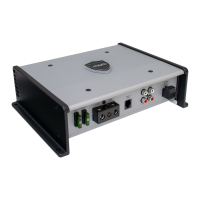
The provided document is an owner's manual for the Wet Sounds SYN-DX Series of full-range Class-D amplifiers, designed for high-performance marine audio applications. The series includes models SYN-DX 2, SYN-DX 2.9 HP, SYN-DX 4, and SYN-DX 6.

Function Description:

The Wet Sounds SYN-DX Series amplifiers are designed to convert power from a boat's electrical system into high-power musical energy. They utilize Class D power supplies for superior performance and extreme power output within a compact chassis. These amplifiers are equipped with thermal overload protection, flexible crossovers, and extended inputs, making them a balanced match for all Wet Sounds products. They are built to operate in humid environments, though direct contact with water should be avoided. The amplifiers feature advanced diagnostic systems controlled by a microprocessor, which flash diagnostic codes via an LED indicator for troubleshooting.

Important Technical Specifications:

SYN-DX 2:

  • Dimensions: 12.21" (L) x 8.27" (W) x 3.08" (H)
  • Stereo @ 4 Ohms: 200W x 2 @ <1.0% THD
  • Stereo @ 2 Ohms: 375W x 2 @ <1.0% THD
  • Mono @ 4 Ohms: 750W x 1 @ <1.0% THD
  • Frequency Response: 20Hz-20KHz
  • Crossover Range Low Pass: 50Hz-250Hz 12dB/Octave
  • Crossover Range High Pass: 50Hz-250Hz 12dB/Octave
  • Input Sensitivity: 0.2V-6.0V
  • Fuses: 3 x 25 Amp

SYN-DX 2.3 HP:

  • Dimensions: 14.57" (L) x 8.27" (W) x 3.08" (H)
  • Stereo @ 4 Ohms: 300W x 2 @ <1.0% THD
  • Stereo @ 2 Ohms: 600W x 2 @ <1.0% THD
  • Mono @ 4 Ohms: 1200W x 1 @ <1.0% THD
  • Frequency Response: 20Hz-20KHz
  • Crossover Range Low Pass: 50Hz-250Hz 12dB/Octave
  • Crossover Range High Pass: 50Hz-250Hz 12dB/Octave
  • Input Sensitivity: 0.2V-6.0V
  • Fuses: 4 x 20 Amp

SYN-DX 4:

  • Dimensions: 10.63" (L) x 8.27" (W) x 3.08" (H)
  • Stereo @ 4 Ohms: 125W x 4 @ <1.0% THD
  • Stereo @ 2 Ohms: 200W x 4 @ <1.0% THD
  • Mono @ 4 Ohms: 400W x 2 @ <1.0% THD
  • Frequency Response: 20Hz-20KHz
  • Crossover Range Low Pass: 50Hz-250Hz 12dB/Octave
  • Crossover Range High Pass: 50Hz-250Hz 12dB/Octave
  • Input Sensitivity: 0.2V-6.0V
  • Fuses: 2 x 30 Amp

SYN-DX 6:

  • Dimensions: 14.57" (L) x 8.27" (W) x 3.08" (H)
  • Stereo @ 4 Ohms (CH1-4): 125W x 4 @ <1.0% THD
  • Stereo @ 2 Ohms (CH1-4): 200W x 4 @ <1.0% THD
  • Mono @ 4 Ohms (CH1-4): 400W x 2 @ <1.0% THD
  • Stereo @ 4 Ohms (CH5-6): 150W x 2 @ <1.0% THD
  • Stereo @ 2 Ohms (CH5-6): 300W x 2 @ <1.0% THD
  • Mono @ 4 Ohms (CH5-6): 600W x 1 @ <1.0% THD
  • Frequency Response: 20Hz-20KHz
  • Crossover Range Low Pass: 50Hz-250Hz 12dB/Octave
  • Crossover Range High Pass: 50Hz-250Hz 12dB/Octave
  • Input Sensitivity: 0.2V-6.0V
  • Fuses: 3 x 30 Amp

Usage Features:

  • Installation: Designed for easy installation in boats, but professional installation is recommended for those without marine electrical and mechanical experience. Amplifiers should be securely mounted in a dry location with sufficient airflow for heat dissipation, avoiding areas with excessive vibration.
  • Power Connections: Requires 4 AWG wire for +12V power and ground connections. A fuse (4 AWG or larger) must be installed on the power wire within 18 inches of the battery for safety. Terminal blocks accept 5/8" stripped wire.
  • Remote Turn-On: Connects to a +12V accessory wire from the head unit or signal source that switches on/off with the key.
  • RCA Inputs: Accepts line-level outputs from source units or signal processors at voltages between 250mV and 6 volts. The SYN-DX Series has one pair of inputs for each pair of channels.
    • SYN-DX 4 Input Selection: Features a switch to designate 2 or 4 channel input. Users can select "FROM CH 1-2" for 4-channel output from one set of RCAs (CH 1,2,3, & 4) or "FROM CH 3-4" to use both sets of inputs.
    • SYN-DX 6 Input Selection: Features two input selection switches. The first designates 2 or 4 channel input (similar to SYN-DX 4). The second turns on/off inputs for channels 5 & 6, allowing them to be carried over from inputs 1 & 2 ("FROM CH 1-2") or use a separate set of RCA cables ("FROM CH 5-6"). Note: Using 2-channel input mode will prevent fading capabilities between front and rear outputs.
  • Speaker Terminal Inputs: Utilizes removable terminal blocks designed for 12 AWG-16 AWG speaker wire. Users need to strip 5/8" of the wire's protective shielding before inserting and tightening into the terminal block.
  • Gain Control: Adjustable input sensitivity ("GAIN") to match the amplifier's output to the head unit/radio's volume levels. It is not a volume or power limiting control. Setting the gain too high can lead to distortion and increased sensitivity to electrical system noise.
    • Adjustment Steps: Turn gain counter-clockwise to "min," increase head unit volume to ¼ maximum, then gently turn gain clockwise until the desired output level is achieved without distortion. This process should be repeated independently for front and rear channels.
  • Crossover Controls: Equipped with a 12dB/octave crossover with frequencies between 50Hz and 250Hz.
    • High-Pass (HI): Plays frequencies above the set crossover point, typically used for mid-range speakers and tweeters.
    • Low-Pass (LO): Plays frequencies below the set crossover point, typically used for subwoofers.
    • Full-Range (FULL): Turns off the crossover, allowing the amplifier to play all frequencies.
  • SYN-DX 2 Advanced Subwoofer Controls: Includes BASS BOOST and SUBSONIC FILTER for subwoofer applications.
  • Bridged Audio RCA Configuration (SYN-DX 4): When bridging two speakers on channels 1-4 to retain stereo separation, left and right RCAs must be split. Left audio goes to CH 1-2, and right audio to CH 3-4. The input mode switch must be set to "FROM CH 3-4." Two dual male RCA Y-Splitters are required for this configuration.

Maintenance Features:

  • Troubleshooting: The manual provides a troubleshooting guide for common issues.
    • Checks: Verify fuses, ground wire connection, +12V on remote and power wires, and battery voltage.
    • LED Indicator: The LED on the amplifier's logo badge indicates operational status. Solid blue means ready for use. A flashing red light indicates protection mode, with specific flash sequences (fault codes) corresponding to different issues (e.g., thermal protection, short protect, over/under voltage, DC protection).
    • Fault Codes: A chart details the flash sequences for various protection modes (e.g., thermal protection, short protect for specific channels, overvoltage, undervoltage, DC protection).
    • Resolution: If in protection mode, check for blown speakers, loose wires causing grounding, and ensure sufficient air circulation to prevent overheating. For HTX 4 and 6 amplifiers, a short only shuts down the faulty channels, while others continue to play.
  • Warranty: Wet Sounds offers a 2-year warranty from the date of purchase, covering defects in material or workmanship. The warranty is non-transferable and requires purchase from an Authorized Wet Sounds Retailer within the United States.
    • Items Not Covered: Defaced/altered serial numbers, products purchased outside the US, installation/shipping costs, damage from abuse/accident/theft/water/neglect, service by unauthorized personnel, subsequent damage to other components, misrepresentations by seller, failure to follow instructions, and cosmetic damage.
  • Obtaining Service: For warranty service, the original invoice (customer name, product, retailer name/address, date of purchase) is required. Contact Wet Sounds Technical Support at 1-877-938-7757 to obtain a Return Authorization (RA) number. The customer is responsible for shipping the product to Wet Sounds.

Wet Sounds SYN-DX 2 Specifications

General IconGeneral
BrandWet Sounds
ModelSYN-DX 2
CategoryAmplifier
LanguageEnglish

Related product manuals