OPERATING MANUAL AND USER GUIDE
5
You have a choice of 56 different effects, from Reverb to
Flanging to Delay. You can send them to the main mix
outputs.
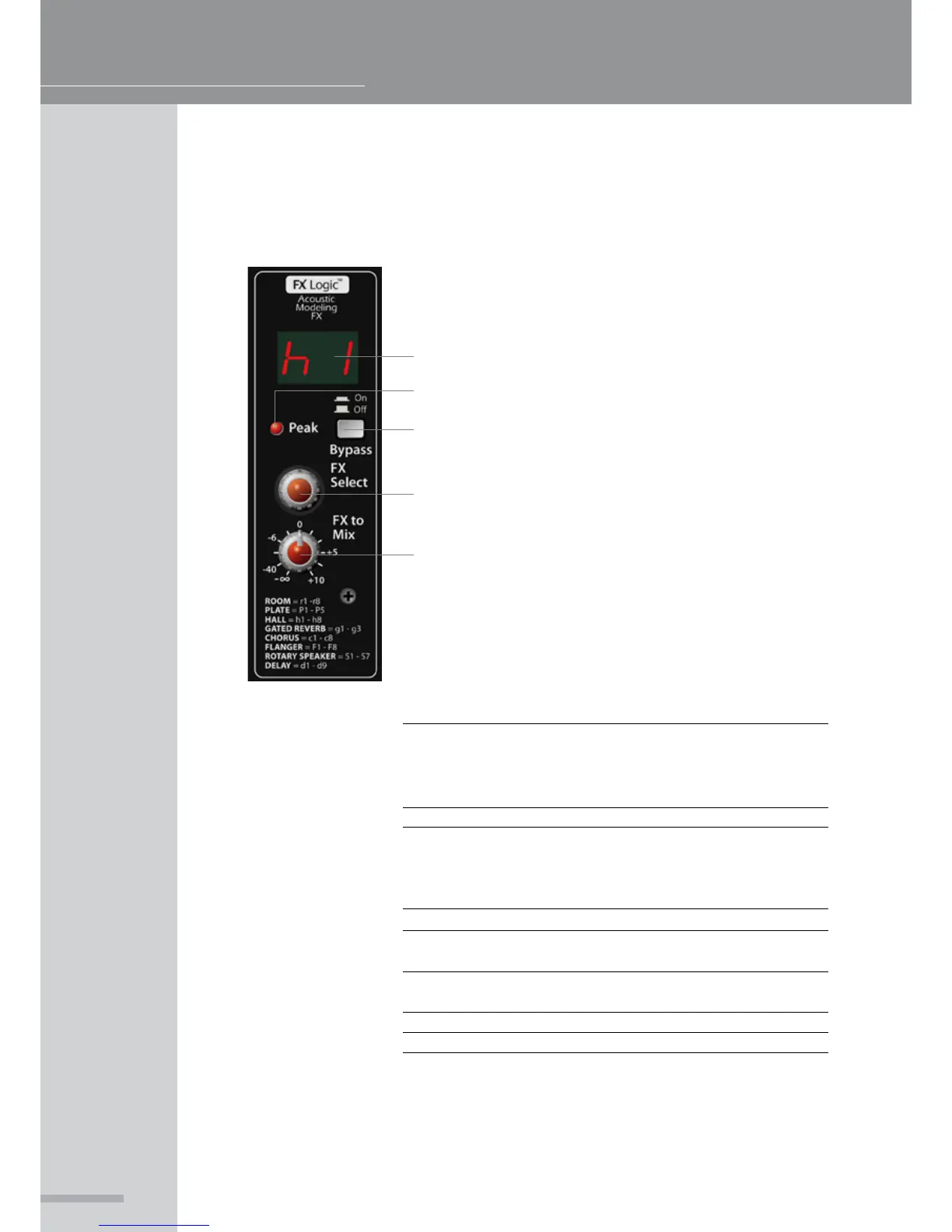
1. Shows which of effect
2. Shows when the FX bus is overloaded
3. Turns the FX processor on or off
4. Selects the effect algorithm as listed below the control
5. Sends the output of the FX processor to the main mix
bus
EFFECTS SECTION (FX Interface):
1
2
3
4
5
ROOM
PLATE
HALL
GATED REVERB
CHORUS
FLANGER
ROTARY SPEAKER
DELAY
r1 Closet, r2 Small ambient room,
r3 Small bathroom, r4 Medium bathroom,
r5 Large bathroom, r6 Small empty room,
r7 Medium empty room, r8 Large empty room.
P1 - P5
h1 Medium hall 1, h2 Medium hall 2,
h3 Medium hall 3, h4 Large hall 1,
h5 Large hall 2, h6 Large hall 3,
h7 Church, h8 Cathedral.
g1 - g3
c1 - c4 Chorus 1-4,
c5 - c8 Chorus with reverb 1-4.
F1 - F6 Flanger 1-6,
F7 - F9 Flanger with reverb 1-2.
S1 - S7
D1 - D9



 To Next Page