Basic Operations
2.
Be sure to turn off the power before getting in and out of the device.
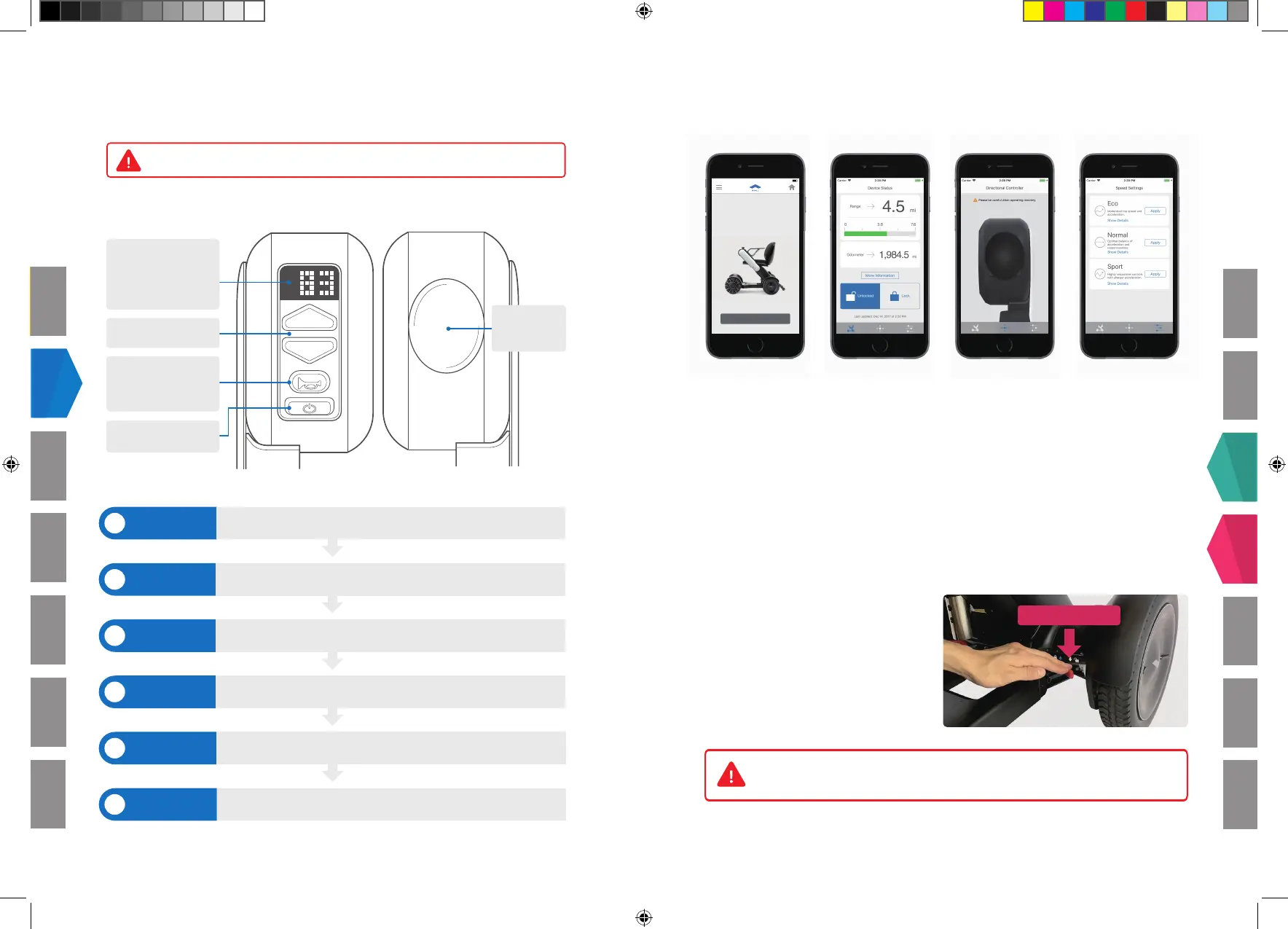
Control Pad
Directional Controller
Assembly
Speed Up / Down
Sound Button
To let people know you
are there
Power Button
Directional
Controller
Display
Battery level is displayed
from 0% to 100%
Getting in
Powering on
Driving
Stopping
Powering off
Getting out
Make sure that display is off before sitting in the seat.
Check that the display lights up when pressing the power button.
Slowly tilt the directional controller towards the direction you want to
move.
To stop the device, remove your hand from the directional controller.
Check that the display turns off when pressing the power button.
Make sure that power is switched off (the display is off) before getting out
of the device.
4
1
2
3
5
6
Smartphone App
Freewheel Mode
Charging
Disassembly
Troubleshooting
Assembly
Basics
3
Smartphone App
3.
Basics
Smartphone App
Charging Disassembly Troubleshooting
Assembly
Freewheel Mode
Never release brakes on inclines.
Make sure you are on a level surface before releasing them.
1. Download the WHILL Model C app from the Apple App Store or Google Play Store
2. Make sure Bluetooth is turned ''on'' on the smartphone
(This is how the smartphone connects to the Model C)
3. Open the app, and enter the app login ID and password
4. Press connect, then congure the speed settings or drive remotely, if you have a
compatible smartphone
Note: WHILL Model C app availability may vary depending on your regional setting.
Freewheel Mode
4.
Brake Release Lever
To manually move the Model C, push
down on the red brake release levers on
both sides.
The freewheel mode can be used
when the Model C is out of charge or
otherwise inoperable.
Hello
Welcome to the WHILL Transportale
iPhone app
First, let's connect to your device
NEXT
2:20 PM
4
320-07185.indd 3 10/09/2018 15:38



 To Next Page
 Loading...

