Using Your Refrigerator
In This Section
Page
Setting the controls
. . . . . . . . . . . . . . ..*...........
7
Changing the control settings . . . . . . . . . . . 8
Removing the door shelf fronts . . . . . . . . 9
Removing the
door trim
.* . . . . . . . m . . . . . . . . . . . 9
Adjusting the
door
bins .- . . . . . . . , . . . . . . . . . . . 9
Adjusting the door bin glides . . . . . . . . . . 10
Adjusting the refrigerator shelves . . 10
Removing the
snack
bin . . . . . . . . . . . . . . . . . . 10
Using the egg bin
. . . . . . . . . ..*.......*.........
11
Removing the crisper and
crisper cover
. . . . . . . . . . . . . . . . . . . . . . . . . ..*.........
11
Adjusting the crisper
humidity
control . . . . . . . . . . . . . . . . . . . . . . . . . . . . . . . 12
Removing the meat drawer
and cover
. . . . . . . . . . . . . . . . . . . . . . . . . . . . . . . . . . . . . . . . . . .
12
Adjusting the meat drawer
temperature . . . . . . . . . . . . . . . . . . . . . m . . . . . . . . . . . . . . . . . 12
Page
Adjusting
the
wine
rack . . . . m . . . . . . . . . . . . ~13
Removing the freezer baskets . . . . . . . . . 13
Removing
the freezer
shelf . . . . . . . . . . . . . . 13
Using the THIRSTCRUSHER*
dispensing
system
. . . . m . . . . . . . s . . . . . . . . . . . . . . 14
Using the automatic ice maker . . . . . . . . 15
Solving common ice maker/
dispenser problems ..,.......,.............. 16
Removing the ice maker
storage
bin . . . . . . . . . . . . . . . . . . . . . . . . . . . . . . . . . . . . . . . . 17
Changing the light bulbs
. . . . . . . . . . . . . . . . . 18
Removing the
base
grille . . . . . . . . . . . . . . . . . 19
Understanding the sounds you
may
hear . . . . . . . . . . . . . . . . . . . . . . . . . . . . . B . . . . . . . . . . . . . . 20
Saving
energy
. . . . . . . . . . . . . . . . . . . . . . . . . . . . . . . . . . . 20
To obtain the best possible results from your refrigerator, it is important that you operate it
properly. This section tells you how to set the controls, remove and adjust some of the
features in your refrigerator, and how to save energy.
Setting the controls
Controls for the refrigerator and freezer are in
the refrigerator. When you plug in the refrigerator
for the first time:
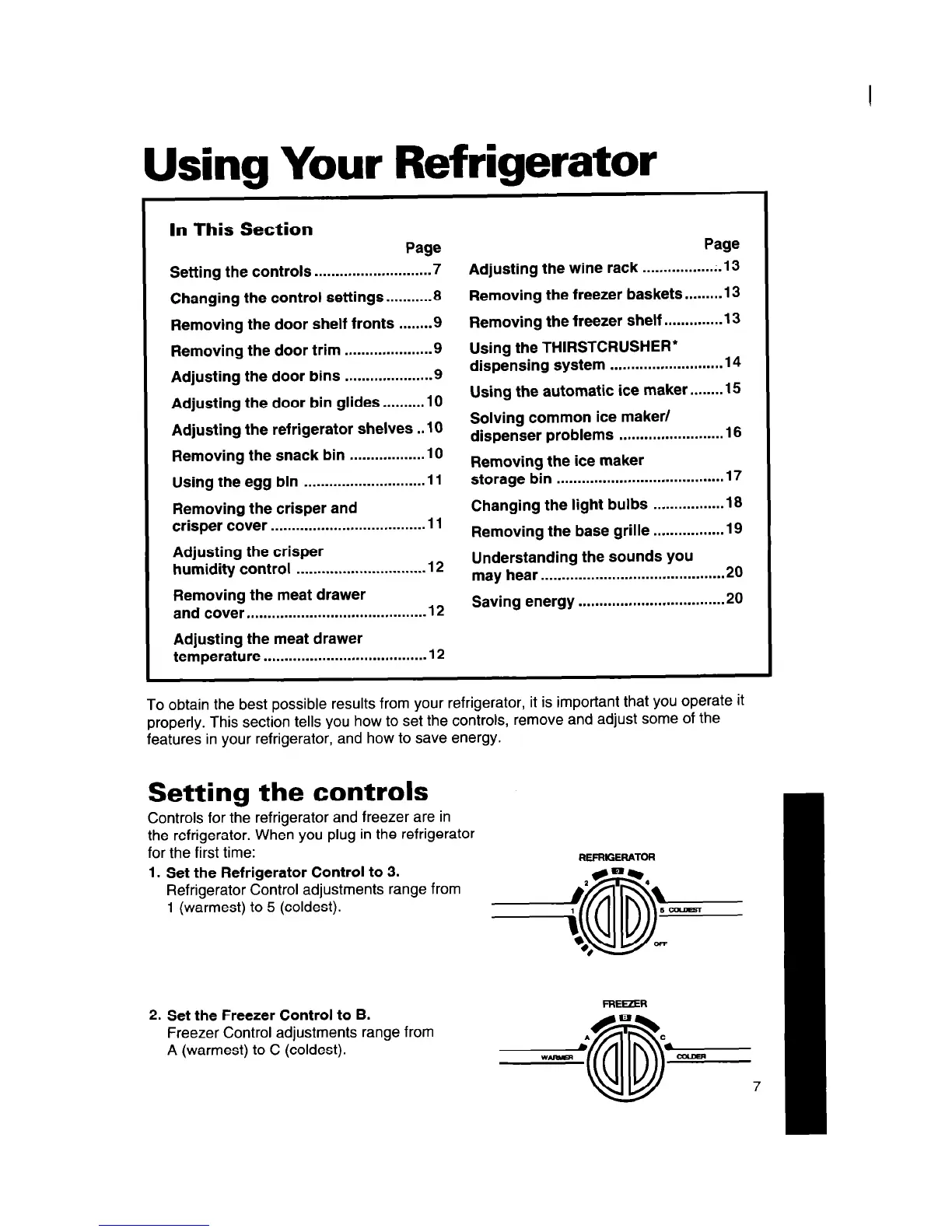
1. Set the Refrigerator Control to 3.
Refrigerator Control adjustments range from
1 (warmest) to 5 (coldest).
2. Set the Freezer Control to B.
Freezer Control adjustments range from
A (warmest) to C (coldest).




 To Next Page