26
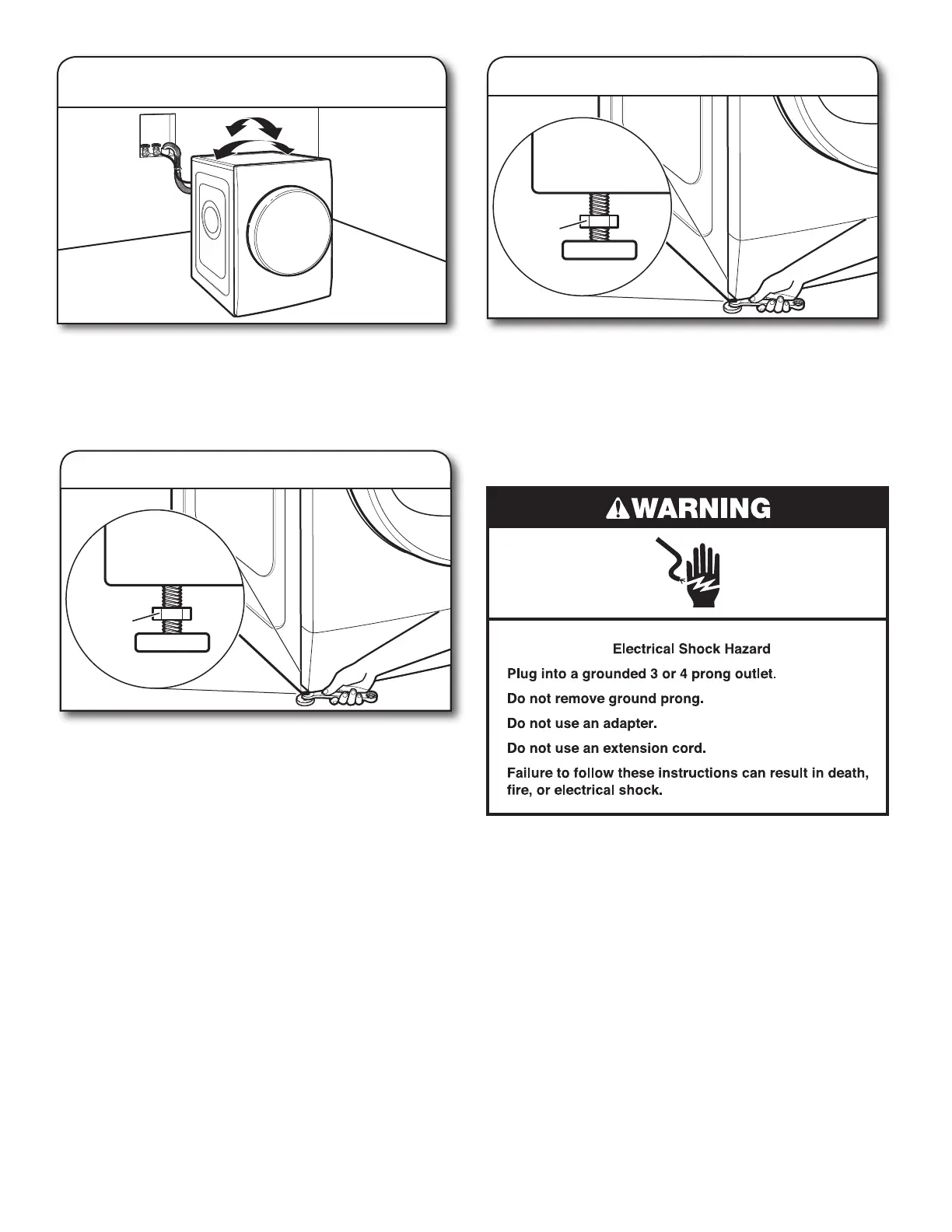
2. Rock washer/dryer to test foot contact
Grip washer/dryer from top and rock back and forth, making
sure all four feet are rmly on oor. Repeat, rocking washer/
dryer from side to side. If washer rocks, go to Step 3 and
adjust leveling feet. If all four feet are in rm contact with oor,
go to “Plug In Washer/Dryer.”
If washer/dryer is not level, use a 1/2” (13 mm) open-end or
adjustable wrench to turn jam nuts clockwise on feet until they
are about 1/2” (13 mm) from the washer/dryer cabinet. Then
turn the leveling foot clockwise to lower the washer/dryer or
counterclockwise to raise the washer/dryer. Recheck levelness
of washer/dryer and that all four feet are rmly in contact with
the oor. Repeat as needed.
When washer/dryer is level and all four feet are rmly in
contact with the oor, use a 1/2” (13 mm) open-end or
adjustable wrench to turn jam nuts counterclockwise on
leveling feet tightly against washer/dryer cabinet.
3. Adjust leveling feet
4. Tighten leveling feet
Plug In Washer/Dryer
Jam nut
Jam nut








 To Next Page