EasyManua.ls Logo

Whirlpool AVM 230 - Control Panel; Symbol Description; Oven Overview

Whirlpool AVM 230
10 pages
Print Icon
To Next Page IconTo Next Page
To Previous Page IconTo Previous Page
Loading...
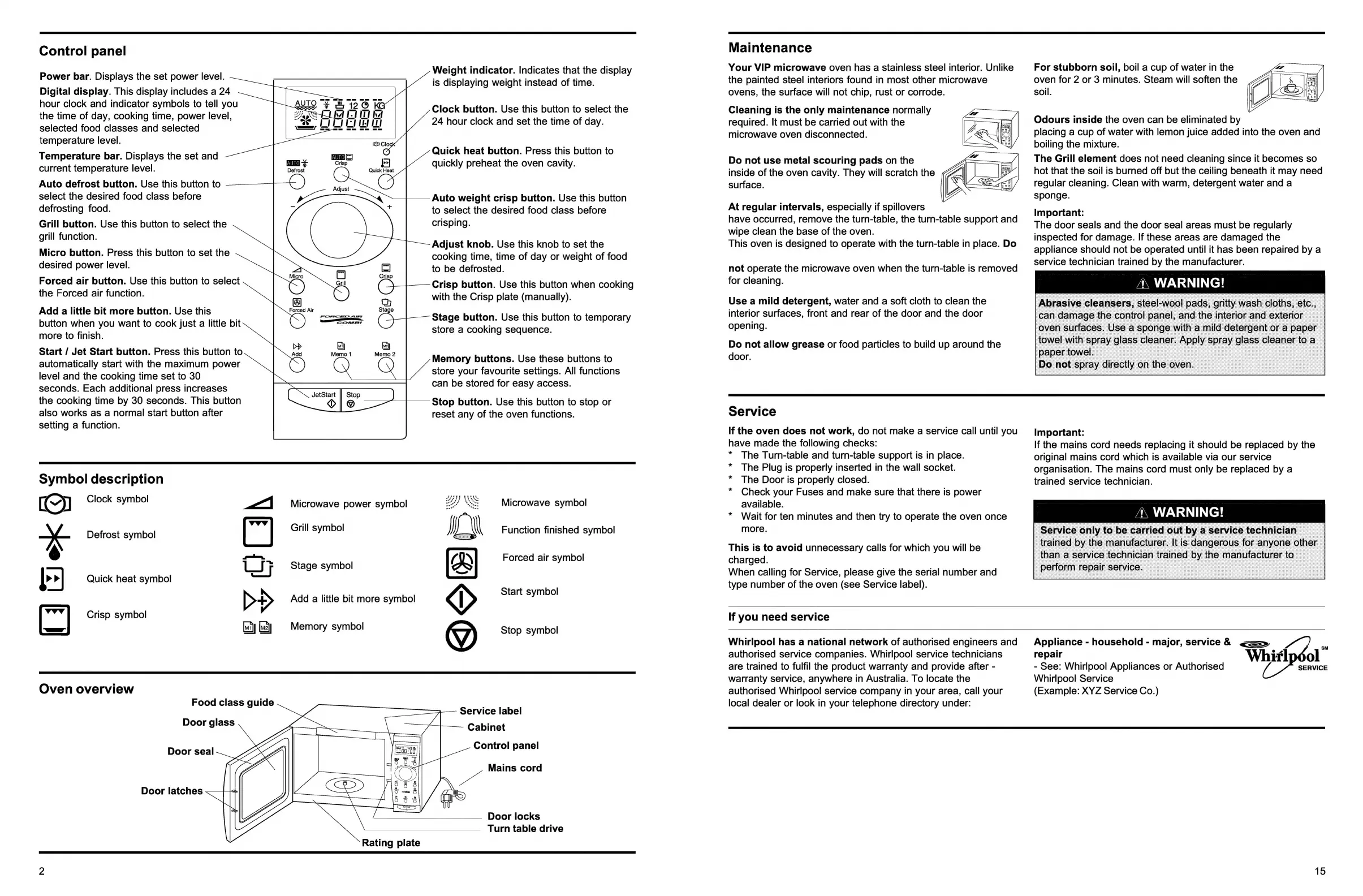
Control
panel
Power
bar.
Displays
the
set
power
level.
Digital
display.
This
display
includes
a
24
hour
clock
and
indicator
symbols
to
tell
you
the
time
of
day,
cooking
time,
power
level,
selected
food
classes
and
selected
temperature
level.
Temperature
bar.
Displays
the
set
and
current
temperature
level.
Auto
defrost
button.
Use
this
button
to
select
the
desired
food
class
before
defrosting
food.
Grill
button.
Use
this
button
to
select
the
grill
function.
Micro
button.
Press
this
button
to
set
the
desired
power
level.
Forced
air
button.
Use
this
button
to
select
the
Forced
air
function.
Add
a
little
bit
more
button.
Use
this
button
when
you
want
to
cook
just
a
little
bit
more
to
finish.
Start
/
Jet
Start
button.
Press
this
button
to
automatically
start
with
the
maximum
power
level
and
the
cooking
time
set
to
30
seconds.
Each
additional
press
increases
the
cooking
time
by
30
seconds.
This
button
also
works
as
a
normal
start
button
after
setting
a
function.
2
Clo
O)
OS
(=)
US)
-X
Crisp
>]
Defrost
Quick
Heat
ce
Adjust
=o
-
+
\
1)
=
3
Oo
Li
2)
Hg
@
(72
OC)
a
=
[?)
oO
Q
>
=
op)
โ€”~
9
{vo}
0)
JetStart
||
Stop
>|
@
Weight
indicator.
Indicates
that
the
display
is
displaying
weight
instead
of
time.
Clock
button.
Use
this
button
to
select
the
24
hour
clock
and
set
the
time
of
day.
Quick
heat
button.
Press
this
button
to
quickly
preheat
the
oven
cavity.
Auto
weight
crisp
button.
Use
this
button
to
select
the
desired
food
class
before
crisping.
Adjust
knob.
Use
this
knob
to
set
the
cooking
time,
time
of
day
or
weight
of
food
to
be
defrosted.
Crisp
button.
Use
this
button
when
cooking
with
the
Crisp
plate
(manually).
Stage
button.
Use
this
button
to
temporary
store
a
cooking
sequence.
Memory
buttons.
Use
these
buttons
to
store
your
favourite
settings.
All
functions
can
be
stored
for
easy
access.
Stop
button.
Use
this
button
to
stop
or
reset
any
of
the
oven
functions.
Symbol
description
1G)
Clock
symbol
ar
Defrost
symbol
p>]
Quick
heat
symbol
[~"]
Crisp
symbol
Microwave
power
symbol
Grill
symbol
Stage
symbol
Add
a
little
bit
more
symbol
Oy
Memory
symbol
Microwave
symbol
ยฐ
*
โ€œa
Function
finished
symbol
Forced
air
symbol
Start
symbol
yy)
Stop
symbol
Oven
overview
Food
class
guide
Door
glass
Door
seal
Door
latches
Service
label
Cabinet
Control
panel
Mains
cord
Door
locks
Turn
table
drive
Rating
plate
Maintenance
Your
VIP
microwave
oven
has
a
stainless
steel
interior.
Unlike
the
painted
steel
interiors
found
in
most
other
microwave
ovens,
the
surface
will
not
chip,
rust
or
corrode.
Cleaning
is
the
only
maintenance
normally
required.
It
must
be
carried
out
with
the
microwave
oven
disconnected.
Do
not
use
metal
scouring
pads
on
the
inside
of
the
oven
cavity.
They
will
scratch
the
surface.
At
regular
intervals,
especially
if
spillovers
have
occurred,
remove
the
turn-table,
the
turn-table
support
and
wipe
clean
the
base
of
the
oven.
This
oven
is
designed
to
operate
with
the
turn-table
in
place.
Do
not
operate
the
microwave
oven
when
the
turn-table
is
removed
for
cleaning.
Use
a
mild
detergent,
water
and
a
soft
cloth
to
clean
the
interior
surfaces,
front
and
rear
of
the
door
and
the
door
opening.
Do
not
allow
grease
or
food
particles
to
build
up
around
the
door.
For
stubborn
soil,
boil
a
cup
of
water
in
the
oven
for
2
or
3
minutes.
Steam
will
soften
the
soil.
Odours
inside
the
oven
can
be
eliminated
by
placing
a
cup
of
water
with
lemon
juice
added
into
the
oven
and
boiling
the
mixture.
The
Grill
element
does
not
need
cleaning
since
it
becomes
so
hot
that
the
soil
is
burned
off
but
the
ceiling
beneath
it
may
need
regular
cleaning.
Clean
with
warm,
detergent
water
and
a
sponge.
Important:
The
door
seals
and
the
door
seal
areas
must
be
regularly
inspected
for
damage.
If
these
areas
are
damaged
the
appliance
should
not
be
operated
until
it
has
been
repaired
by
a
service
technician
trained
by
the
manufacturer.
A\
WARNING!
Service
If
the
oven
does
not
work,
do
not
make
a
service
call
until
you
have
made
the
following
checks:
*
The
Turn-table
and
turn-table
support
is
in
place.
*
The
Plug
is
properly
inserted
in
the
wall
socket.
*
The
Door
is
properly
closed.
*
Check
your
Fuses
and
make
sure
that
there
is
power
available.
Wait
for
ten
minutes
and
then
try
to
operate
the
oven
once
more.
This
is
to
avoid
unnecessary
calls
for
which
you
will
be
charged.
When
calling
for
Service,
please
give
the
serial
number
and
type
number
of
the
oven
(see
Service
label).
Important:
If
the
mains
cord
needs
replacing
it
should
be
replaced
by
the
original
mains
cord
which
is
available
via
our
service
organisation.
The
mains
cord
must
only
be
replaced
by
a
trained
service
technician.
A\
WARNING!
If
you
need
service
Whirlpool
has
a
national
network
of
authorised
engineers
and
authorised
service
companies.
Whirlpool
service
technicians
are
trained
to
fulfil
the
product
warranty
and
provide
after
-
warranty
service,
anywhere
in
Australia.
To
locate
the
authorised
Whirlpool
service
company
in
your
area,
call
your
local
dealer
or
look
in
your
telephone
directory
under:
Appliance
-
household
-
major,
service&
<=ยป
x
repair
Whiripdol
-
See:
Whirlpool
Appliances
or
Authorised
SERVICE
Whirlpool
Service
(Example:
XYZ
Service
Co.)
15

Related product manuals