EasyManua.ls Logo

Whirlpool AVM 230 - Cooking Interruption; Time and Power

Whirlpool AVM 230
10 pages
Print Icon
To Next Page IconTo Next Page
To Previous Page IconTo Previous Page
Loading...
Auto
crisp
function
Your
microwave
oven
has
an
automatic
Crisp
function
for
ready
made
foods.
This
function
enables
you
to
quickly
reheat
your
food
in
one
step
to
serving
temperature.
The
oven
needs
to
know
the
type
of
food
to
be
crisped
and
the
net
weight
of
the
food.
Four
food
categories
have
been
designed
into
your
oven.
They
will
provide
you
with
good
end
results.
Each
subsequent
press
will
select
the
next
food
category.
If
the
weight
is
less
than
the
minimum
weight:
Use
the
manual
"Crisp
function"
to
crisp
the
food
manually.
Experience
will
give
you
the
correct
time
for
your
favourite
small
amount
foods.
Frozen
potato
products
im
Frozen
pizza
*
Chips
*
Wedges
*
Gems
If
the
weight
is
greater
than
the
maximum
weight:
Divide
the
food
into
two
or
more
pieces
and
proceed
to
Auto
Crisp
each
piece
separately.
If
it's
not
possible
to
divide
the
food,
you
must
use
the
manual
"Crisp
function"
to
crisp
the
food
manually.
With
greater
amounts
it
is
necessary
to
stir
or
turn
the
food
during
Crisping
and
this
is
best
done
with
the
manual
"Crisp
function".
Auto
Crisp
is
used
only
for
ready
made
foods
x
Pies
&
pastries
*
Meat
pies
(from
room
or
refrigerator)
*
Sausage
rolls
(from
frozen)
LL!
Frozen
chicken
Nuggets
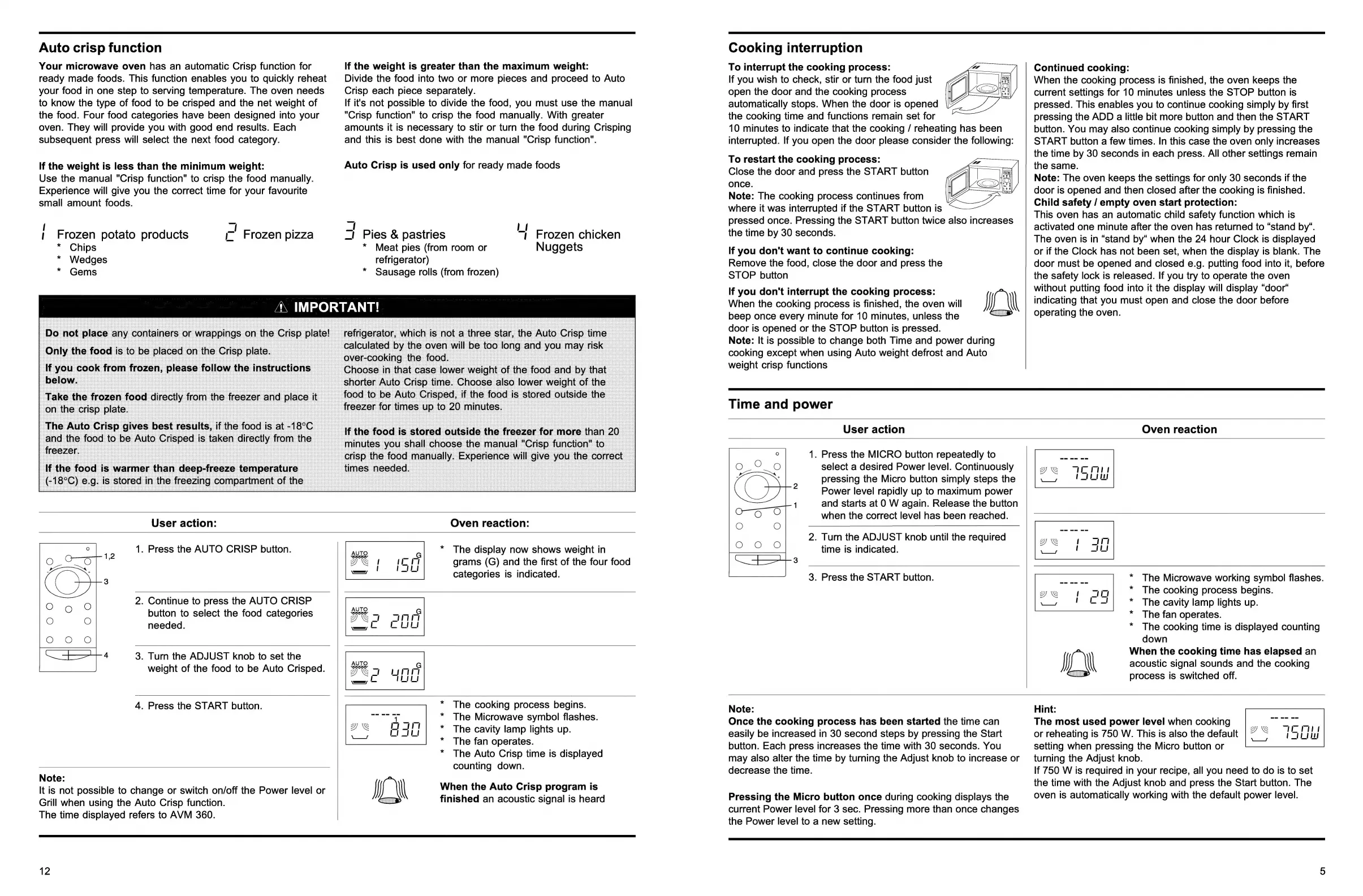
User
action:
Oven
reaction:
1.
Press
the
AUTO
CRISP
button.
*
The
display
now
shows
weight
in
grams
(G)
and
the
first
of
the
four
food
categories
is
indicated.
2.
Continue
to
press
the
AUTO
CRISP
button
to
select
the
food
categories
needed.
4
3.
Turn
the
ADJUST
knob
to
set
the
weight
of
the
food
to
be
Auto
Crisped.
4.
Press
the
START
button.
Note:
It
is
not
possible
to
change
or
switch
on/off
the
Power
level
or
Grill
when
using
the
Auto
Crisp
function.
The
time
displayed
refers
to
AVM
360.
The
cooking
process
begins.
The
Microwave
symbol
flashes.
The
cavity
lamp
lights
up.
The
fan
operates.
The
Auto
Crisp
time
is
displayed
counting
down.
+ +
+*£
££
When
the
Auto
Crisp
program
is
finished
an
acoustic
signal
is
heard
Cooking
interruption
To
interrupt
the
cooking
process:
If
you
wish
to
check,
stir
or
turn
the
food
just
open
the
door
and
the
cooking
process
automatically
stops.
When
the
door
is
opened
the
cooking
time
and
functions
remain
set
for
10
minutes
to
indicate
that
the
cooking
/
reheating
has
been
interrupted.
If
you
open
the
door
please
consider
the
following:
To
restart
the
cooking
process:
Close
the
door
and
press
the
START
button
once.
Note:
The
cooking
process
continues
from
where
it
was
interrupted
if
the
START
button
is
a
pressed
once.
Pressing
the
START
button
twice
also
increases
the
time
by
30
seconds.
If
you
don't
want
to
continue
cooking:
Remove
the
food,
close
the
door
and
press
the
STOP
button
If
you
don't
interrupt
the
cooking
process:
When
the
cooking
process
is
finished,
the
oven
will
beep
once
every
minute
for
10
minutes,
unless
the
door
is
opened
or
the
STOP
button
is
pressed.
Note:
It
is
possible
to
change
both
Time
and
power
during
cooking
except
when
using
Auto
weight
defrost
and
Auto
weight
crisp
functions
Continued
cooking:
When
the
cooking
process
is
finished,
the
oven
keeps
the
current
settings
for
10
minutes
unless
the
STOP
button
is
pressed.
This
enables
you
to
continue
cooking
simply
by
first
pressing
the
ADD
a
little
bit
more
button
and
then
the
START
button.
You
may
also
continue
cooking
simply
by
pressing
the
START
button
a
few
times.
In
this
case
the
oven
only
increases
the
time
by
30
seconds
in
each
press.
All
other
settings
remain
the
same.
Note:
The
oven
keeps
the
settings
for
only
30
seconds
if
the
door
is
opened
and
then
closed
after
the
cooking
is
finished.
Child
safety
/
empty
oven
start
protection:
This
oven
has
an
automatic
child
safety
function
which
is
activated
one
minute
after
the
oven
has
returned
to
“stand
by“.
The
oven
is
in
“stand
by“
when
the
24
hour
Clock
is
displayed
or
if
the
Clock
has
not
been
set,
when
the
display
is
blank.
The
door
must
be
opened
and
closed
e.g.
putting
food
into
it,
before
the
safety
lock
is
released.
If
you
try
to
operate
the
oven
without
putting
food
into
it
the
display
will
display
“door*
indicating
that
you
must
open
and
close
the
door
before
operating
the
oven.
Time
and
power
User
action
1.
Press
the
MICRO
button
repeatedly
to
select
a
desired
Power
level.
Continuously
pressing
the
Micro
button
simply
steps
the
Power
level
rapidly
up
to
maximum
power
1
and
starts
at
0
W
again.
Release
the
button
when
the
correct
level
has
been
reached.
2.
Turn
the
ADJUST
knob
until
the
required
time
is
indicated.
3.
Press
the
START
button.
Oven
reaction
The
Microwave
working
symbol
flashes.
The
cooking
process
begins.
The
cavity
lamp
lights
up.
The
fan
operates.
The
cooking
time
is
displayed
counting
down
When
the
cooking
time
has
elapsed
an
acoustic
signal
sounds
and
the
cooking
process
is
switched
off.
+ + + +
Note:
Once
the
cooking
process
has
been
started
the
time
can
easily
be
increased
in
30
second
steps
by
pressing
the
Start
button.
Each
press
increases
the
time
with
30
seconds.
You
may
also
alter
the
time
by
turning
the
Adjust
knob
to
increase
or
decrease
the
time.
Pressing
the
Micro
button
once
during
cooking
displays
the
current
Power
level
for
3
sec.
Pressing
more
than
once
changes
the
Power
level
to
a
new
setting.
Hint:
The
most
used
power
level
when
cooking
or
reheating
is
750
W.
This
is
also
the
default
setting
when
pressing
the
Micro
button
or
turning
the
Adjust
knob.
If
750
W
is
required
in
your
recipe,
all
you
need
to
do
is
to
set
the
time
with
the
Adjust
knob
and
press
the
Start
button.
The
oven
is
automatically
working
with
the
default
power
level.

Related product manuals