EasyManua.ls Logo

Whirlpool AVM 230 - Stage Function; Optional Clock Display

Whirlpool AVM 230
10 pages
Print Icon
To Next Page IconTo Next Page
To Previous Page IconTo Previous Page
Loading...
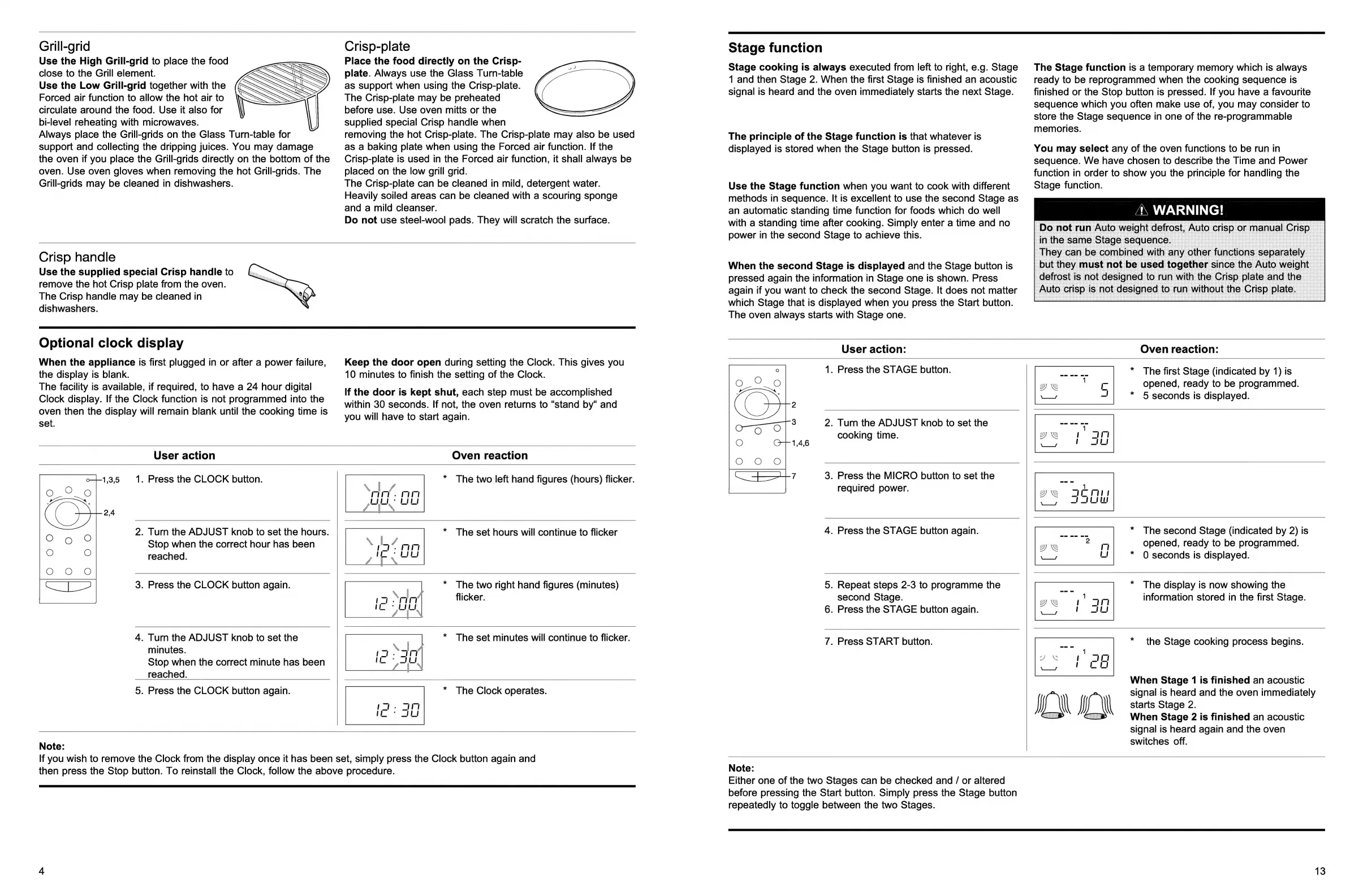
Grill-grid
Use
the
High
Grill-grid
to
place
the
food
close
to
the
Grill
element.
Use
the
Low
Grill-grid
together
with
the
Forced
air
function
to
allow
the hot
air
to
circulate
around
the
food.
Use
it
also
for
bi-level
reheating
with
microwaves.
Always
place
the
Grill-grids
on
the
Glass
Turn-table
for
support
and
collecting
the
dripping
juices.
You
may
damage
the
oven
if
you
place
the
Grill-grids
directly
on
the
bottom
of
the
oven.
Use
oven
gloves
when
removing
the hot
Grill-grids.
The
Grill-grids
may
be
cleaned
in
dishwashers.
Crisp-plate
Place
the
food
directly
on
the
Crisp-
plate.
Always
use
the
Glass
Turn-table
as
support
when
using
the
Crisp-plate.
The
Crisp-plate
may
be
preheated
before
use.
Use
oven
mitts
or
the
supplied
special
Crisp
handle
when
removing
the
hot
Crisp-plate.
The
Crisp-plate
may
also
be
used
as
a
baking
plate
when
using
the
Forced
air
function.
If
the
Crisp-plate
is
used
in
the
Forced
air
function,
it
shall
always
be
placed
on
the
low
grill
grid.
The
Crisp-plate
can
be
cleaned
in
mild,
detergent
water.
Heavily
soiled
areas
can
be
cleaned
with
a
scouring
sponge
and
a
mild
cleanser.
Do
not
use
steel-wool
pads.
They
will
scratch
the
surface.
Crisp
handle
Use
the
supplied
special
Crisp
handle
to
remove
the hot
Crisp
plate
from
the
oven.
The
Crisp
handle
may
be
cleaned
in
dishwashers.
Optional
clock
display
When
the
appliance
is
first
plugged
in
or
after
a
power
failure,
the
display
is
blank.
The
facility
is
available,
if
required,
to
have
a
24
hour
digital
Clock
display.
If
the
Clock
function
is
not
programmed
into
the
oven
then
the
display
will
remain
blank
until
the
cooking
time
is
set.
User
action
Keep
the
door
open
during
setting
the
Clock.
This
gives
you
10
minutes
to
finish
the
setting
of
the
Clock.
If
the
door
is
kept
shut,
each
step
must
be
accomplished
within
30
seconds.
If
not,
the
oven
returns
to
“stand
by“
and
you
will
have
to
start
again.
Oven
reaction
1.
Press
the
CLOCK
button.
*
The
two
left
hand
figures
(hours)
flicker.
2.
Turn
the
ADJUST
knob
to
set
the
hours.
Stop
when
the
correct
hour
has
been
reached.
*
The
set
hours
will
continue
to
flicker
3.
Press
the
CLOCK
button
again.
*
The
two
right
hand
figures
(minutes)
flicker.
4.
Turn
the
ADJUST
knob
to
set
the
minutes.
Stop
when
the
correct
minute
has
been
reached.
*
The
set
minutes
will
continue
to
flicker.
5.
Press
the
CLOCK
button
again.
*
The
Clock
operates.
Note:
If
you
wish
to
remove
the
Clock
from
the
display
once
it
has
been
set,
simply
press
the
Clock
button
again
and
then
press
the
Stop
button.
To
reinstall
the
Clock,
follow
the
above
procedure.
Stage
function
Stage
cooking
is
always
executed
from
left
to
right,
e.g.
Stage
1
and
then
Stage
2.
When
the
first
Stage
is
finished
an
acoustic
signal
is
heard
and
the
oven
immediately
starts
the
next
Stage.
The
principle
of
the
Stage
function
is
that
whatever
is
displayed
is
stored
when
the
Stage
button
is
pressed.
Use
the
Stage
function
when
you
want
to
cook
with
different
methods
in
sequence.
It
is
excellent
to
use
the
second
Stage
as
an
automatic
standing
time
function
for
foods
which
do
well
with
a
standing
time
after
cooking.
Simply
enter
a
time
and
no
power
in
the
second
Stage
to
achieve
this.
When
the
second
Stage
is
displayed
and
the
Stage
button
is
pressed
again
the
information
in
Stage
one
is
shown.
Press
again
if
you
want
to
check
the
second
Stage.
It
does
not
matter
which
Stage
that
is
displayed
when
you
press
the
Start
button.
The
oven
always
starts
with
Stage
one.
The
Stage
function
is
a
temporary
memory
which
is
always
ready
to
be
reprogrammed
when
the
cooking
sequence
is
finished
or
the
Stop
button
is
pressed.
If
you
have
a
favourite
sequence
which
you
often
make
use
of,
you
may
consider
to
store
the
Stage
sequence
in
one
of
the
re-programmable
memories.
You
may
select
any
of
the
oven
functions
to
be
run
in
sequence.
We
have
chosen
to
describe
the
Time
and
Power
function
in
order
to
show
you
the
principle
for
handling
the
Stage
function.
User
action:
Oven
reaction:
1.
Press
the
STAGE
button.
2.
Turn
the
ADJUST
knob
to
set
the
cooking
time.
3.
Press
the
MICRO
button
to
set
the
required
power.
4.
Press
the
STAGE
button
again.
5.
Repeat
steps
2-3
to
programme
the
second
Stage.
6.
Press
the
STAGE
button
again.
7.
Press
START
button.
*
The
first
Stage
(indicated
by
1)
is
opened,
ready
to
be
programmed.
*
5
seconds
is
displayed.
*
The
second
Stage
(indicated
by
2)
is
opened,
ready
to
be
programmed.
*
0
seconds
is
displayed.
*
The
display
is
now
showing
the
information
stored
in
the
first
Stage.
*
the
Stage
cooking
process
begins.
When
Stage
1
is
finished
an
acoustic
signal
is
heard
and
the
oven
immediately
starts
Stage
2.
When
Stage
2
is
finished
an
acoustic
signal
is
heard
again
and
the
oven
switches
off.
Note:
Either
one
of
the
two
Stages
can
be
checked
and
/
or
altered
before
pressing
the
Start
button.
Simply
press
the
Stage
button
repeatedly
to
toggle
between
the
two
Stages.
13