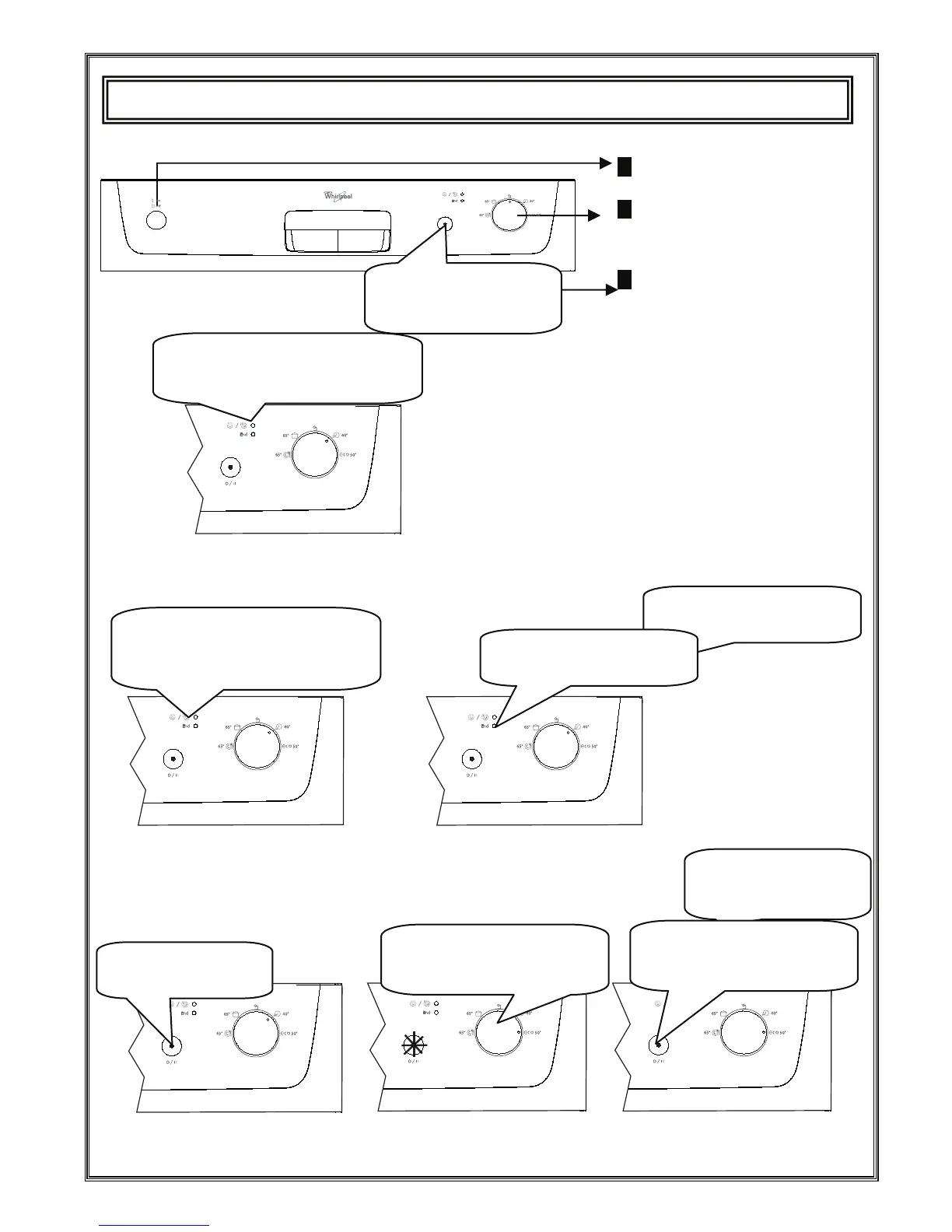
1. Press the Power On/Off key.
2. Select the program suiting your
dishes via the Program Selection
3. Start the program pressing
the Power Start/Pause key.
Switching on the machine
Program follow-up
You can follow the program flow using the program follow-up lambs located on the control panel.
Changing a programme
If you would like to change programs while a washing program is continuing.
Do not open the cover before
the lamp Finished is on.
The new program started
will resume the course of
the old program.
Once the Power On/Off key
is pressed, the lamp Power
Start/Pause is highlighted.
Start the program you have
newly selected by pressing
again the Start/Pause key.
After the program stops, select
your desired program via the
Program selection button.
Press once the Power
Start/Pause key.
Once the program is over, the
lamp Finished is illuminated.
As long as Washing and Drying goes
on the Washing/Drying lamp goes on
to light .When drying is active machine
stays silent about 40-50 minutes
The lamp on Program Start/Pause key
goes off once the Program starts and
the washing/Drying lamp is highlighted.





 To Next Page