Setting the Controls
Operating your dishwasher's controls properly helps you obtain the best possible washing
results. This section tells you how to select wash cycles and options.
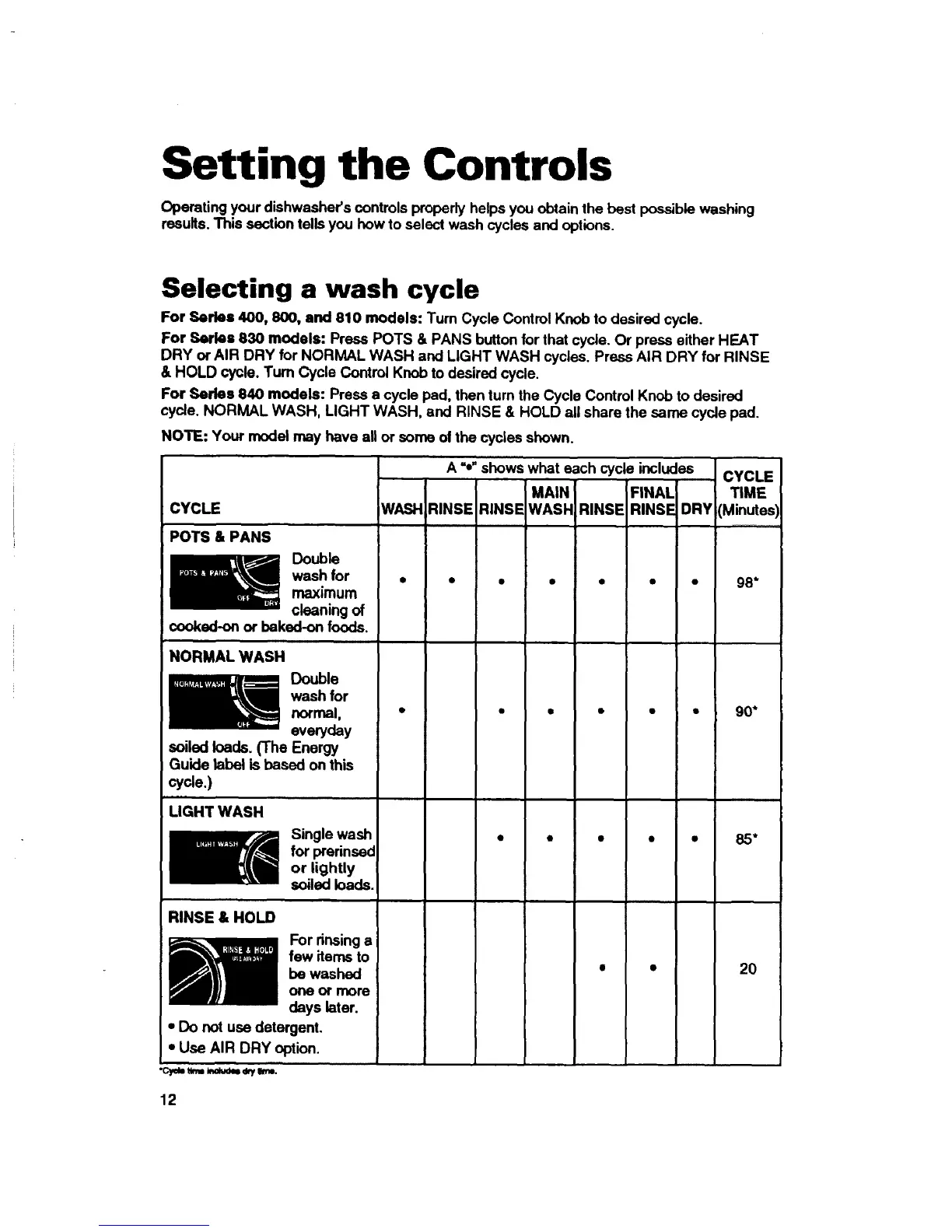
Selecting a wash cycle
For Series 400, 800, and 810 models: Turn Cycle Control Knob to desired cycle.
For Series 830 models: Press POTS & PANS button for that cycle. Or press either HEAT
DRY or AIR DRY for NORMAL WASH and LIGHT WASH cycles. Press AIR DRY for RINSE
& HOLD cycle. Turn Cycle Control Knob to desired cycle.
For Series 840 models: Press a cycle pad, then turn the Cycle Control Knob to desired
cycle. NORMAL WASH, LIGHT WASH, and RINSE & HOLD all share the same cycle pad.
NOTE: Your model may have all or some ofthe cycles shown.
A -o"shows what each cycle includes CYCLE
MAIN FINAL TIME
WASH RINSE RINSE WASF RINSE RINSE DRY (MinutesI
CYCLE
POTS & PANS
Double
wash for •
maximum
cleaning of
cooked-on or baked-on foods.
,, ,,,,,,
NORMAL WASH
Double
wash for
normal, •
everyday
soiled loads. (The Energy
Guide label is based on this
cycle.)
98*
90*
LIGHT WASH
Single wash
for prerinssd
or lightly
soiled loads.
85 •
RINSE & HOLD
_E or rinsing a
few items to
be washed
one or more
days later.
• Do not use detergent.
• Use AIR DRY option.
2O
•c,_b urn,N_ =_ytree.
12



 To Next Page