5-12
Programming (continued)
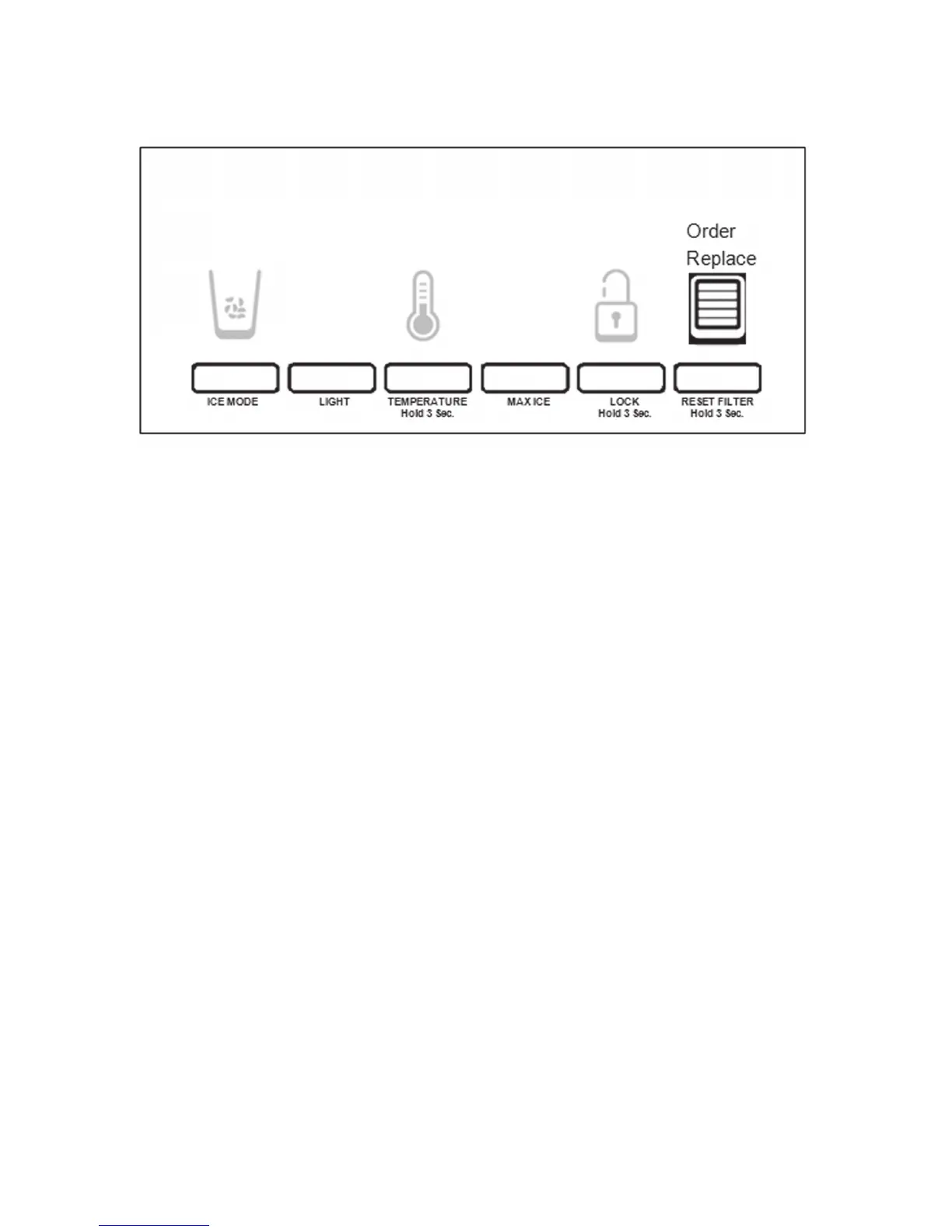
Water Filter Status Light:
The water lter status light will help you know when to change your water lter.
When the dispenser control panel’s water lter status display changes to “ORDER,” this tells
you that it is almost time to change the water lter cartridge.
Replace the water lter cartridge when the water lter status display changes to “REPLACE.”
The lter should be replaced at least every 6 months depending on your water quality and us-
age.
NOTE: If water ow to your water dispenser or ice maker decreases noticeably, change the
lter sooner. After changing the water lter, reset the status light.
Details:
Pressing and holding RESET FILTER starts the 3 seconds countdown. Using the dispenser
cancels the countdown AND no dispensing is permitted. The number ‘3’ blinks 3 times and the
‘invalid’ tone sounds 3 times and user has to release both the pad and the button and press
the button again to start it over
After 3 seconds, the BLUE WATER BARS in the Icon ash and an audible tone sounds 3
times. When the system is reset, the “ORDER” and “REPLACE” icons will disappear from the
display screen. See gure 16.
Note: Users can reset the lter status at any stage.
Figure 16



 To Next Page