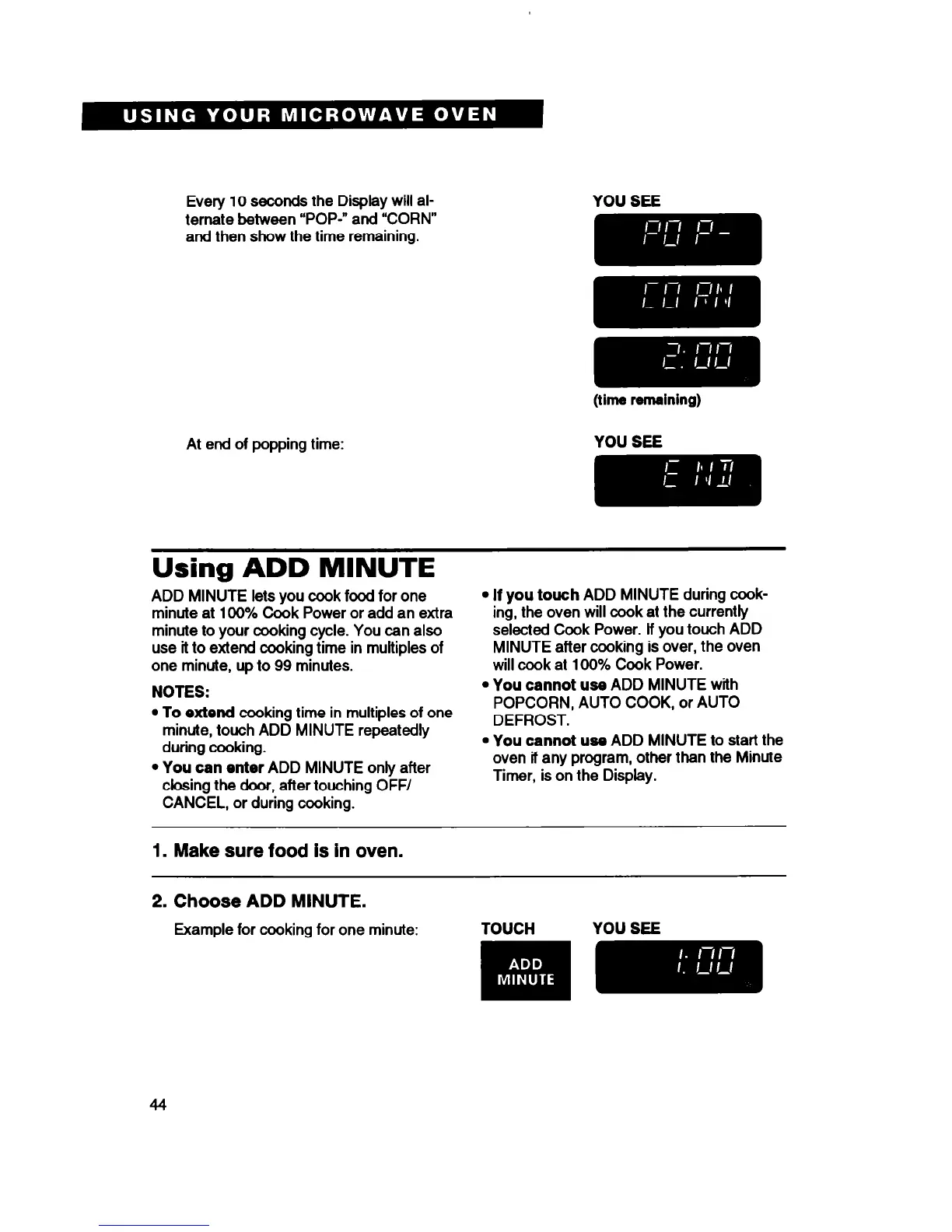
Every 10 seconds the Display will al-
ternate between “POP-” and “CORN”
and then show the time remaining.
At end of popping time:
YOU SEE
(time remaining)
Using ADD MINUTE
ADD MINUTE lets you cook food for one
minute at 100% Cook Power or add an extra
minute to your cooking cycle. You can also
use it to extend cooking time in multiples of
one minute, up to 99 minutes.
NOTES:
l
To
extend cooking time in multiples of one
minute, touch ADD MINUTE repeatedly
during cooking.
l
You
can enter
ADD MINUTE only after
closing the door, after touching OFF/
CANCEL, or during cooking.
l
If you
touch
ADD MINUTE during cook-
ing, the oven will cook at the currently
selected Cook Power. lf you touch ADD
MINUTE after cooking is over, the oven
will ccok at 100% Cook Power.
l
You cannot
use ADD MINUTE with
POPCORN, AUTO COOK, or AUTO
DEFROST.
l
You cannot
use ADD MINUTE to start the
oven if any program, other than the Minute
Timer, is on the Display.
1. Make sure food is in oven.
2. Choose ADD MINUTE.
44



 To Next Page