MSEX0105i – Electronic No Frost Refrigerator Bottom Mount/ Dual Fan - Maestro High 32
REMARKS
1- This routine always starts when the product is pluged in and has priority over other commands
done on the Interface;
2- During this initial automatic test routine, if the Doors are open, the Fan Motor won’t be
deactivated;
3- If the product is in Defrosting mode, this routine will be aborted due to defrost mode has priority
over all functions
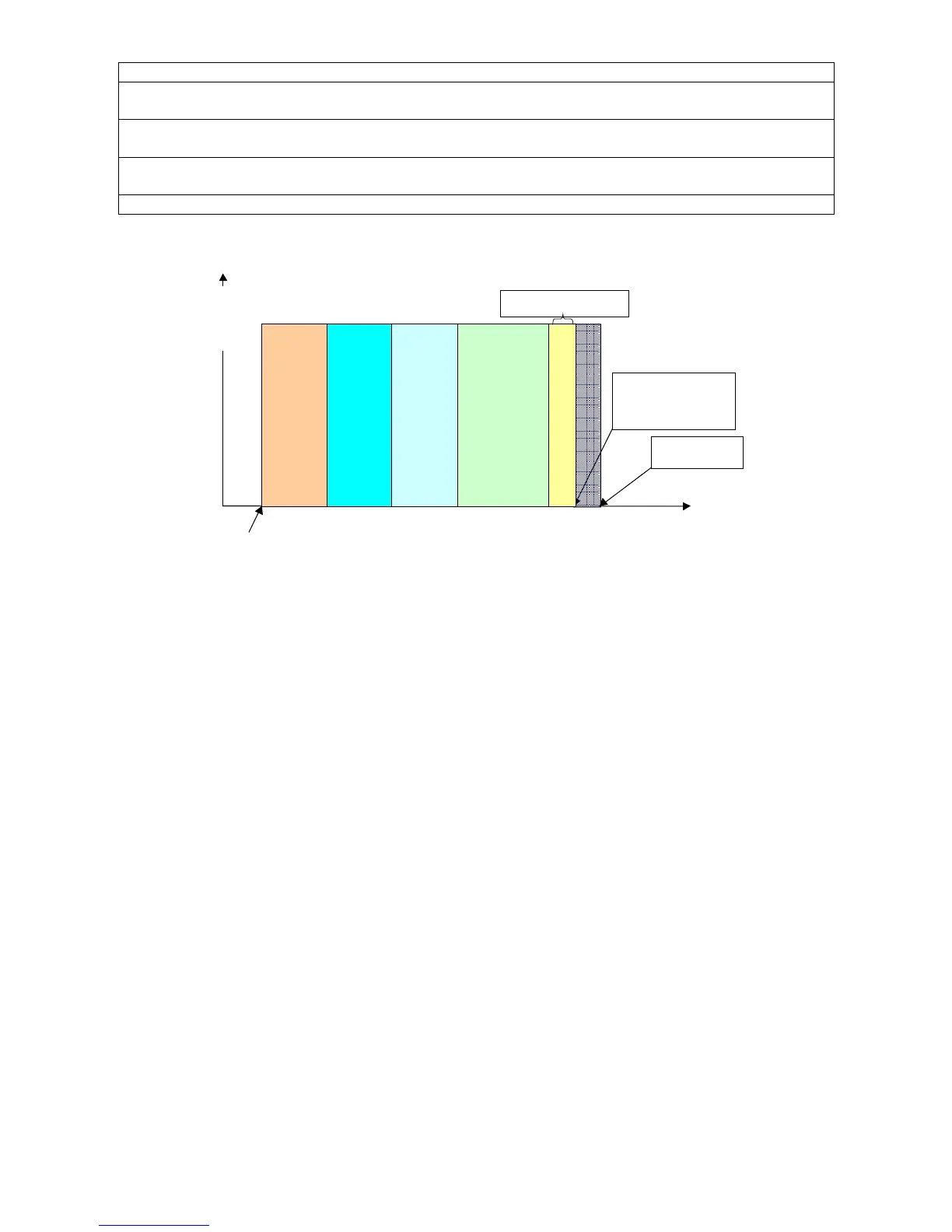
The routine ending will be in 5 minutes and 48 seconds.
Summarily, the steps described above can be seen graphically.
DEFROST HEATER
START UP:
Check point; if the product is warm/ hot or cold
F
C
C
FA
COMPRESSOR + FAN MOTORS
# If warm, will TURN ON
# If cold
, will KEEP OFF
6s 6s
In case of any Sensor
failure, compressor will
turns-off
Component
5min
End of the routine
20s
Time
10s6s
FREEZER FAN
MOTOR
REFRIGERADOR
FAN MOTOR
Compressor, will keep on
(if the product is warm)
SENSORS TEST
7.2. Interface Board / LCD Display Routine
This refrigerator Interface Board has a Test Routine (manual) which will allow the technician to test the
Icons operation, Back-light and sound Alarm – BEEP, to this, next steps must be followed:
1 – With closed doors, Turn off the product from the socket, and wait 10 seconds;
2- Turn it on again and open the two doors (Refrigerator and Freezer) simultaneously;
Note: Wait the Open Door Icons to be shown in the LCD Display.
3- Close the 2 doors again;
4- Press at the same time for 3 seconds the keys;
• “OK”
• “ + “
• “ – “
• “MENU”
Note: In this moment, the icons may switch on (even some not available to this model of refrigerator)
and then will turn off automatically. The code “ 9 ” must be shown on the Freezer Temperature Icon of
the LCD Display, otherwise the test routine was not accepted.
5- Press “ ON ” key and all the Upper Icons (regarding to Freezer Compartment) will switch on;
6- Press “ ON ” again and the icons will switch off;
7- Press “ MENU ” key and all the Intermediate Icons (regarding to “Alarms”) will switch on;
8- Press “MENU ” again and the icons will switch off;
9- Press “ OFF ” key and all Lower Icons (regarding to the Refrigerator Compartment) will switch on;
10- Press “OFF” again and the icons will switch off;
11- Press “ + ” key and the BEEP sound will activate;
12- Press “ + ” again and the BEEP sound will be disabled;
13- Press “ – ” key and the LCD Back light will switch on. After few seconds will switch off automatically;
14- Press “ OK ” key and the “ 9 “ code will change to “ 8 “ code;
15- Repeat step 14 until the codes reduce one by one reaching to the “ 0 “ code, then the routine is
concluded. Wait for the LCD interface to return automatically to the previous program done by the user.
Note: In this operation wait until the code ( number) stabilizes, after that, press “OK” key




 To Next Page