33
EN
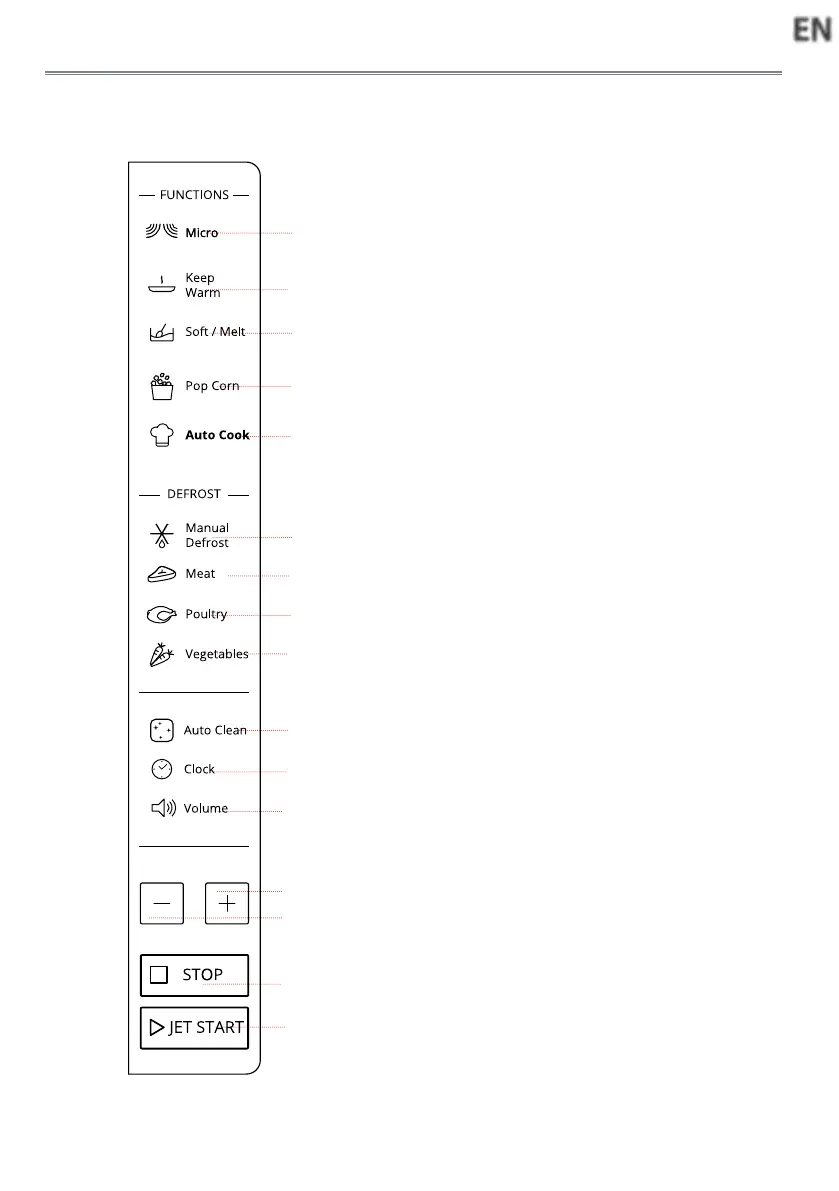
CONTROL PANEL DESCRIPTION
qMicro
Use to set power level.
wKeep Warm
Touch to set Keep Warm program.
eSoft/Melt
Press this button to access Soft/
Melt cooking mode.
rPop corn
tAuto Cook
Use to access the automatic reci-
pes menu.
yManual Defrost
To defrost manually.
uioMeat/Poultry/Vegetables
To set defrost menu.
aAuto Clean
Use to clean cavity.
sClock
Use to set the time of day.
dVolume
Use to activate/deactivate beep si-
gnal.
f+/-
Use to input food menu code, clock
time, cook time, cook weight.
gSTOP
Use to pause, stop or cancel cook-
ing.
hJET START
Use to start the cooking.
Use to set quick start program.
q
w
e
r
t
y
i
o
a
s
d
f
u
h
g
f



 To Next Page