19
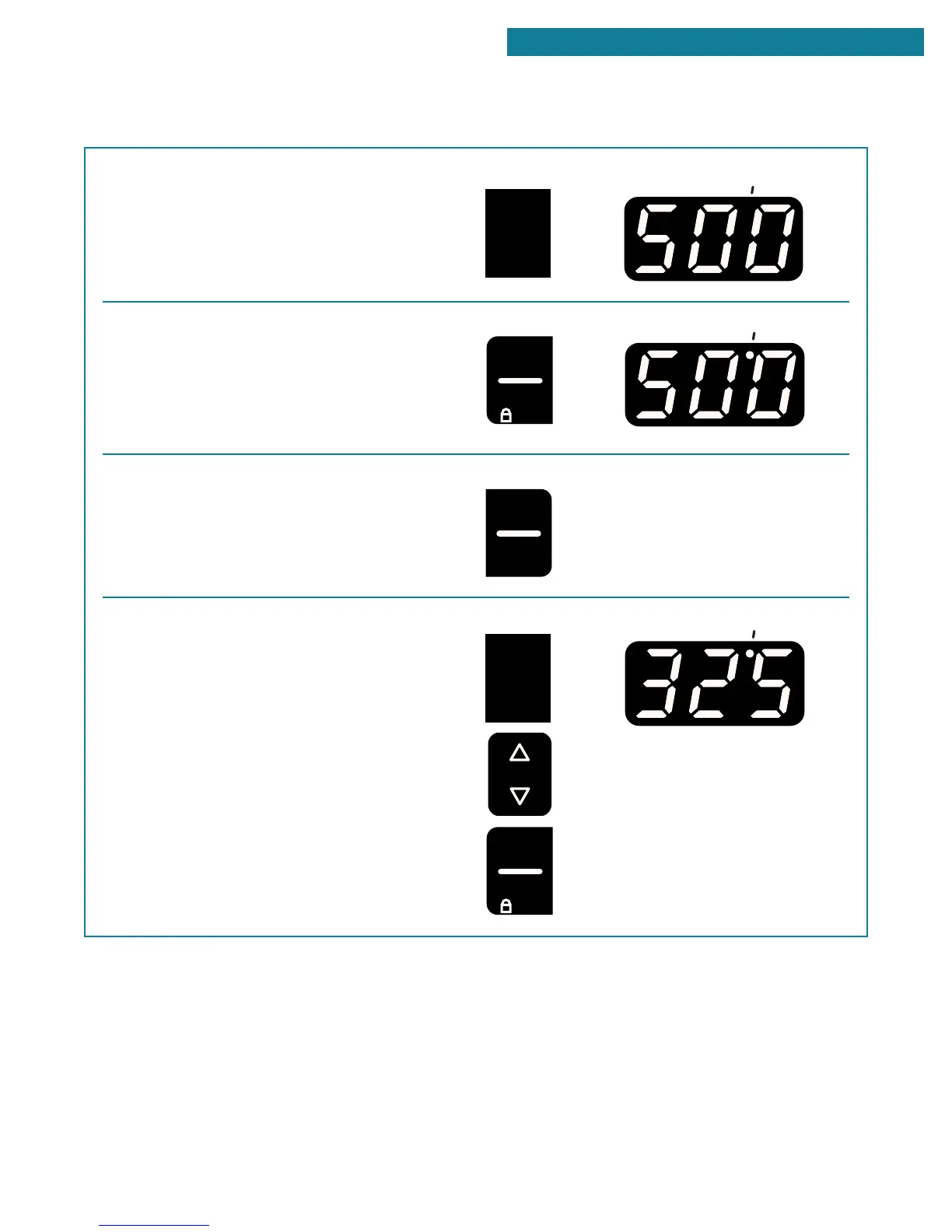
4. Press the custom broil pad.
The broil indicator light will light up.
5. Start the oven.
The on indicator light will light up.
NOTE: You can change the temperature setting
any time after pressing the start/enter pad. To
change the setting, see “To custom broil at a
lower temperature” below.
6. After broiling, turn off the oven.
To custom broil at a lower temperature:
•
If your food is cooking too fast, press the custom
broil pad and press the t temp pad until “325°F”
shows on the display. Then press the start/
enter pad.
BROILING (CONT.)
USING YOUR RANGE
PRESS YOU SEE
CUSTOM
BROIL
PRESS YOU SEE
START
5 SEC
ENTER
ON
PRESS YOU SEE
(a blank display)
OFF
CANCEL
PRESS YOU SEE
CUSTOM
BROIL
TEMP
START
5 SEC
ENTER
ON
(example shows broil at
325°F)
continued on next page



 To Next Page