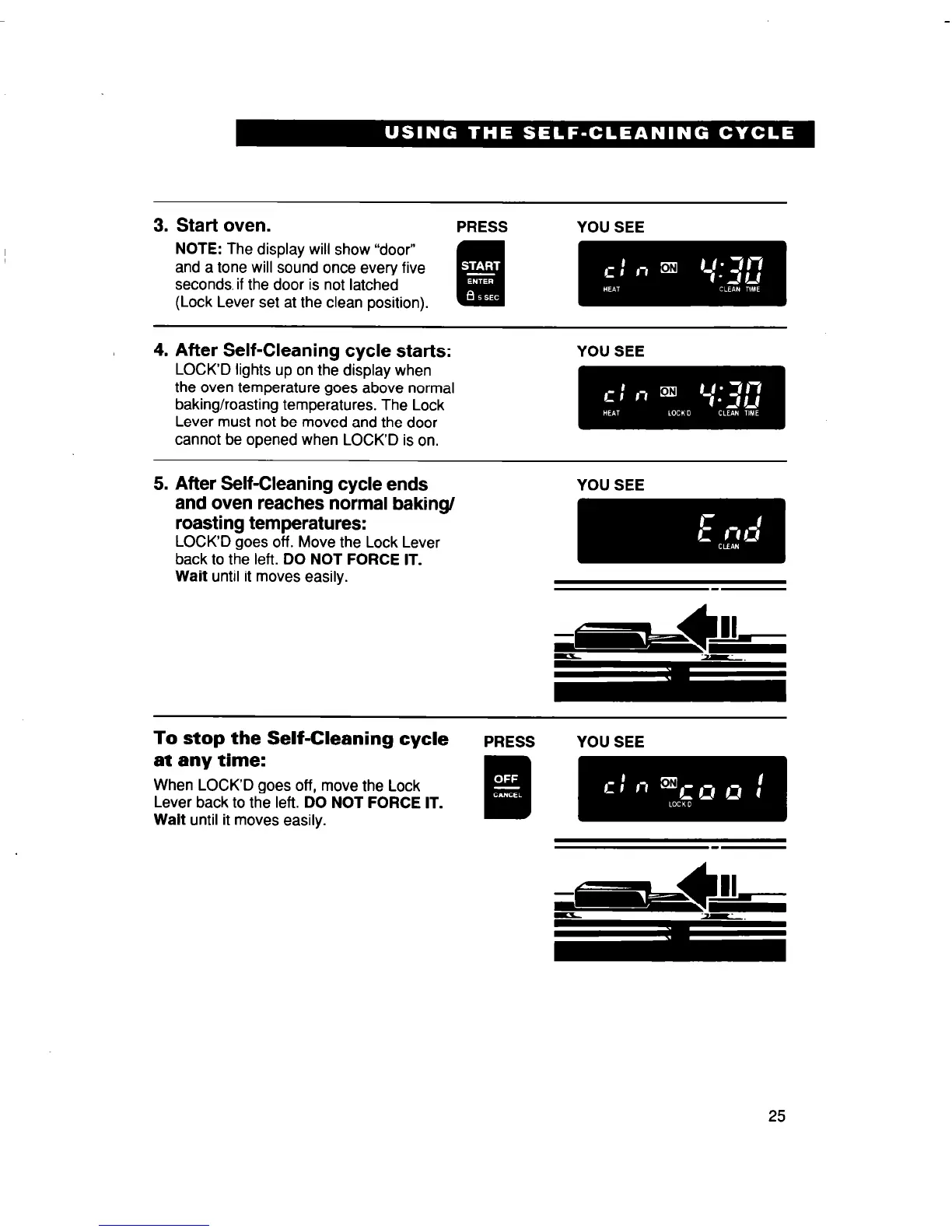
3. Start oven.
PRESS YOU SEE
NOTE: The display will show “door”
and a tone will sound once every five
seconds. if the door is not latched
(Lock Lever set at the clean position).
4. After Self-Cleaning cycle starts:
LOCK’D lights up on the display when
the oven temperature goes above normal
baking/roasting temperatures. The Lock
Lever must not be moved and the door
cannot be opened when LOCK’D is on.
YOU SEE
5. After Self-Cleaning cycle ends
and oven reaches normal baking/
roasting temperatures:
LOCK’D goes off. Move the Lock Lever
back to the left. DO NOT FORCE IT.
Wait until it moves easily.
YOU SEE
mm
To stop the Self-Cleaning cycle
PRESS YOU SEE
at any time:
When LOCK’D goes off, move the Lock
Lever back to the left. DO NOT FORCE IT.
Walt until it moves easily.
25



 To Next Page