15
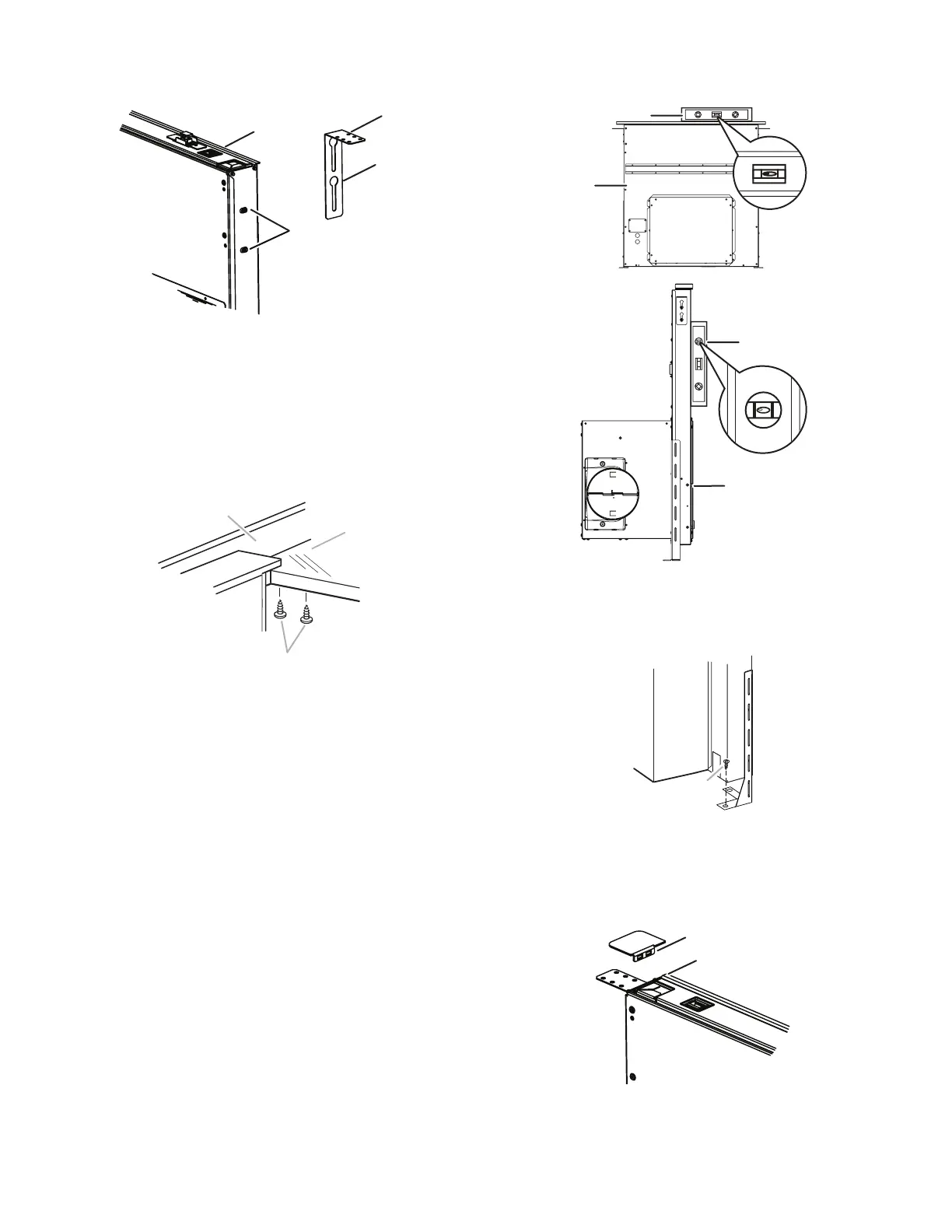
5. Install the left and right undercounter mounting brackets to
the vent box. Slide the keyhole slots over the guide tabs and
push the brackets up to set them in place.
6. Drill two pilot holes through each of the undercounter
mounting brackets into the underside of the countertop. Using
two screws (not provided) of the appropriate length, mount the
brackets to the countertop.
IMPORTANT: Select a screw length that will not allow the
screws to go through the countertop when tightened.
D
A
B
C
A. Vent box
B. Undercounter mounting bracket
C. Keyhole slots
D. Guide tabs
B
A. Screws
B. Backsplash
C. Countertop
7. Check that the downdraft vent is level as shown below.
Loosen the lower support leg screws and position the
legs against the cabinet oor.
8. Fasten the lower support legs to the cabinet oor with
screws (not provided).
9. Tighten the lower support leg screws.
10. Attach the left and right end caps to the vent box. Place the
tab into the mounting slot at each end of the downdraft vent,
as shown, and push down to lock into place.
A
B
B
A
A. Downdraft
B. Level
A
A. Screw (not provided)
A
B
A. End cap tab
B. Mounting slot


 To Next Page