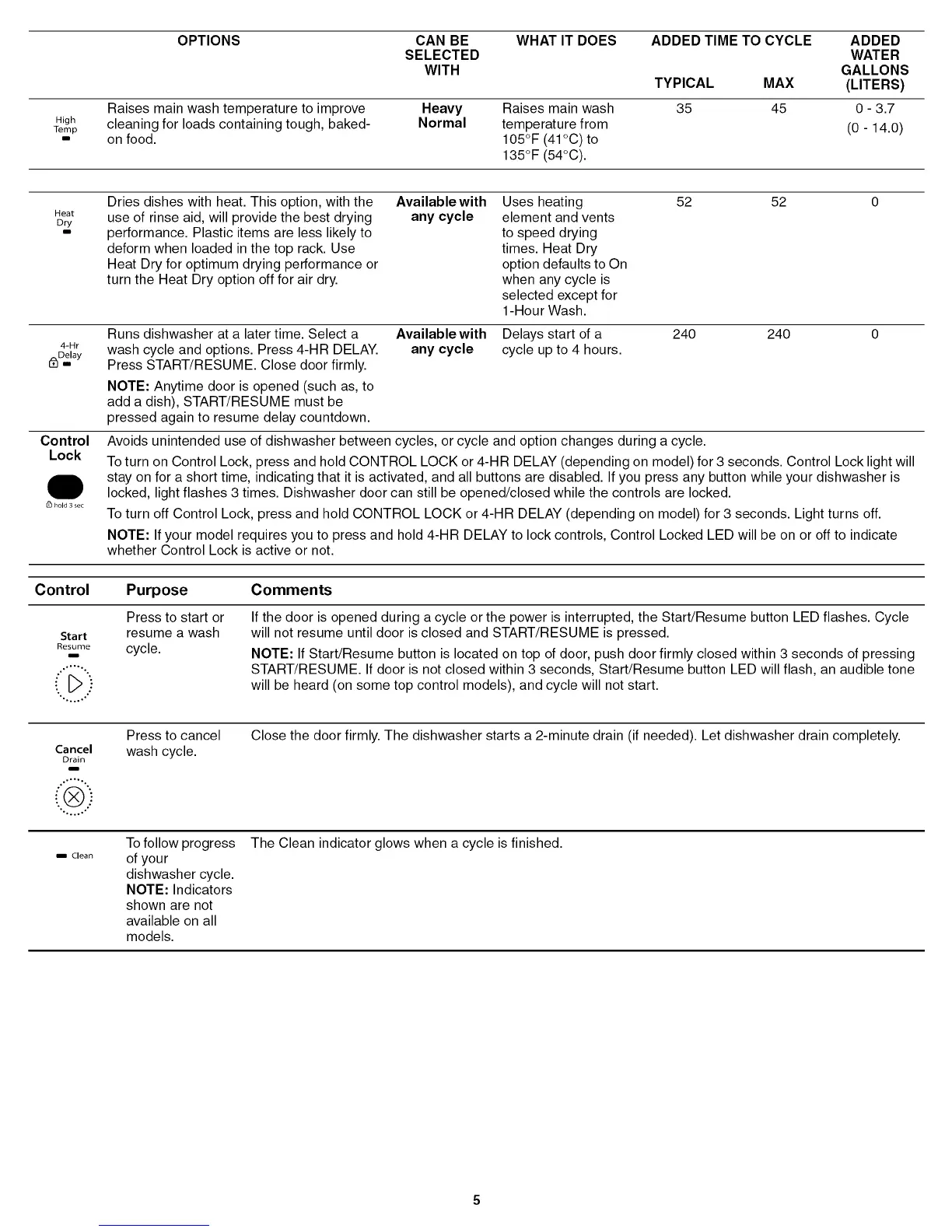
OPTIONS CAN BE WHAT IT DOES ADDED TIME TO CYCLE ADDED
SELECTED WATER
WITH GALLONS
TYPICAL MAX (LITERS)
Raises main wash temperature to improve Heavy Raises main wash 35 45 0 - 3.7
High cleaning for loads containing tough, baked- Normal temperature from (0 14.0)
Temp
- on food. 105°F (41°C) to
135°F (54°C).
Dries dishes with heat. This option, with the Available with Uses heating 52 52 0
Heat use of rinse aid, will provide the best drying any cycle element and vents
Dry
- performance. Plastic items are less likely to to speed drying
deform when loaded in the top rack. Use times. Heat Dry
Heat Dry for optimum drying performance or option defaults to On
turn the Heat Dry option off for air dry. when any cycle is
selected except for
1-Hour Wash.
4-Hr
i_Dm_elay
Control
Lock
hold 3 sec
Runs dishwasher at a later time. Select a
wash cycle and options. Press 4-HR DELAY.
Press START/RESUME. Close door firmly.
NOTE: Anytime door is opened (such as, to
add a dish), START/RESUME must be
pressed again to resume delay countdown.
Available with Delays start of a 240 240 0
any cycle cycle up to 4 hours.
Avoids unintended use of dishwasher between cycles, or cycle and option changes during a cycle.
To turn on Control Lock, press and hold CONTROL LOCK or 4-HR DELAY (depending on model) for 3 seconds. Control Lock light will
stay on for a short time, indicating that it is activated, and all buttons are disabled. If you press any button while your dishwasher is
locked, light flashes 3 times. Dishwasher door can still be opened/closed while the controls are locked.
To turn off Control Lock, press and hold CONTROL LOCK or 4-HR DELAY (depending on model) for 3 seconds. Light turns off.
NOTE: If your model requires you to press and hold 4-HR DELAY to lock controls, Control Locked LED will be on or off to indicate
whether Control Lock is active or not.
Control Purpose Comments
Start
Resume
I
.°.°°%
-°°°o°°
Press to start or
resume a wash
cycle.
If the door is opened during a cycle or the power is interrupted, the Start/Resume button LED flashes. Cycle
will not resume until door is closed and START/RESUME is pressed.
NOTE: If Start/Resume button is located on top of door, push door firmly closed within 3 seconds of pressing
START/RESUME. If door is not closed within 3 seconds, Start/Resume button LED will flash, an audible tone
will be heard (on some top control models), and cycle will not start.
Cancel
Drain
I
,°.,,°°
i®i}
'°°°°.°,
i Clean
Press to cancel
wash cycle.
Close the door firmly. The dishwasher starts a 2-minute drain (if needed). Let dishwasher drain completely.
To follow progress
of your
dishwasher cycle.
NOTE: Indicators
shown are not
available on all
models.
The Clean indicator glows when a cycle is finished.



 To Next Page